When AI replaces Google: Is your website ready to be cited? A practical review of AEO
Have you noticed that recently, more and more people are asking ChatGPT directly instead of just “Google it”?
This is not conjecture on my part. According to multiple survey reports, since 2025, more than 40% of global search behaviors have been transferred to AI assistants. ChatGPT, Perplexity, Google AI Overview, Claude… these tools are rewriting the definition of “search”.
Honestly, as someone who has been running a personal brand for over a decade, this trend makes me both excited and anxious. What’s exciting is that AI search creates new exposure opportunities for high-quality content; what’s worrying is that if your content is not structured correctly and tagged incorrectly, AI will not be able to “understand” what you wrote—let alone quote you.
So, I decided to do a complete AEO transformation on Vista.tw. This article is a complete review of this actual battle.
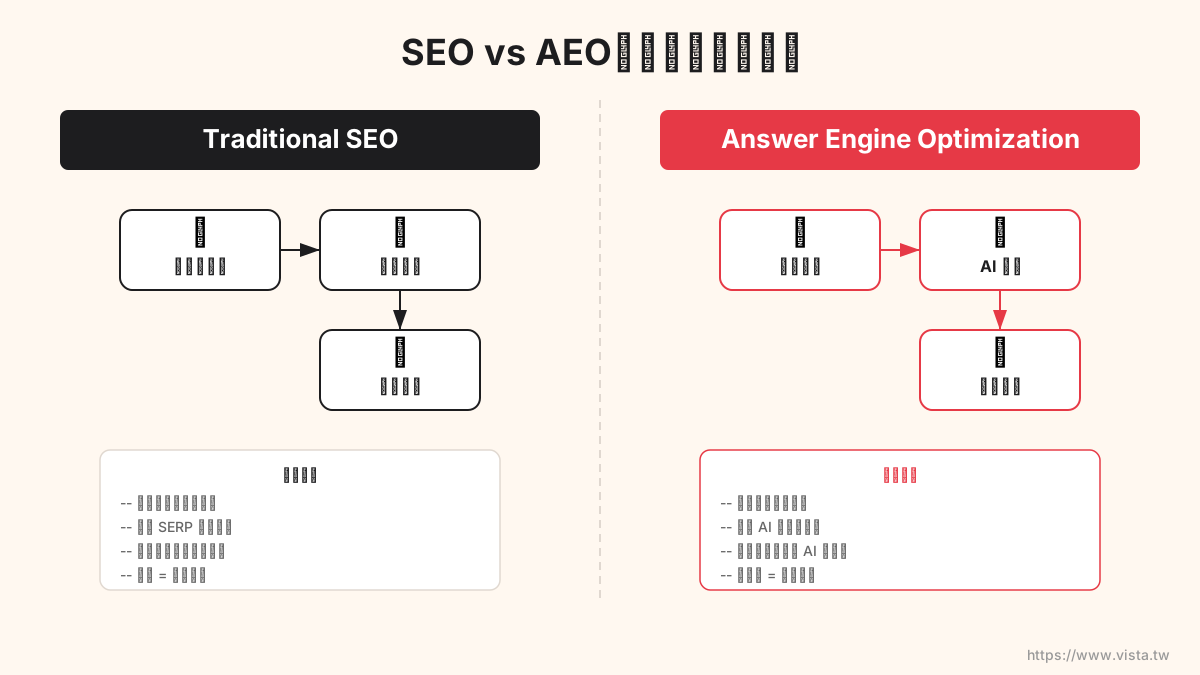
▲ SEO vs AEO: The search paradigm is undergoing a fundamental shift
What is an AEO? Why should you pay attention now?
AEO (Answer Engine Optimization), Chinese can be translated as “Answer Engine Optimization”. The biggest difference from traditional SEO is that SEO pursues “ranking”, while AEO pursues “citations”.
Imagine this scenario: someone asks ChatGPT “How to build a personal brand?”, AI directly quotes the content of your article as the answer, and attaches a source link. This is the ultimate goal of AEO.
The logic of traditional SEO is: Keyword → Ranking → Click → Reading.
The logic of AEO is: Question → AI Summary → Direct Quote → Brand Exposure.
There is no conflict between the two, but if you only do SEO and ignore AEO, your content may be marginalized in the AI era.
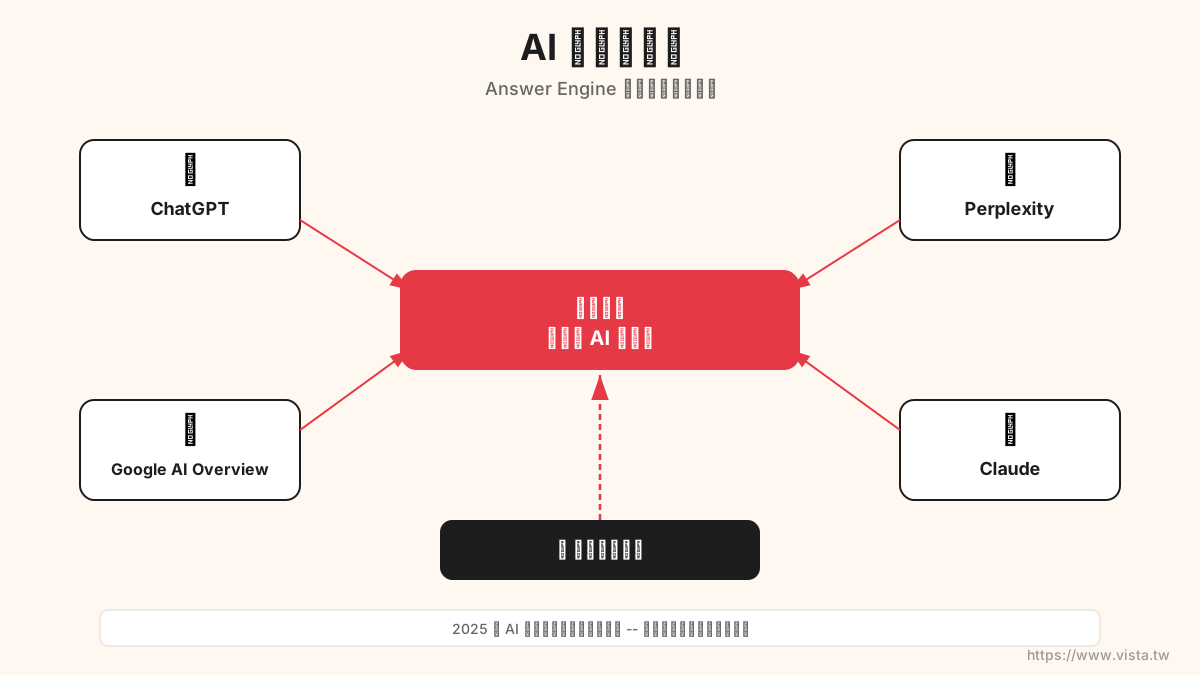
▲ AI search new territory: Has your content been cited by AI?
My starting point: 1,743 articles, but no “structure”
Frankly speaking, I have accumulated 1,743 blog posts over the years I have been running Vista.tw. There are a lot of them, but there is a fatal problem - lack of systematic content structure.
Articles are written one by one, and tags are added at will. The same concept may be labeled with four different labels: “AI”, “AI tool”, “artificial intelligence”, and “artificial intelligence”. The result is:
- There are 1,104 tags, but most are only used once
- Lack of meaningful internal links between articles
- No “topic center page” to tell search engines (and AI) where my area of expertise is
- Schema structured data is not complete enough
It’s like a library, with many books but no catalogs or index cards. Whether it is a human reader or an AI crawler, it is difficult to quickly understand the knowledge map of this website.
Solution: Topic Cluster site-wide strategy
I chose to reorganize the content of the entire website using the Topic Cluster architecture.
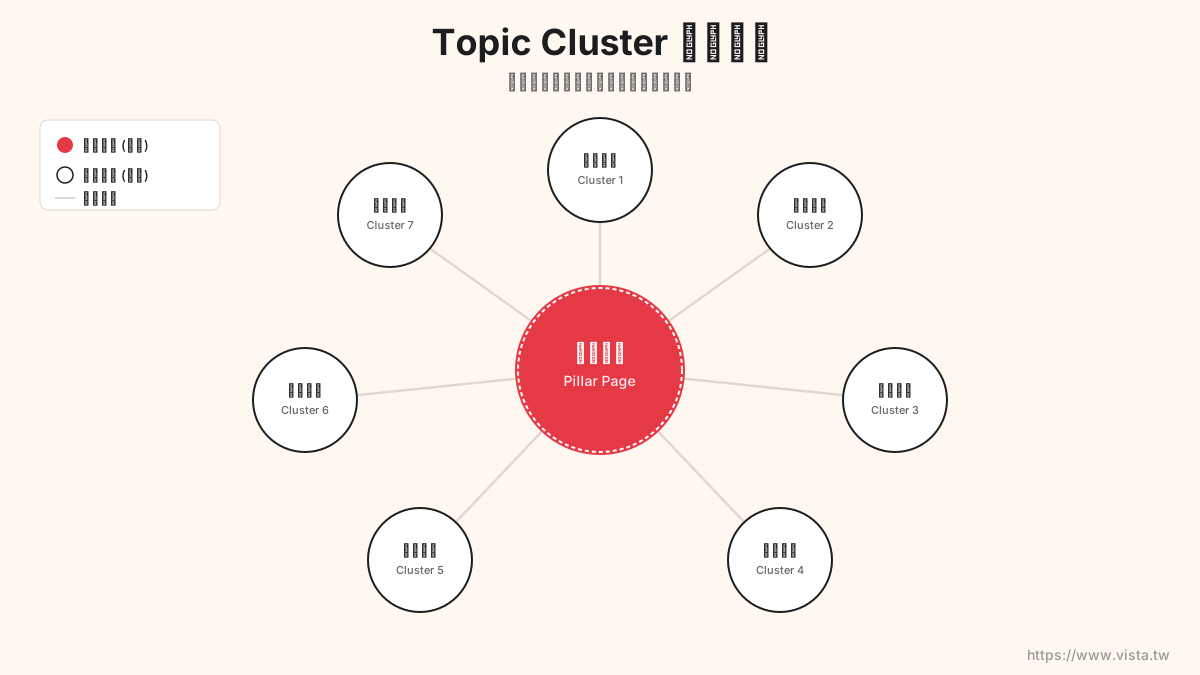
▲ Topic Cluster structure: with pillar pages as the core, clusters of articles surrounded by links
The concept of Topic Cluster is actually not complicated:
- Pillar Page: Each core topic has a comprehensive long page that covers all important aspects of the topic
- Cluster Content: Individual in-depth articles around pillar pages
- Internal Linking: Pillar pages and cluster articles are interconnected to form a semantic network
This architecture isn’t just good for SEO – more importantly, it helps AI understand the relevance and authority of your content. When AI sees that you have a complete ecosystem of content on a certain topic, it is more likely to view you as a trusted source in that field.
Step 1: Label regularization - from 1,104 to 50
To set up a Topic Cluster, the first thing to do is to organize the tag system.
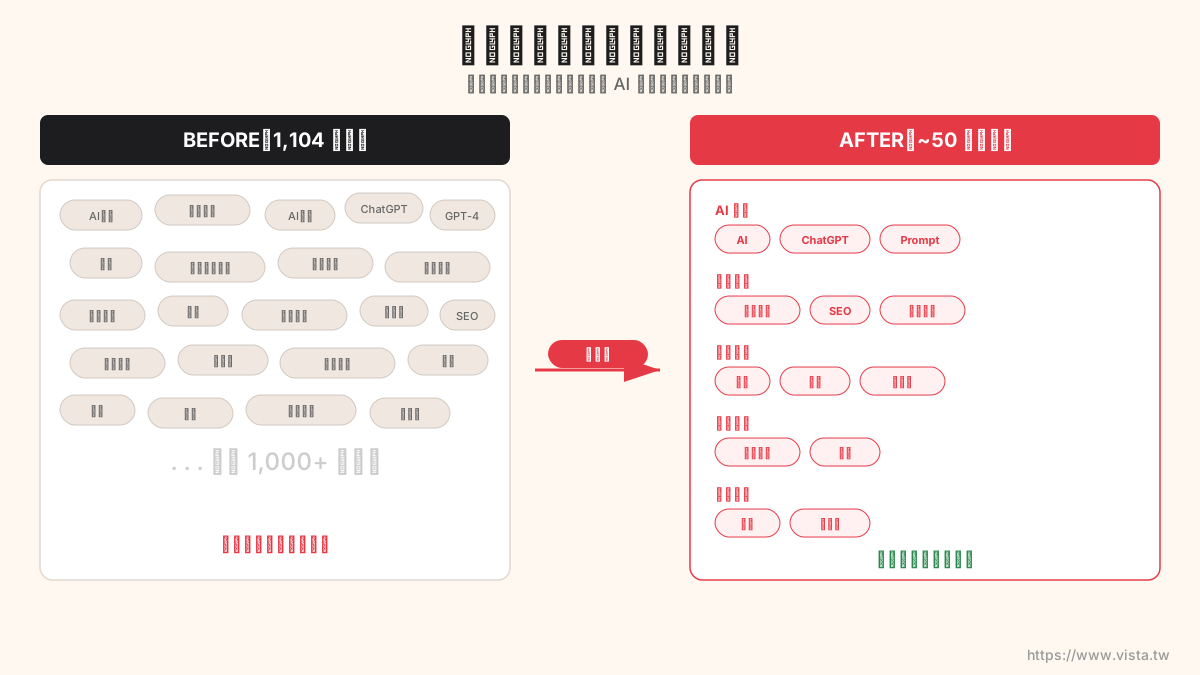
▲ Label regularization: Converging 1,104 fragmented labels into core categories
I wrote a Node.js script to automate this process. The core logic is to establish a set of mapping rules:
AI,AI tool,artificial intelligence,artificial intelligence→ unified into AIWriting skills,Writing mentality,Writing strategies→ unified into WritingCopywriting,Product Copywriting,Sales Copywriting→ unified into Copywriting WritingSocial Media,Community Management→ Unified into Social Marketing
The script scans the YAML frontmatter of all 1,743 articles and automatically merges them. Finally:
| Indicators | Values |
|---|---|
| Modified files | 156 articles |
| Number of labels before normalization | 1,104 |
| Number of tags after normalization | ~50 core tags |
💡 Action suggestions for you: No matter what platform you use, first take stock of your current tags or categories. If the number exceeds 100, you are almost certain to have a large number of duplicate and fragmented issues.
Step 2: Plan seven pillar pages
After sorting out the tags, I planned seven core themes based on my professional positioning and content distribution:
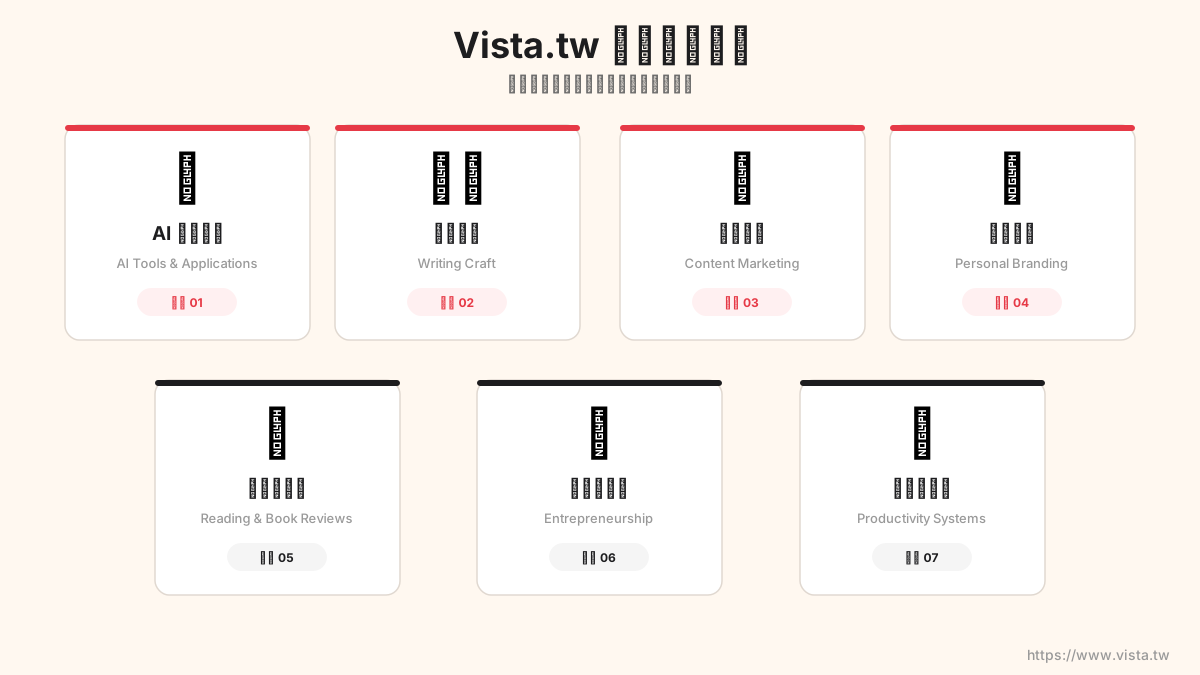
▲ Vista.tw seven pillars page overview
| # | Pillar theme | Corresponding page | Core tags |
|---|---|---|---|
| 1 | AI practical application | /topic/ai | AI, ChatGPT, Claude Code |
| 2 | Writing mentality | /topic/writing | Writing, copywriting |
| 3 | Content Marketing | /topic/content-marketing | Content Marketing, SEO, Social Marketing |
| 4 | Personal brand | /topic/personal-brand | Personal brand, self-media |
| 5 | Reading and book reviews | /topic/reading | Reading, reading experience |
| 6 | Entrepreneurship and Business | /topic/business | Entrepreneurship, business model |
| 7 | Productivity system | /topic/productivity | Productivity, time management, notes |
These seven topics cover my most core areas of knowledge over the past decade. Each pillar page is a “portal” that allows both human readers and AI crawlers to quickly grasp my complete perspective on the topic.
Step 3: Create standard specifications for pillar pages
A good pillar page does not just list relevant articles. It needs to have deep content, structured data, and clear user experience.
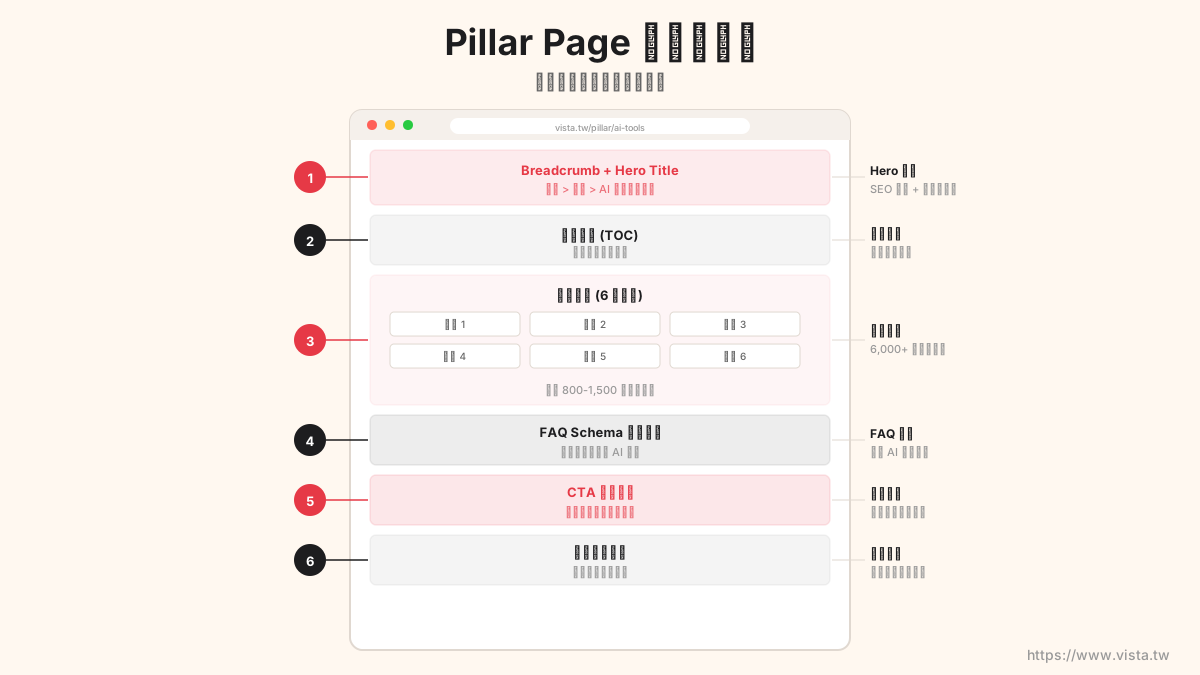
▲ Six major elements of the pillar page
Here are my standard specs for each pillar page:
1. Hero block + breadcrumb navigation
The top of the page contains the title, description, and two CTA buttons. Breadcrumb navigation (Home > Topic > AI Practical Application) not only helps users locate, but also generates a BreadcrumbList Schema, allowing search engines to accurately understand the page hierarchy.
2. Table of Contents
Quick jump links to six main paragraphs. This design serves two purposes at the same time: improving user experience and allowing AI crawlers to quickly scan the page structure.
3. Six paragraphs of in-depth content
Each pillar page contains at least six H2-level content paragraphs of 200-400 words each. These are not hydrographs – they are the distilled essence of over a decade of experience. AI search engines particularly prefer this kind of content with depth, perspective, and structure.
4. FAQ structured questions and answers
This is AEO’s secret weapon. Each pillar page contains 8-9 frequently asked questions and is tagged with the FAQPage Schema.
Why are FAQs so important? Because the essence of AI search is “question and answer”. When someone asks ChatGPT a question, if you happen to have a well-structured answer on your page, the chance of being cited is greatly increased.
5. CTA Call to Action
There are clear next steps at the bottom of each pillar page – this could be signing up for a workshop, booking a consultation, or reading extended content.
6. Featured Articles Grid
Dynamically filter out up to 20 related cluster articles and present them in a card grid. This not only enriches the page content, but also builds a strong internal link network.
Step 4: Establish a two-way connection mechanism
The power of Topic Cluster lies in two-way connections. Pillar pages link to series articles, and series articles link back to pillar pages.
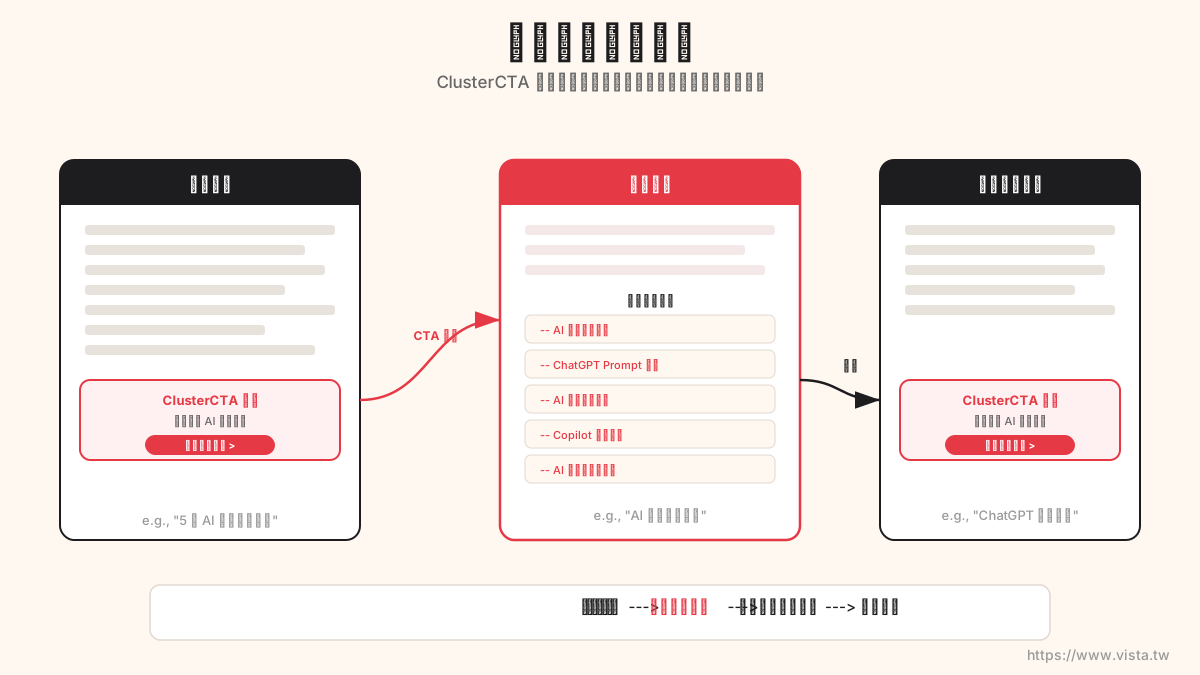
▲ ClusterCTA component automatically creates backlinks at the bottom of each article
I created a ClusterCTA element that is automatically embedded at the bottom of every blog post. This component will automatically match to the corresponding pillar page based on the tag of the article, and display up to three related pillar page links.
For example, an article tagged “AI” and “Writing” will automatically appear at the bottom:
- 🤖 AI practical application guide
- ✍️ The complete guide to writing
This allows 1,743 articles to become “traffic entrances” to pillar pages, and also helps AI crawlers understand the semantic relationships between content.
Step 5: Comprehensive markup of structured data
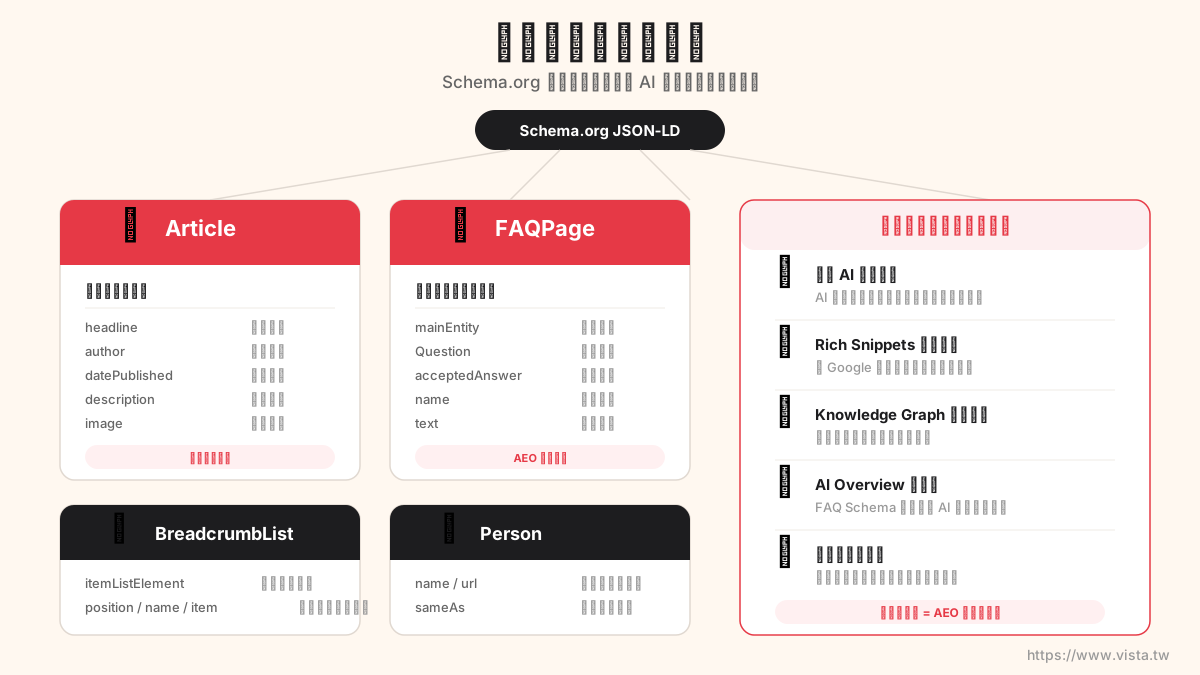
▲ Four Schema.org structured data types
Structured data is the foundation of AEO. I marked four Schema.org materials on each pillar page:
- Article — Tell AI this is an article, including author, publication date, topic
- FAQPage — marks the question and answer structure so that AI can directly retrieve the answers
- BreadcrumbList — describes the position level of the page in the website
- Person — Establish the author’s credibility and professional background
💡 **Why is structured data particularly important for AEO? ** Because AI doesn’t “read” your web page – it “parses” your web page. Structured data is like an instruction manual you write for AI, telling it: “This paragraph is the question, this paragraph is the answer, this person is the author, and he is professional in this field.”
Five-Step Action Blueprint: You Can Do This Too
If you also want to do AEO optimization for your website or personal brand, here is the five-step action blueprint I compiled:
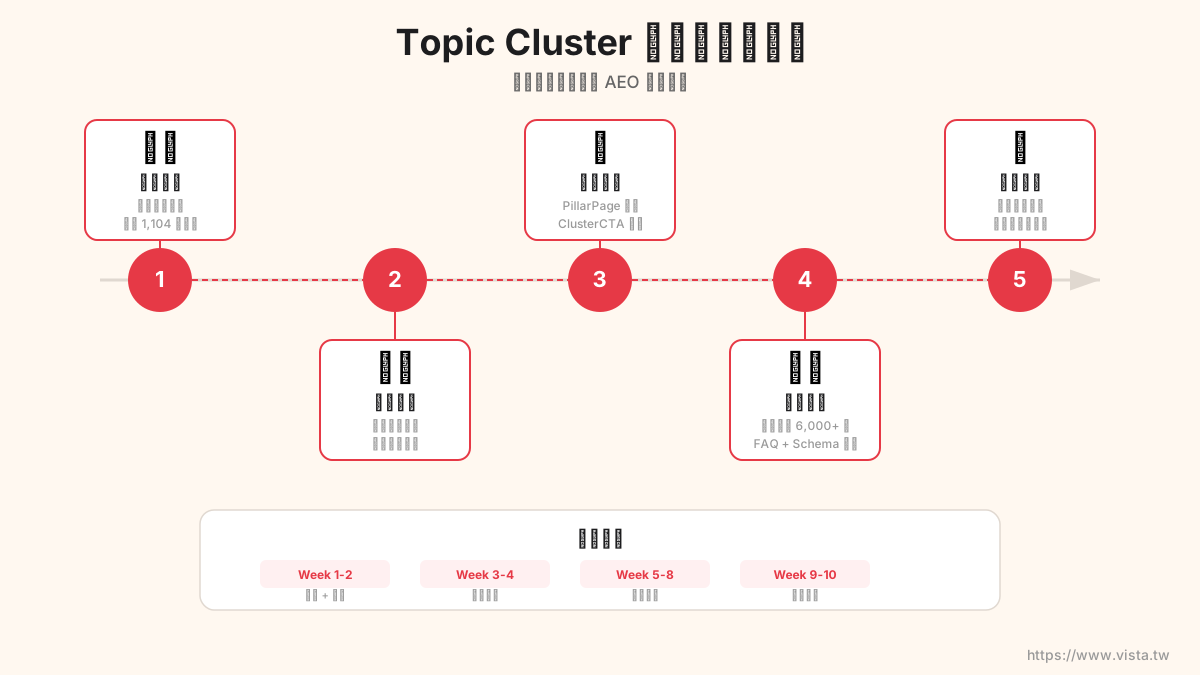
▲ Five-step action path from inventory to launch
Step 1: Take inventory of existing content and tags
Make a list of all the tags and categories on your website and identify duplication and fragmentation issues. If you have more than 50 articles, there is almost certainly room for optimization.
Step 2: Plan 3-7 core pillar themes
Depending on your professional niche, choose 3-7 core topics. These topics should be the areas in which you are most capable, passionate, and have the greatest market demand.
Step 3: Create reusable page components
If you use Astro, Next.js, or another modern framework, create reusable pillar page elements and CTA link elements. This ensures consistent quality across all pillar pages and facilitates future maintenance.
Step 4: Write in-depth content + FAQ
Each pillar page needs at least 1,500+ words of in-depth content, plus 8-10 FAQs. The content should have opinions, cases, and practical value—not the kind of AI-generated hydrology.
Step 5: Deploy and verify
After the deployment is online, use Google Rich Results Test to verify that your structured data is correct. Continuously monitor citation status on Google Search Console and various AI platforms.
AEO Optimization Checklist
Finally, I would like to share a checklist that I use myself:
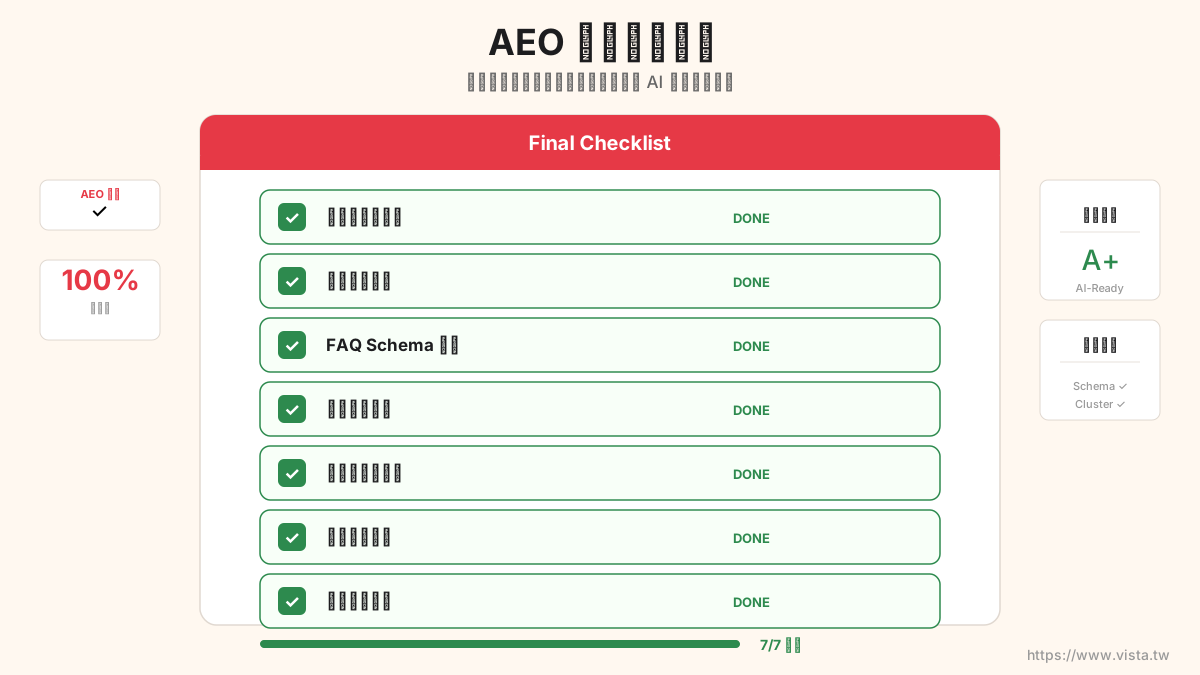
▲ Make sure you tick every box and your AEO is in place
- ✅ The tag system has been formalized (no more than 50 core tags)
- ✅ Created 3-7 pillar pages
- ✅ 1,500+ words of deep content per pillar page
- ✅ Each pillar page has 8+ FAQs (including FAQPage Schema)
- ✅ Article, BreadcrumbList, Person Schema markup complete
- ✅ The series of articles has a linking mechanism (pointing to the corresponding pillar page)
- ✅ The pillar page has a grid of selected articles (connected to clustered articles)
- ✅ Clear call to action
- ✅ Complete breadcrumb navigation
- ✅ Verified by Google Rich Results Test
Write at the end
In this AEO transformation, I used AI (yes, Claude Code) to assist in completing most of the technical implementation - tag normalization scripts, page component development, and structured data markup. But strategic planning and content writing are still human jobs.
AI can help you build a house, but you have to draw the blueprint of the house yourself.
如果你也在思考如何让自己的内容在 AI 时代保持能见度,我建议你现在就开始行动。 It doesn’t need to be done all at once, but at least complete the first two steps: inventory tags and plan pillar themes.
Want to know more?
If you are interested in AEO or Topic Cluster strategies, please feel free to communicate with me through the following methods:
- 📩 Book one-on-one consultation: Provide customized AEO strategy suggestions for your website or personal brand
- 🛠️ Register for Vibe Coding Practical Workshop: 3 hours of zero-based experience, learn to use AI to build your own website. Not only teaches you how to make a website, but also teaches you how to make an AEO-friendly website