Researchers’ academic poster savior: a Claude Code skill that reads papers first and then regenerates diagrams
In the past few years, every time I was tasked with designing an academic poster to attend a certain academic seminar, I would struggle a little. Either open PowerPoint and work slowly, or find an art editor and discuss it back and forth with the other person; occasionally look for AI tools that seem to be helpful, but the quality of the output images is either too fancy, or blurry when there are too many words, making it almost impossible to use in seminars. I believe that doctoral and master’s students and university professors should be familiar with this pain point.
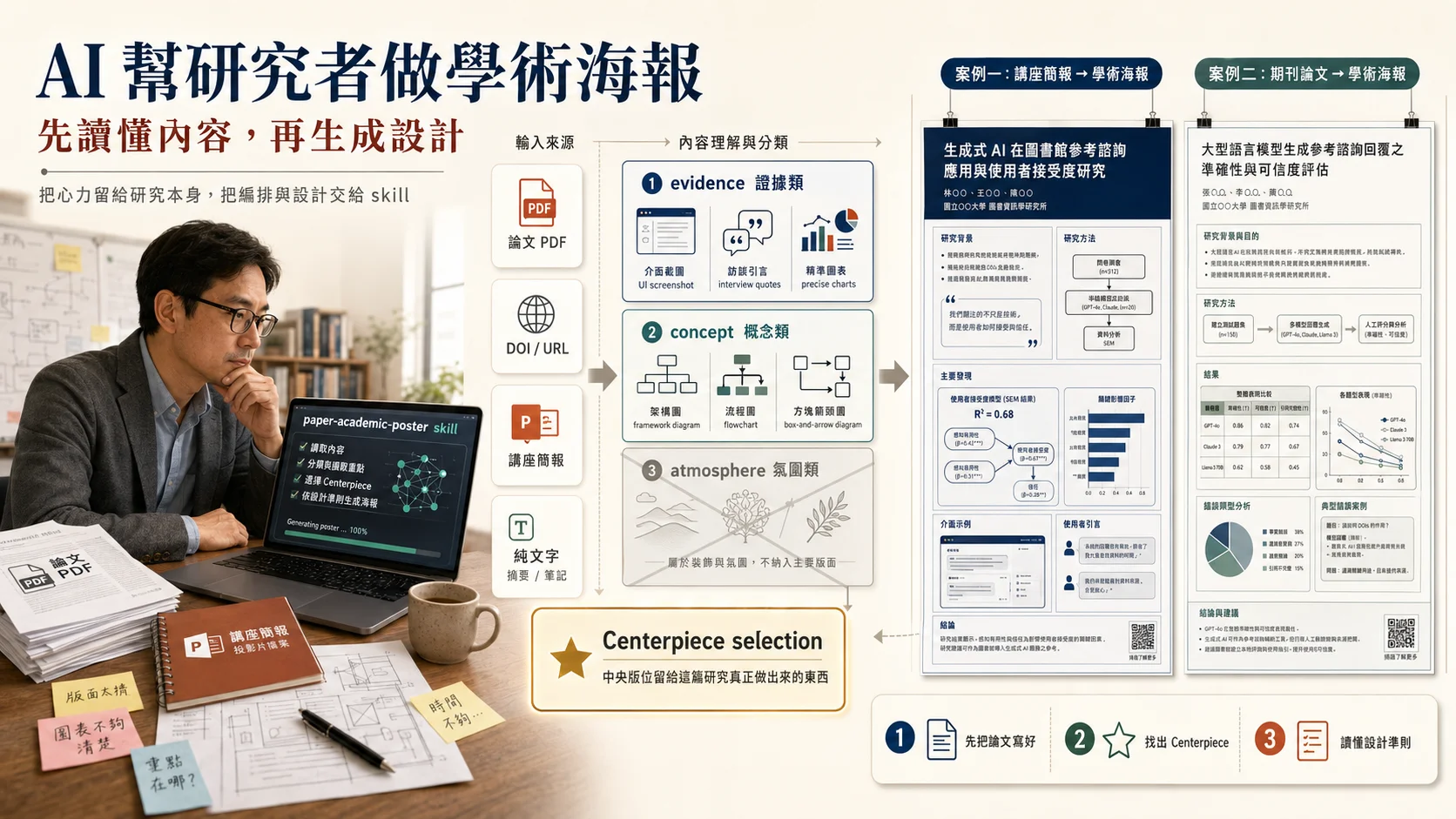
Recently, I finally came across a tool that can really solve this problem. It was paper-academic-poster skill developed by my long-time friend [Associate Professor Wang Shuyi] (https://glxy.tjnu.edu.cn/info/1076/2827.htm) of Tianjin Normal University School of Management. It can be hung and used under the Claude Code environment. Give it a paper PDF, DOI, URL or plain text. It will first read the paper once, and then generate a complete vertical A0 academic poster through GPT Image 2. The overall style follows the restrained and calm, design-oriented academic journal poster language of IEEE, ASIST or iConference.
In this article, I want to do two things: first introduce the design philosophy of this skill, and then use my two recent actual test cases (a lecture briefing, a journal article) to illustrate how it can save researchers a lot of effort. If you are concerned about how to integrate AI into the research process, you can also refer to my previous article “[Researcher’s Academic Co-pilot System] (/blog/ai-academic-research-copilot-system)”.
It is not a typesetting tool, it is a designer who can read papers.
Many AI drawing tools on the market can create posters, but the biggest difference between them and the skill designed by [Associate Professor Wang Shuyi] (https://glxy.tjnu.edu.cn/info/1076/2827.htm) is the order issue.
Generally, AI drawing tools give prompts first and then give the model to draw pictures. But this skill first reads the paper, then categorizes the visual materials, and finally prompts to draw pictures.
What’s the difference? The difference is that it divides the visual materials in the paper into three categories:
The first category is evidence, including UI screenshots, verbatim transcripts of interviews, photos of experimental scenes, and charts with exact values. This type of material will be retained as reference input for GPT Image 2.
The second category is the concept concept category, including architecture diagrams, flow charts, framework diagrams and box-and-arrow concept diagrams. Such images will be redrawn into a unified poster visual language, and the original images will not be glued in directly.
The third category is atmosphere, which are purely decorative and dispensable materials that can be discarded directly.
This set of classification rules is written in the production-contract.md of the skill. It is a design criterion that Professor Wang himself verified when he was working on the OpenClaw paper poster.
It also has a rule that I think is particularly critical, called Centerpiece selection. The largest visual position of the poster must be reserved for things that are only produced by this paper, actually built, actually run, and actually captured. The central space must not be occupied by theoretical frameworks that can be applied to ten papers.
This rule completely changed the fate of my two recent poster designs.
Case 1: Turn lecture presentation into academic poster
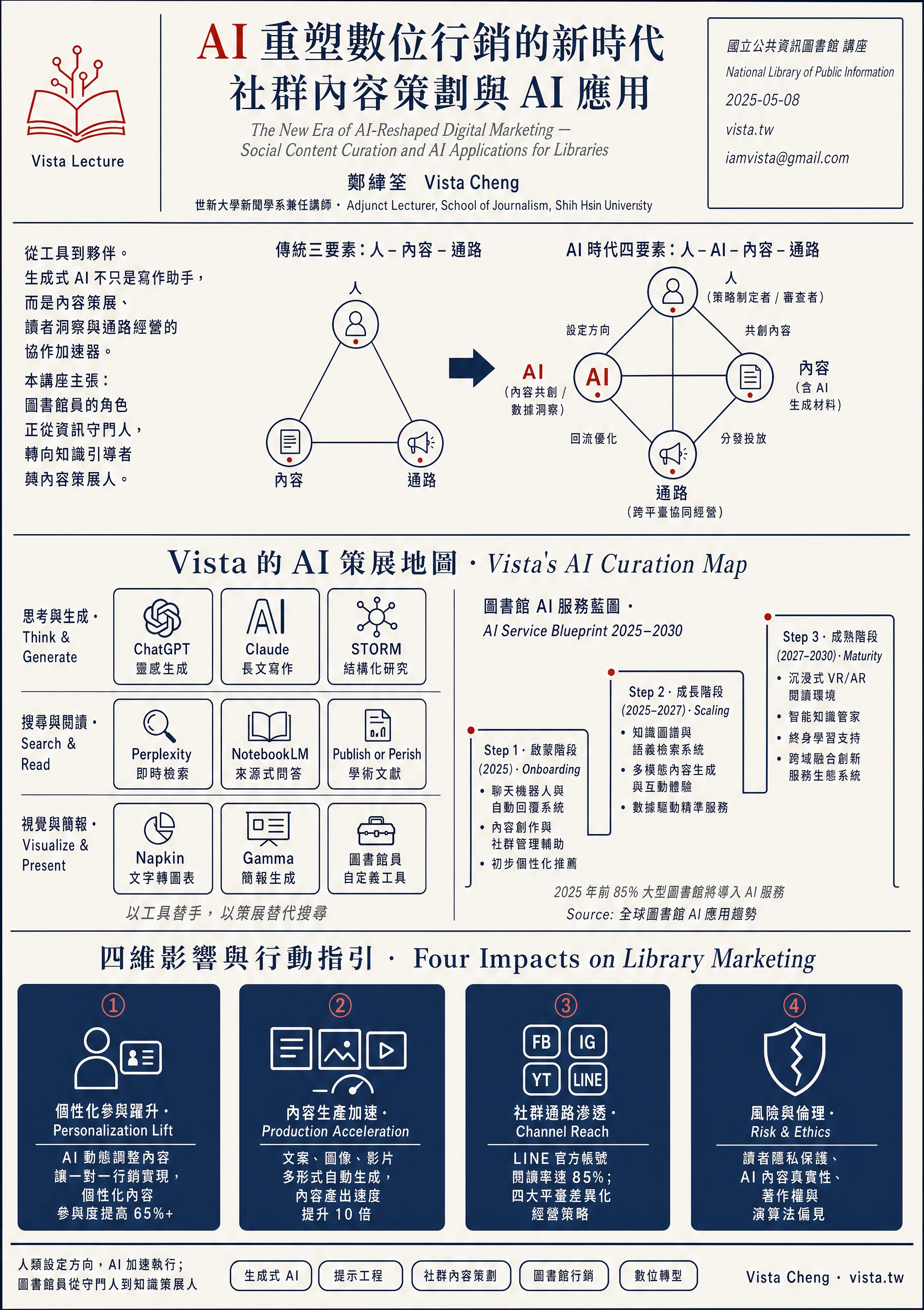
The first material is a lecture presentation I gave at the National Library of Public Information a while ago. The theme is “AI Reshapes the New Era of Digital Marketing: Social Content Planning and AI Applications.” 88 pages, A4 horizontal format. The content ranges from the introduction of generative AI to the prompt project and library AI service blueprint. The amount of noise is actually quite large.
I throw the PDF path to the skill and it does three things:
First, find out the topic of the lecture, the background of the speaker, and the structure of the main chapters.
Second, it is determined that this source is not a peer-review paper (no DOI, ISSN, formal abstract), so the metadata block in the upper right is automatically replaced with lecture venue information (National Library of Public Information, vista.tw, iamvista@gmail.com), and journal information is not forced. I particularly like this rule because it doesn’t force you to fake existing metadata.
Third, select the content that really should be at the center of the 88-page brief: the 9 AI tool maps that I curated myself, and the three-phase timeline of the library’s AI service blueprint from 2025 to 2030.
The four dark blue cards in the lower row retain the four most powerful quantitative findings of the lecture: personalized content participation increased by more than 65%, content generation speed increased by 10 times, LINE official account reading rate was 85%, and 85% of large libraries will introduce AI by 2025.
The entire poster uses three colors: off-white (#F5EFE5), dark navy (#1B2C4F), and brick red (#B23A2C). The word AI in the title is highlighted in red, and the rest is navy serif. The entire generation process takes about 5 minutes, native 2416×3424 resolution, 6.6 MB PNG.
For graduate students, the key point of this case is: even if the materials you have are classroom briefings, seminar reports, and oral exam lecture notes, you can use this skill to turn them into a decent visual summary and hang it at the entrance of the research room or the seminar poster area, and the texture will be different immediately.
Case 2: Turn journal articles into academic posters
The second case is my paper “From Artificial Intelligence to Workplace Revolution: An In-depth Discussion of the Role and Impact of ChatGPT in Free Workers’ Information Acquisition” published in Volume 27, Issue 1, of “Journal of Shude University of Science and Technology” last year.
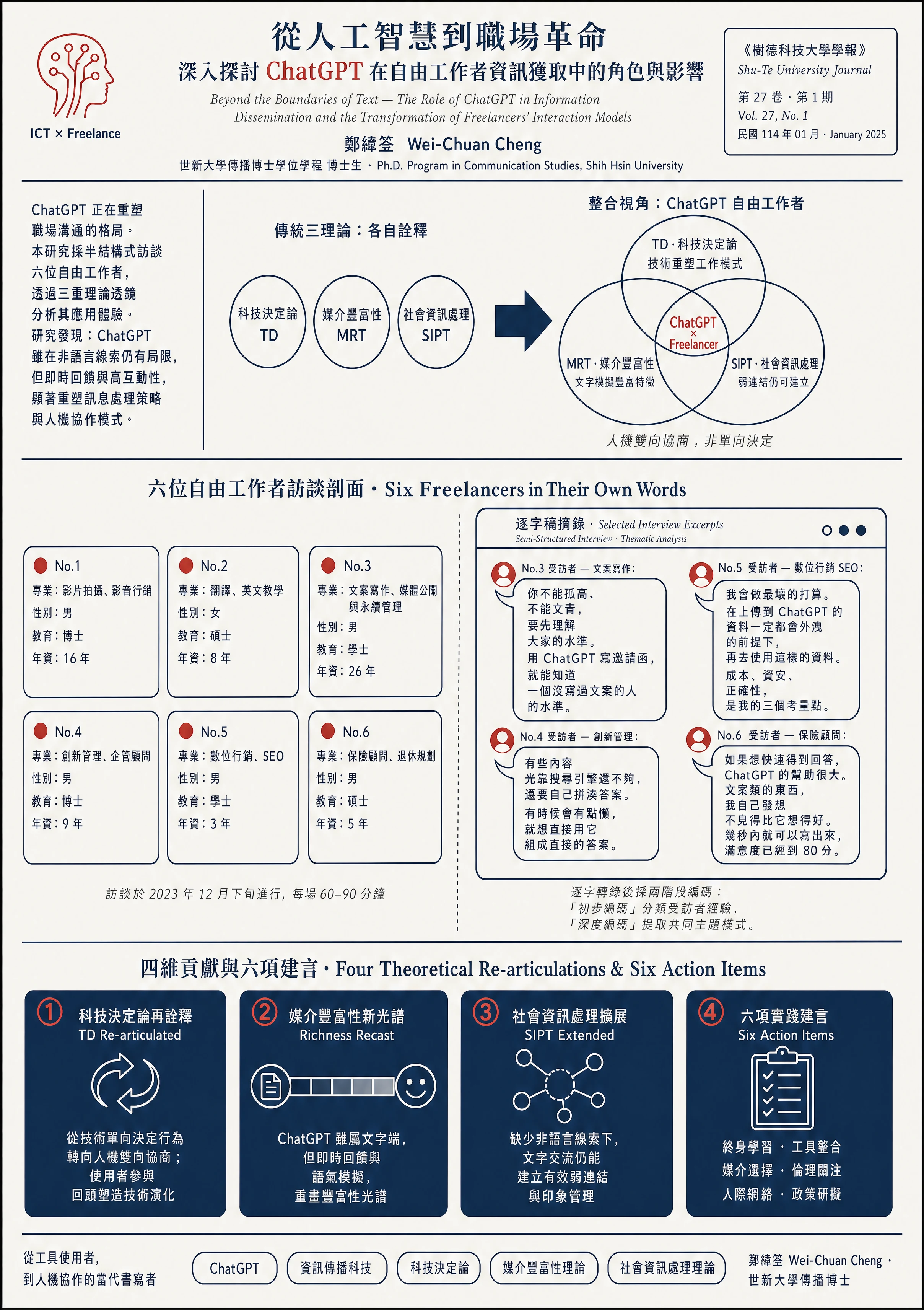
The nature of this paper is very simple: qualitative research, semi-structured interviews with 6 freelance workers, using three theoretical lenses (technological determinism TD, media richness theory MRT, social information processing theory SIPT). The conclusion is that ChatGPT is reshaping the information acquisition process and interaction model of freelance workers.
skill made the entire process smoother when working on this peer-review paper.
It automatically applies the complete academic_paper style template, which is the v7 version verified by [Associate Professor Wang Shuyi] (https://glxy.tjnu.edu.cn/info/1076/2827.htm) on the OpenClaw paper. The prose abstract above breaks the abstract into short sentences of multiple lines, with no more than 14 Chinese characters per line.
The concept change diagram has changed from three independent theoretical circles to a Venn diagram of the intersection of the three circles. The central intersection is marked with red letters ChatGPT × Freelancer.
The largest, Centerpiece, gave me the first-of-its-kind material for this paper: background tables of six interviewees, plus four excerpts of verbatim drafts that I hand-picked. Respondent No. 3 said “You can’t be aloof or intellectual, you must first understand everyone’s level”, Respondent No. 5 said security considerations, Respondent No. 4 said the search engine is not enough, Respondent No. 6 said “ChatGPT can be written in a few seconds, and the satisfaction level has reached 80 points.”
That’s the value of the Centerpiece rule. It does not waste space on the introduction of those three theories (that is what the literature review should do), but collects them into the four dark blue cards in the lower row: TD reinterpretation, MRT richness spectrum redrawing, SIPT weak link expansion, and six practical suggestions. Take it one line at a time. The visual focus of the poster naturally falls on what the six people I actually interviewed for this research said.
If you have written about qualitative research, interview research, or case studies, this logic should make your eyes light up. The most common mistake we make when making posters is to evenly divide the space into four major parts: literature review, research methods, research findings, and conclusions. As a result, the entire poster looks like a microcosm of the thesis table of contents. But Associate Professor Wang Shuyi this skill pulls you out of this inertia from the beginning and forces you to make a choice: What is the most unique thing about your research that others cannot do? Please put it in the center.
Three suggestions for graduate students and university professors
As I write this, I would like to give three specific suggestions directly.
First, don’t wait until you submit to an international conference. You can use it to quickly generate a high-quality visual summary for research proposal progress reports, dissertation oral examination presentation attachments, final presentations in research methods classes, and laboratory annual reviews. As the saying goes, “A picture is worth a thousand words.” The power of visual summary is greater than you think.
Second, write the paper first and then create the poster. This skill is not used to help you fix papers with empty content. What it can do is to reorganize papers that already have content in academic design language. If you can’t figure out what to put on your Centerpiece, it’s not a skill problem, it’s the research itself that needs to be polished.
Third, don’t be afraid to read the details of prompt. Associate Professor Wang Shuyi writes all design criteria in the references folder, including production-contract.md, academic-paper-style.md, academic-paper-style-prompt-template.md, etc. The documents themselves serve as a good textbook for academic poster design. After reading it once, you will have an extra layer of judgment whether you hand-draw posters, hire an art editor to do drawings, or use PowerPoint to layout in the future.
##Finally
I have known Associate Professor Wang Shuyi for many years, and I admire him very much as I watched him develop this poster design process from the paper “OpenClaw: Scientific Research Workflow Agent and Its Application Based on Large-Scale Language Models” in “Library and Information Knowledge”, and turned it into a paper-academic-poster skill that can be shared with other scholars. What he is doing is essentially codifying the design judgment of a senior researcher into a tool that can be repeated. For graduate students and professors, this is one of the few AI applications that can actually save you dozens of hours.
If you already have a Claude Code environment, you can directly install paper-academic-poster to ~/.claude/skills/, and connect the Hermes agent with the OpenAI Codex certification (this part of [Associate Professor Wang Shuyi] (https://glxy.tjnu.edu.cn/info/1076/2827.htm)‘s README is very clear, and I completed it in about ten minutes by following it myself); if you haven’t used Claude Code yet, then this may be a good reason for you to start using it.
The vast project of designing academic posters can no longer be considered a daunting task for graduate students or professors. Leave your efforts to the research itself, and leave the arrangement and design to this skill designed by [Associate Professor Wang Shuyi] (https://glxy.tjnu.edu.cn/info/1076/2827.htm). This is my sincere recommendation to all researchers.
If you find this article helpful, you are welcome to visit my personal website or follow my business card page for more information. My own long-term content platform content.tw mainly accumulates writing and content creation methods, while one-person company solo.tw offers various online classes and workshops for creators and independent workers.