Use Vibe Coding to build an event registration system: a real development review by a non-engineer
Why do I need to make my own registration system?
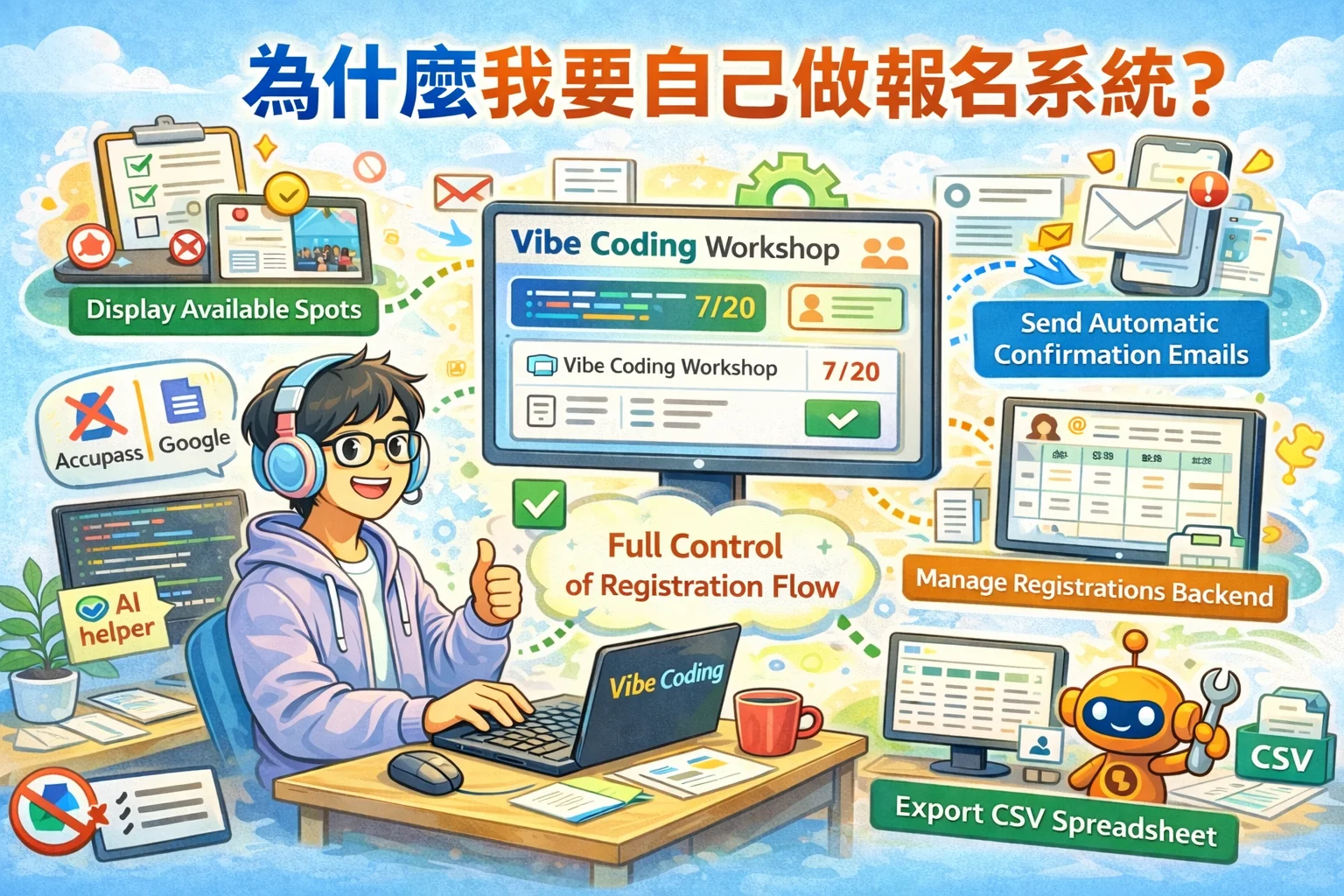
Recently, I decided to host a live event for the partners of the Vibe Coding Practical Community. Logically speaking, registration can be done using Google Forms or Accupass - but as a person who promotes Vibe Coding, wouldn’t it be great if I could use Vibe Coding as a registration system?
More importantly, I want to have complete control over the registration process: automatically sending confirmation letters, real-time display of remaining seats, background management of registration information, and exporting CSV… Although these functions are available on third-party platforms, the space for customization is very limited.
The best way to learn is to do it yourself. The most convincing teaching is to truly share the pitfalls you have stepped on.
 ▲ Use Vibe Coding to build an event registration system from scratch
So I decided to take on the challenge: use Vibe Coding to bring the event registration system online from scratch within one day. The following is my true review - including the ideas for technology selection, the pitfalls encountered during the development process, and the five practical strategies I extracted from them.
Technology selection: Why this combination?
Before starting, I first determined the technical architecture. Although the spirit of Vibe Coding is to use natural language to talk to AI for development, you must at least know what tool you want to use - it’s like before cooking, you have to decide whether to use a gas stove or an induction cooker?
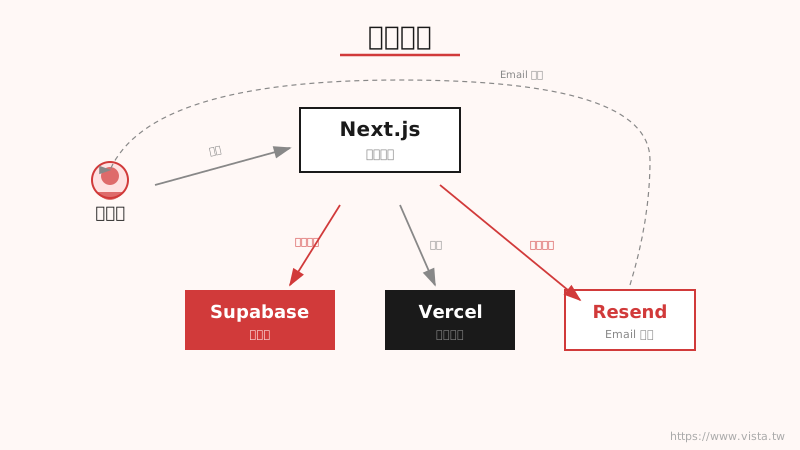 ▲Technical architecture of event registration system
I chose the following combination:
- Next.js: The most mature full-end framework in the React ecosystem, covering both the front and back ends
- Supabase: Open source Firebase alternative with built-in database, authentication and instant subscriptions
- Vercel: The best deployment platform for Next.js, it will be automatically deployed upon push
- Resend: Email service specially designed for developers, supports React templates
Why choose this combination? Because the integration between them is very smooth and the AI (especially Claude) understands these tools very well. When you tell the AI “Help me use Supabase to do the registration function”, it can immediately write the correct code - this is very important in Vibe Coding.
Development process: What is accomplished in one day?
I use Claude Code as an AI collaboration tool to describe requirements step by step through natural language. The whole process is roughly divided into three stages.
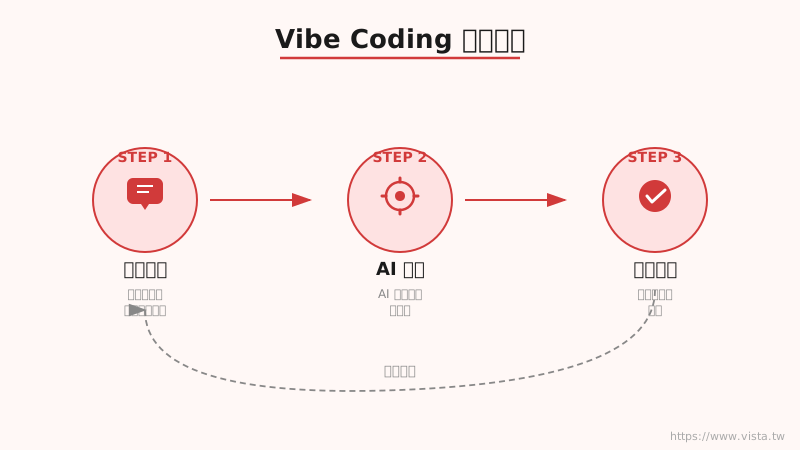 ▲ Vibe Coding development process: requirement description → AI generation → verification and correction
Phase 1: Database design and basic functions
I first described the registration system needs to AI: “I need an event registration system that supports multiple ticket types, automatically sends confirmation letters after registration, and automatically waits for a place when the quota is full.” AI helped me design the database structure, including three main data tables of events, ticket types, and registration, as well as corresponding API routes.
Phase 2: Front-end interface and registration process
Next, I described what each page looks like: activity list page, activity details page (including registration form), and backend management page. Based on my description, AI generated a complete React component, including form validation, state management and error handling.
The third stage: Email templates and advanced functions
Finally, I asked AI to help me design email templates for registration confirmation letters, event reminder letters, and event update notifications, supporting three event formats: online, physical, and hybrid.
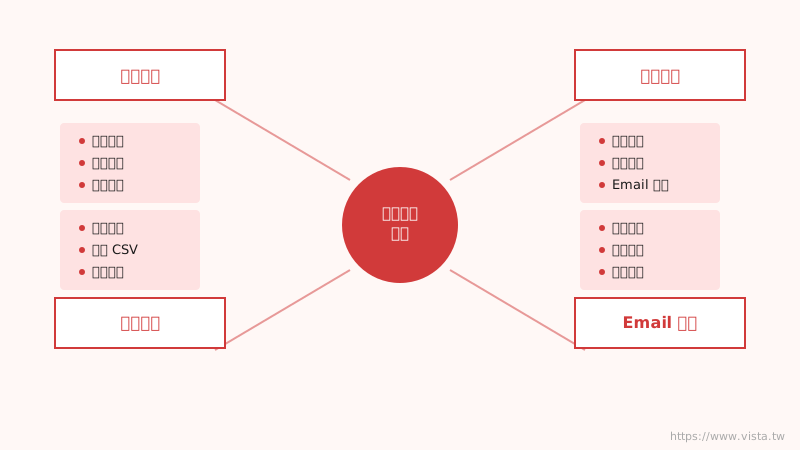 ▲ Functional architecture of the registration system
Throughout the process, I barely had to write any code myself. But I need to do three things: Describe clearly the requirements, Verify the output of AI, Provide correction directions. These three things sound simple, but in practice they are the core skills of Vibe Coding.
Real pitfalls: Three bugs that taught me lessons
After the system was built, I happily went online to test it. As a result, I stepped on three pitfalls in a row - each one gave me a deeper understanding of Vibe Coding.
Bug #1: Database security error during registration
When the first tester signed up, the system immediately popped up an error: “new row violates row-level security policy”.
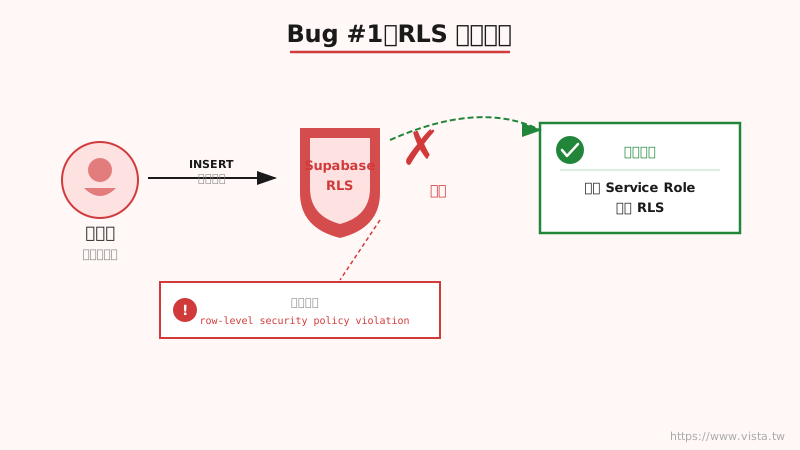 ▲ Bug #1: Database security policy blocks public registration
**What’s the problem? ** Supabase’s Row Level Security (RLS) is a database-level security mechanism - it checks “who” has permission to do “what operations”. AI did write the rule “anyone can register” when designing the database, but when the registration function was actually executed, a guest identity (not logged in) was used, causing the permission check to fail.
**How to solve it? ** I told AI: “The registration API needs to use service role instead, bypassing RLS.” AI immediately created a service role client specifically for writing public registration data.
This bug taught me: Vibe Coding doesn’t mean you don’t need to understand technology at all. You should at least be able to read error messages and use the correct keywords to communicate with the AI.
Bug #2: The registration was successful, but the confirmation letter was not sent.
After the registration function was repaired, I found that although the background showed that the registration was successful, the applicant’s mailbox was empty - the confirmation letter was not sent at all.
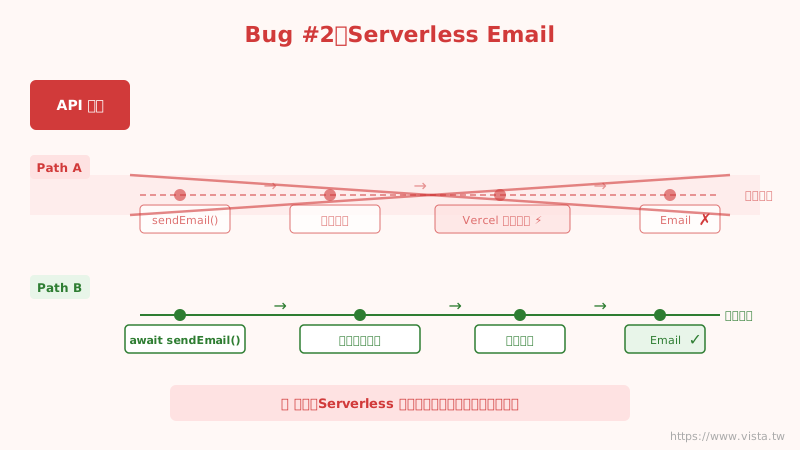 ▲ Bug #2: In a Serverless environment, asynchronous tasks may not be executed in time
**What’s the problem? ** When AI was writing the program code, the action of “sending a letter” was designed to be “fire and forget” - that is, after issuing the command to send a letter, it would directly return a success message without waiting for it to complete. This is no problem on a normal server, but in Vercel’s Serverless environment, the function will be terminated immediately after returning, and the program that sent the letter will be killed before it has finished executing.
**How to solve it? ** Just add the await keyword - let the program wait until sending the letter is completed before returning the result. This modification is only one line, but if you don’t understand how Serverless works, you don’t know where the problem lies?
Bug #3: The number of votes is not updated immediately after registration
After successful registration, the remaining places on the page still show the original number and have not been reduced.
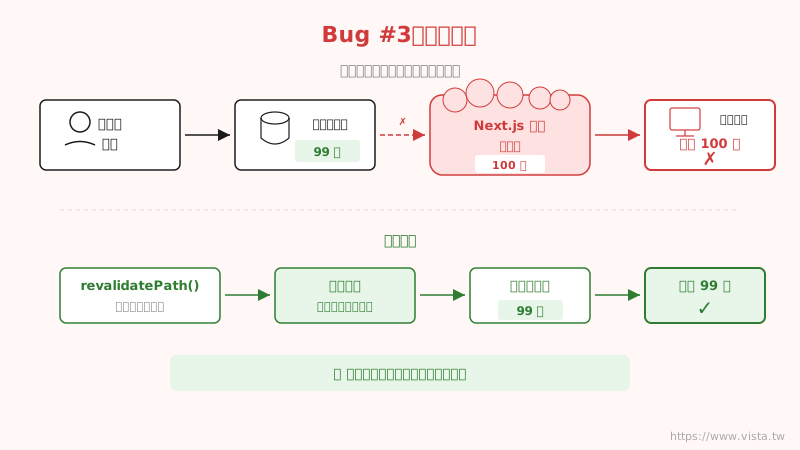 ▲ Bug #3: The cache mechanism prevents the page from seeing the latest data
**What’s the problem? ** Next.js will cache page data in order to improve performance. When someone successfully registers, the number of votes in the cache is old, causing the numbers displayed on the page to be inconsistent with the actual situation.
**How to solve it? ** After successfully registering the API, actively call revalidatePath to clear the cache of the page and force Next.js to re-obtain the latest data. At the same time, router.refresh() is also called on the front end to update the screen.
AI development vs traditional development: What’s the difference?
Going through this entire development process has given me a clearer understanding of AI-assisted development. The biggest difference between it and traditional development is not the program code itself, but the role of the developer.
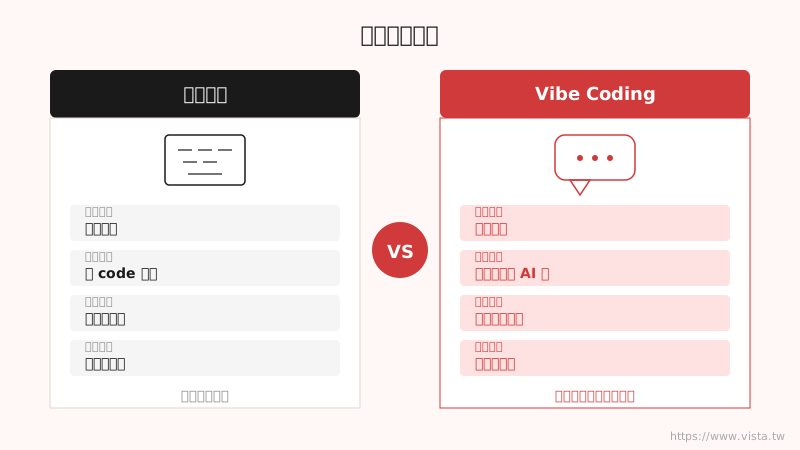 ▲The changing role of AI development vs. traditional development
| For | Traditional Development | Vibe Coding |
|---|---|---|
| Core skills | Writing code | Describing requirements |
| How to debug | Read the code to find the problem | Describe the problem and let AI fix it |
| Development speed | Days to weeks | Hours to a day |
| Learning threshold | High (needs programming foundation) | Medium (needs logical thinking) |
| Suitable for | Engineers | Anyone with an idea |
But it should be noted that Vibe Coding does not require technical knowledge at all - you need to have at least the following abilities:
- Understand error messages: Know what the system is complaining about
- Understand the basic architecture: Know what roles the front-end, back-end, and database play respectively
- Accurately describe the problem: Be able to convey the situation you encounter to the AI in clear language
Five practical tips for Vibe Coding
From this development experience, I summarized five practical tips and shared them with friends who also want to try Vibe Coding.
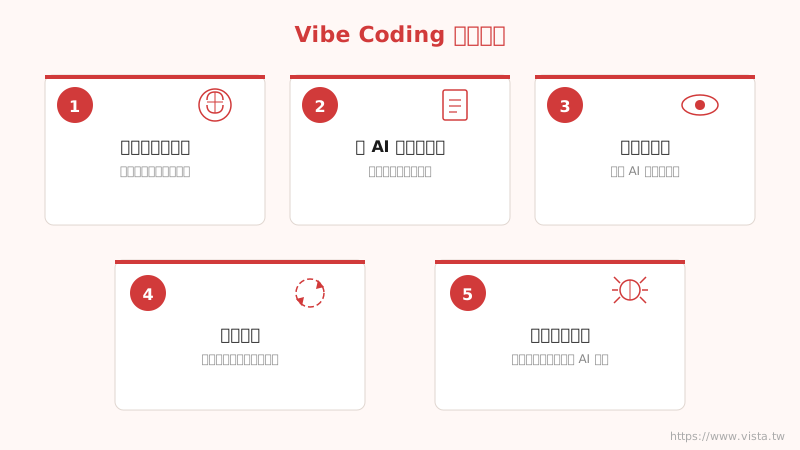 ▲ Five practical tips for Vibe Coding
Tip 1: Think clearly before speaking
Don’t rush to tell AI to help me build a registration system. Take ten minutes to think about it: What features do you need? What is the user’s operation process? What edge cases need to be handled? The clearer you think, the more accurate the output AI will give you.
Tip 2: Give AI enough context
AI cannot read minds. If you only said there was a problem with the registration, it might have been changed to a completely irrelevant place. You want to say: “After the user signed up using Gmail, the background showed success, but the confirmation letter was not received in the mailbox.” The more complete the context, the more accurate the AI’s judgment will be.
Tip 3: Only by understanding the output can you verify the results.
AI-generated code can have hidden problems - like the “fire and forget” email problem I encountered. You don’t need to be able to write that code yourself, but you do need to be able to understand what it’s doing to judge whether it’s correct.
Tip 4: Run fast in small steps and iterate step by step
Don’t try to do all the features at once. First go through the core registration process, and after confirming that it is active, add advanced functions such as email notifications, background management, and ticket type settings. Every step is tested, verified, and corrected, so that one mistake will not lead to a big mess.
Tip 5: Establish your own debugging thinking
When you encounter a bug, calm down and think: “Which layer might the problem lie in? Is it a front-end display problem, an API logic problem, or a database problem?” Once you have made a preliminary judgment, and then discuss it with AI, the efficiency will be greatly improved.
Conclusion: The best learning is actual combat
This event registration system has now been officially launched and is accepting registrations. The entire development process made me more convinced: Vibe Coding is really feasible, but it is not magic - it requires you to have logical thinking, problem description ability, and the patience to continue iteration.
 ▲Vibe Coding practical workshop, taking you to create your own digital works
If you also want to experience the power of Vibe Coding with your own hands, welcome to join my Vibe Coding practical workshop. In the three-hour workshop, I will take you to start from scratch, use natural language to collaborate with AI, and create a work of your own. No programming knowledge is required, just come with your ideas.
The future does not belong to people who can write programs, but to people who can collaborate with AI.