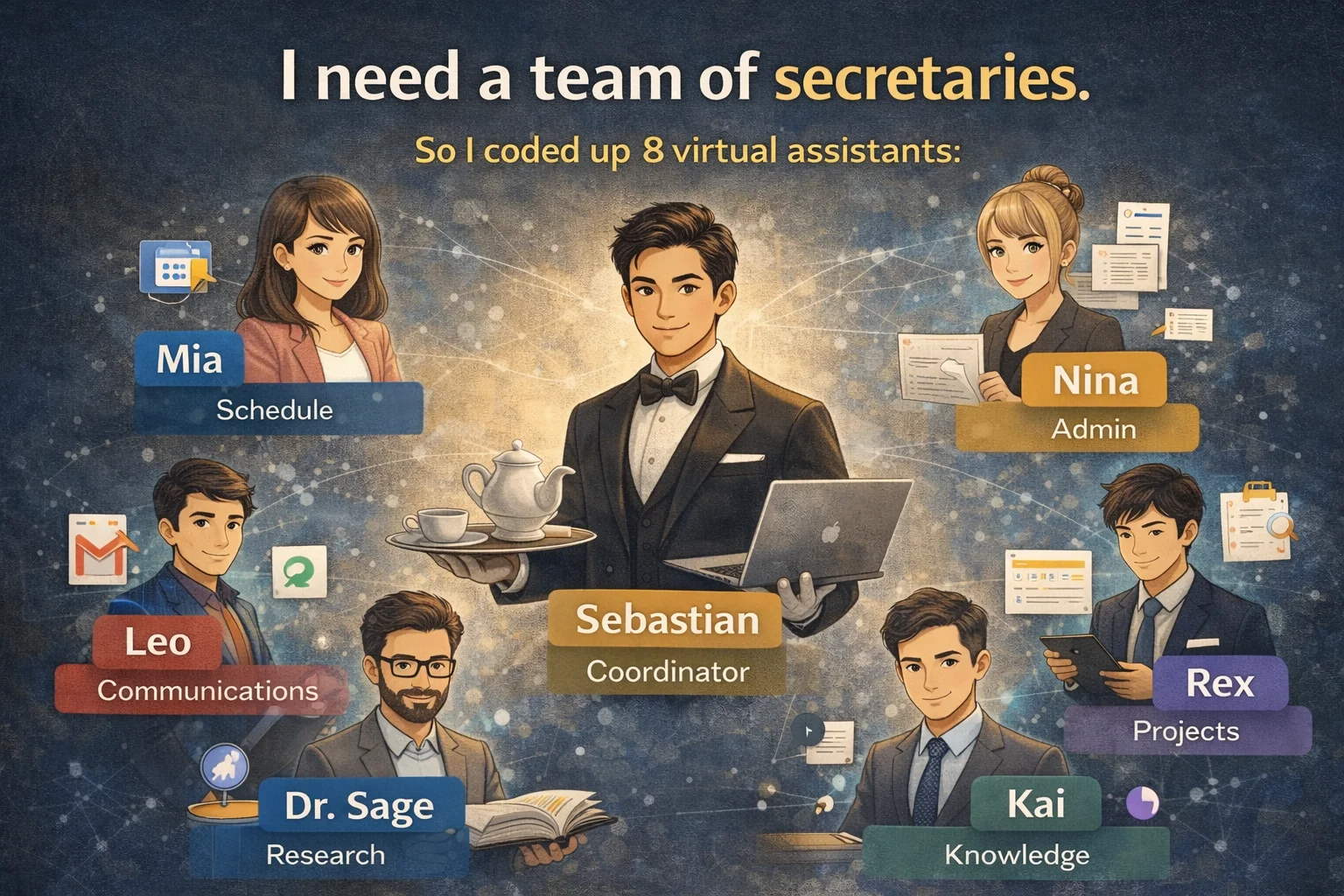
I used Claude Code to help me form a team of 8 secretaries
At eleven o’clock last Wednesday night, I was dealing with three things at the same time: a cooperation invitation letter that needed to be responded to the next day, a draft of an article that had been delayed for five days, and a research progress report due next week. I stared at the browser with seventeen tabs open on the screen, and suddenly an idea came to me - I need a secretary.
oh! No, what I need is a whole team of secretaries.
Yeah, but I can’t afford that many people. So I did something that might be a little crazy: I spent an afternoon building a team of 8 virtual secretaries using Claude Code. A housekeeper coordinated the arrangements, and seven dedicated secretaries performed their duties to help me with everything from schedule management to academic research.
Now, let me review the design ideas of this system and dismantle it carefully for you to see.
 ▲My 8-person virtual secretarial team - one butler and seven dedicated secretaries
Let’s make one thing clear first: this is not an AI assistant that helps you reply to messages.
Well, I know you must have used ChatGPT to help you reply to emails, or you may have used GitHub Copilot to help you write programs. But have you noticed that these tools work alone - that is, if you ask one thing, it will answer one thing. It’s a given, it’s gone after asking!
But, real world work doesn’t work like that.
For example: If you tell your secretary, “A proposal report is due next week,” how will a good staff team react?
She doesn’t just help you mark a deadline on your calendar. Instead, let the research consultant first confirm whether the literature is complete, the schedule secretary reverses the schedule and marks what to do every day, the project manager establishes milestones to track progress, and the knowledge steward retrieves relevant materials written three months ago from your note library…
The four people started moving at the same time, each doing what they were best at.
This is what I want: not a smarter chatbot, but a virtual team that understands division of labor, collaborates, and has memory. If you still don’t quite understand the difference between AI Agent and general Chatbot, it is recommended to read that article first, which will make it easier to understand the following content.
Team structure: one steward, three teams, seven experts
I designed the team as a two-tier organization. On the top floor is Sebastian, the butler, and the only entrance to all instructions. It is divided into three groups: life group, career group and academic group.
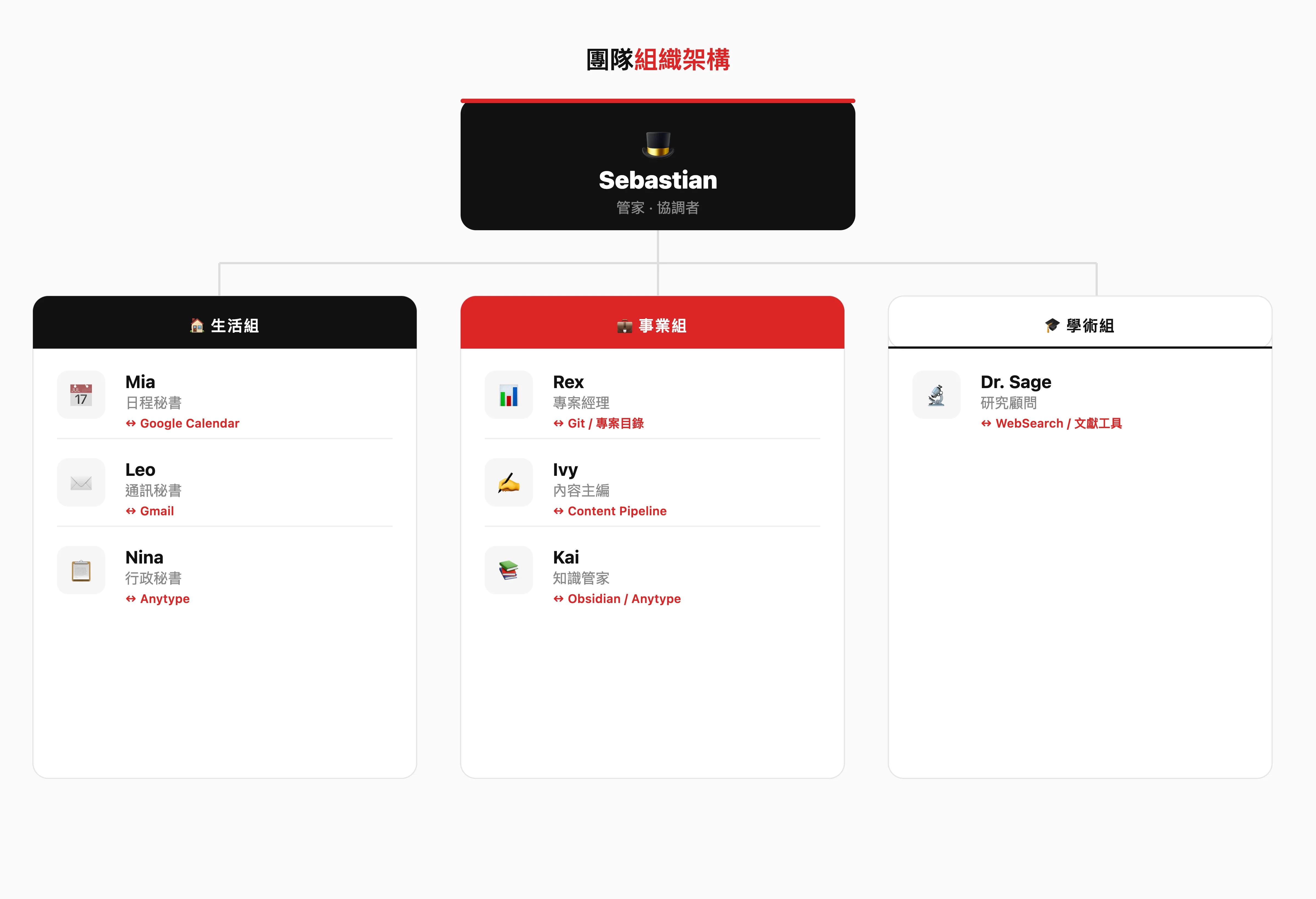 ▲ Two-tier organizational structure - Sebastian, the butler, coordinates and coordinates three dedicated groups
Butler Sebastian - the only entrance to all instructions
Sebastian is the coordinator of the entire team. He doesn’t do things directly, but he gives orders and decides who does what.
When I said to him, “Help me handle the mail in my mailbox,” he knew to call Leo (corresponding secretary). I said, “The report is due next week.” He knew that four people would be transferred at the same time. I said “good morning” and he started the morning briefing process, sorting out today’s overview from four dimensions: schedule, emails, projects and content.
To put it bluntly, Sebastian only has one thing to do: understand what I said and think about who needs to be sent.
Life Group: Guard your time and attention
Mia (Schedule Secretary) is a warm-hearted timekeeper who has zero tolerance for being late. She interfaces with Google Calendar and is responsible for schedule management, deadline tracking and meeting arrangements. She would help me reserve time and nudge me gently but firmly when I was about to be late.
Leo (Corresponding Secretary) is a neat message filter. He connects to Gmail and helps me condense fifty emails into three sentences every day. “Today there are 23 new letters, only 3 are worth reading. I have sorted the rest.” - This is Leo’s style.
Nina (Administrative Secretary) is a silent and efficient logistics king. Whether it’s invoices, billing, renewal reminders or SOP establishment – these little things don’t occupy my brain space. I don’t hear Nina speak very often, but what needs to be done is not missed.
Business Group: Promote your products and content
Rex (Project Manager) is a data-driven battlefield PM. He keeps an eye on every product in my hand - he won’t praise you when the progress is ahead of schedule, but he will tell you directly when the progress is behind. “It’s almost done” doesn’t hold true here with Rex. All kinds of tasks are either completed or not.
Ivy (Content Editor) is a creative director with taste. She manages the entire content pipeline, from seed idea to final publication. If your opening is too boring, she will reject it. “The point of view of this article is sharp enough, but the beginning is too slow. I suggest starting directly from the story in the third paragraph.” - It is not embarrassing to be rejected by Ivy, but to be proud of being released by her.
Kai (Knowledge Steward) is the learned librarian. In my case, my own knowledge is scattered in Obsidian, Anytype, draft folders and library - Kai allows me to find any piece of information at any time. His most powerful thing is the cross-system connection: “You mentioned a similar point in a draft about innovation methodology three months ago. Do you want me to call it out?”
Secretly, I’ve been scared by Kai myself a few times. There were some things I had forgotten I had written, and when he translated them, it felt like someone knew your own head better than you did.
Academic Group: Make your research solid
Dr. Sage (Research Advisor) is a rigorous but not boring scholar. Literature search, argumentation testing, methodology checking, and citation format—all are within his scope. His principle is: every argument must be well-founded, and every quote must be traced to its source.
Yesterday, I invited a number of graduate students from the Ph.D. and Master’s Practice Group to help with testing. Everyone said that Dr. Sage is knowledgeable and can help find research entry points with academic value.
The real difficulty is not to make the eight characters move, but to make them interact
Honestly, it wouldn’t be hard to get each of the eight characters to answer questions. The hard part is letting them know when to pass the ball.
This is very similar to Ben Cera’s idea of building Polsia - not to stack more AI tools, but to design a system for AI to collaborate with each other.
So, I designed several key scenarios to verify this:
Scene 1: Morning briefing
Every morning, Sebastian collects information from four sources in sequence - Mia reports on today’s schedule and upcoming deadlines, Leo summarizes unread important emails, Rex lists the priorities of each project, and Ivy updates the pending items in the content pipeline. Sebastian puts it all together into one brief, presented all at once.
No need for me to ask one by one. Yes, I just say “good morning.”
Scenario 2: Cross-group collaboration
The sentence “The paper is due next week” will trigger the simultaneous actions of four characters: Dr. Sage checks the completeness of the documentation, Mia reverses the schedule on the calendar, Rex establishes milestones, and Kai retrieves relevant notes and materials from Obsidian.
Four lines are moving forward simultaneously, and Sebastian is responsible for ensuring that no one’s work is pushed past each other’s or steps on the line.
Scenario 3: Intelligent transfer
Leo is checking his email when he spots a meeting invitation—he won’t handle the schedule himself, but will pass it on to Mia. Mia checks for conflicts, suggests time periods, and sends the results back to Leo to draft a response.
Each role does what they do best, but knows when to pass the ball to whom? This is the same logic as how a real team works.
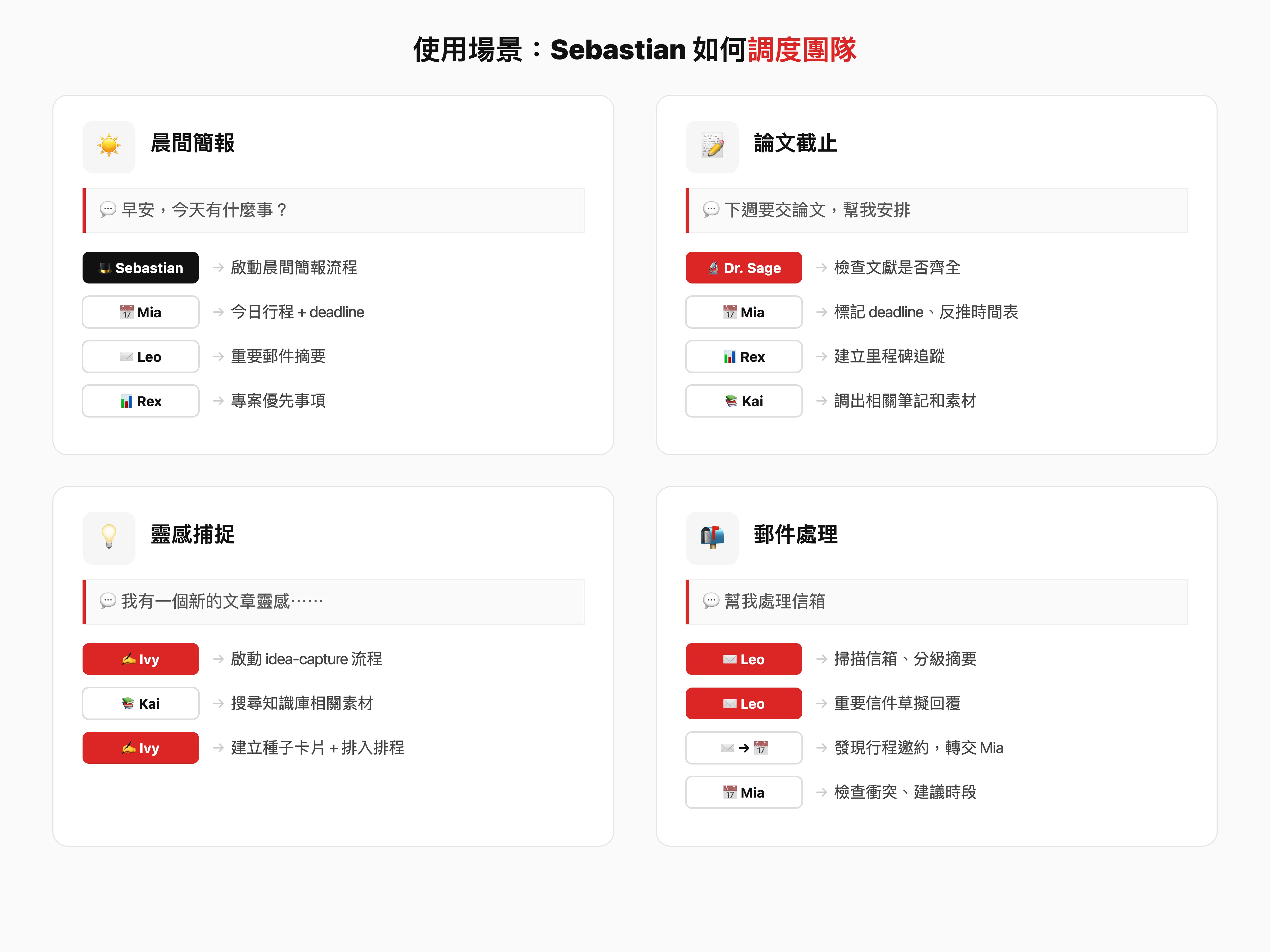 ▲ Sebastian, the butler, intelligently schedules the corresponding dedicated secretary according to the instructions
How is it technically done? Easier than you think
The architecture of the entire system is actually very simple and easy to understand. The core is a skill file as the coordinator, plus seven role definition files with clear division of labor.
~/.claude/commands/
└─ secretary.md ← Sebastian (main entrance)

~/.claude/secretary/
├─roles/
│ ├─ mia.md ← Calendar Secretary ↔ Google Calendar
│ ├─ leo.md ← Corresponding Secretary ↔ Gmail
│ ├─ nina.md ← Administrative Secretary ↔ Anytype
│ ├─ rex.md ← Project Manager ↔ Git
│ ├─ ivy.md ← Content Editor ↔ Content Pipeline
│ ├─ kai.md ← Knowledge Manager ↔ Obsidian / Anytype
│ └─ dr-sage.md ← Research Consultant ↔ WebSearch
├─ routines/
│ ├─ morning-brief.md ← Morning Briefing Template
│ └─ weekly-report.md ← Weekly report template
└─ config.md ← Team settings
Each role profile contains three things: character definition (tone, personality), scope of responsibilities, and docking tool (MCP). Sebastian reads the config to determine who can do what, and loads the corresponding role file as needed.
There’s a key design decision here: On-demand loading. Instead of reading all eight characters into every conversation - that would burst the context window. Sebastian itself is very lightweight, and only the character assigned to the task will be loaded with full definition.
For example, when I say “check my itinerary”, I don’t need to include Dr. Sage’s academic character.
If you are interested in the architectural design of AI Agent, you can refer to this guide on importing AI Agent for small and medium-sized enterprises, which contains more system design ideas.
Before import vs after import
| Scenario | Before import | After import |
|---|---|---|
| Check the itinerary | Open Google Calendar and check by yourself | ”Are you free tomorrow afternoon?” → Mia replies in three seconds |
| Process emails | Open Gmail and read each message one by one | ”Process mailbox” → Leo graded summary + draft reply |
| Track project progress | Open each repo to see commits and issues | ”Solo status this week?” → Rex digital reporting |
| Find old notes | Obsidian search, Anytype search, browse folders | ”I have written something about X before” → Kai cross-system search |
| Write an article | Run your own pipeline step by step | ”I have an inspiration” → Ivy startup process + Kai supplementary materials |
| Thesis research | Search the literature and organize citations by yourself | ”Help me find relevant literature on X” → Dr. Sage Search + Abstract |
| Every morning | Open five apps by yourself to piece together today’s to-dos | ”Good Morning” → Get the morning briefing in one go |
Honestly, the biggest change isn’t how much time I save. It’s that I no longer have to remember “which tool should I open now?”
In the past, I spent the first thirty minutes of every morning switching between Calendar, Gmail, Obsidian, and GitHub. Now I say “good morning” and Sebastian organizes all the information and brings it to me. During those thirty minutes, I drank coffee and thought about the most important thing today.
The first time I used the morning briefing, I was actually scared. It’s not because there is a lot of information, but because Sebastian strings together information from four different sources in a way that I never thought of myself - he doesn’t just make a list, but helps me mark “the one thing that needs most attention today.” That day was the deadline for replying to a cooperation invitation, and I was almost buried in fifty unread letters.
💡 **Want to build your own AI content production system? **
In AI content production system workshop, I completely dismantled the design framework of this automatic content production process - from architecture design to prompt engineering, from single role to multi-role collaboration. Not just a concept, but actually build it with you.
You can do this too: Build your own virtual team in five steps
1. Take inventory of your tool ecosystem
What tools do you use every day now? Google Calendar, Gmail, Notion, Obsidian? List them first. These are the “hands and feet” that your secretary can operate. The key to this step is to find out which tools have an API or MCP that can be connected - a secretary without hands and feet can only talk on paper no matter how smart he is.
2. Find the three most repeated things
What do you repeat every day? Check the itinerary, read the letter, follow the progress? These three things are the scope of your first secretaries’ responsibilities. Instead of trying to do eight characters from the beginning, start with the three things that have the biggest pain points.
3. Design your coordinator
Write a scheduler responsible for determining “who should give this sentence to.” You don’t have to do it perfectly from the beginning. It’s enough to be able to distinguish between three situations. Sebastian will only distinguish three commands: “Itinerary”, “Email” and “Others” at the beginning.
4. Give the character personality, not just functionality
This is important. Each character is more than just a wrapper for a tool, giving it a name, tone, and personality. You’ll find that AI with personality is easier to use over the long term than a cold tool—because you’ll automatically want to interact with it. Leo’s neatness, Ivy’s pickiness, and Dr. Sage’s rigor—these personalities make me look forward to talking to them every day.
5. Run first, then optimize
Don’t think about doing eight characters at once. Do the three core ones first, run for two weeks, and observe which links are stuck? Then, gradually complete it. I myself started with Sebastian and three secretaries. Regarding how to use AI to build your own one-person company tool chain, you can refer to this more complete inventory.
One person can also have a team
I’ve been writing online for over twenty years. In the past twenty years, the most important thing I have learned is not how to write better, but - the bottleneck of a person’s output is never ability, but bandwidth.
You have ideas, abilities, and all kinds of tools, but you only have one head and twenty-four hours.
Sebastian and his team are like a set of amplifiers – I take charge of decision-making and direction, they take care of execution and tracking. My time is spent on “thinking”, not on “finding” and “switching”. This is the key shift from from “asking AI” to “letting AI do it for you”.
To be more specific, the value of this system is not that it allows me to do more. It allows me to spend my time on irreplaceable things.
Leave the repetitive tasks to AI and leave your energy to the things that really matter.
If you are also a practitioner of one-person company, or you are thinking about how to use AI to redesign your workflow, this set of ideas for a virtual secretary team may give you some inspiration. The point is not how flashy the tool is, but whether you have thought clearly: What can only you do and what can be handed over?
🎓 AI Content Production System Workshop
Want to learn to build your own AI content production system? In this workshop, I will lead you to design and build an AI system that can really help you work from scratch. You don’t need to be able to write programs, you just need to know what problem you want to solve?
👉 Learn more course information
Extended reading:
- How can professionals make good use of AI Agent? The key shift from asking AI to letting AI do it for you
- Is it really possible for a one-person company to rewrite the future? See the new era of AI entrepreneurship from Polsia
- Stop chasing tools! Build your own “unbeatable system” in the AI era
External Resources:
- AI tool chain inventory of one-person company (Solo)
- The one-person company revolution is coming (Solo)
- Claude Code official documentation
📖 深入探索相關主題