I used Claude Code to place my first Facebook ad: the five pitfalls that a novice stepped on, and the way to survive that I finally found

I recently scrolled through Facebook and saw a post (opens in a new tab) by my friend Guan Dengyuan (opens in a new tab) (Xiaoguan). He shared how he used Claude to help place ads, and it was not as difficult as he imagined: just ask Claude Code to help connect Meta’s API, and then you can directly issue commands to create ads (opens in a new tab), change settings and retrieve data, without having to manually click on each field. Thank you very much Xiaoguan for sharing, it gave me a sudden enlightenment.
Xiaoguan also mentioned that when someone asked him to post a result capture (opens in a new tab), his reply was very straightforward: Whether the results are good or not is related to your own concepts and operations. It does not mean that if you leave it to AI, it will automatically help you make money.
This sentence is very well said and it hit me. Because I have always had an idea: I am not a professional advertising pitcher. Every time I open the advertising manager, I am deterred by seeing those dense columns. If advertising can be managed through speech, the threshold will be much lower for individual entrepreneurs like me.
So, I decided to try it myself and write down the whole process, including all the stuck points. Because what is really useful is never “I succeeded”, but “Where did I get stuck and how did I get through it later”.
Let me talk about the conclusion first: all this is possible, but there are more thunders encountered in the process than imagined. While the impression is still deep, I wrote this complete record of my exploration.
Starting method: String API is actually the simplest part
Guan Dengyuan is right, the connection itself is not difficult. The core is to register an application on Meta’s developer platform, add the marketing API, and then generate a set of access tokens. Individuals can apply, and corporate status is not necessarily required.
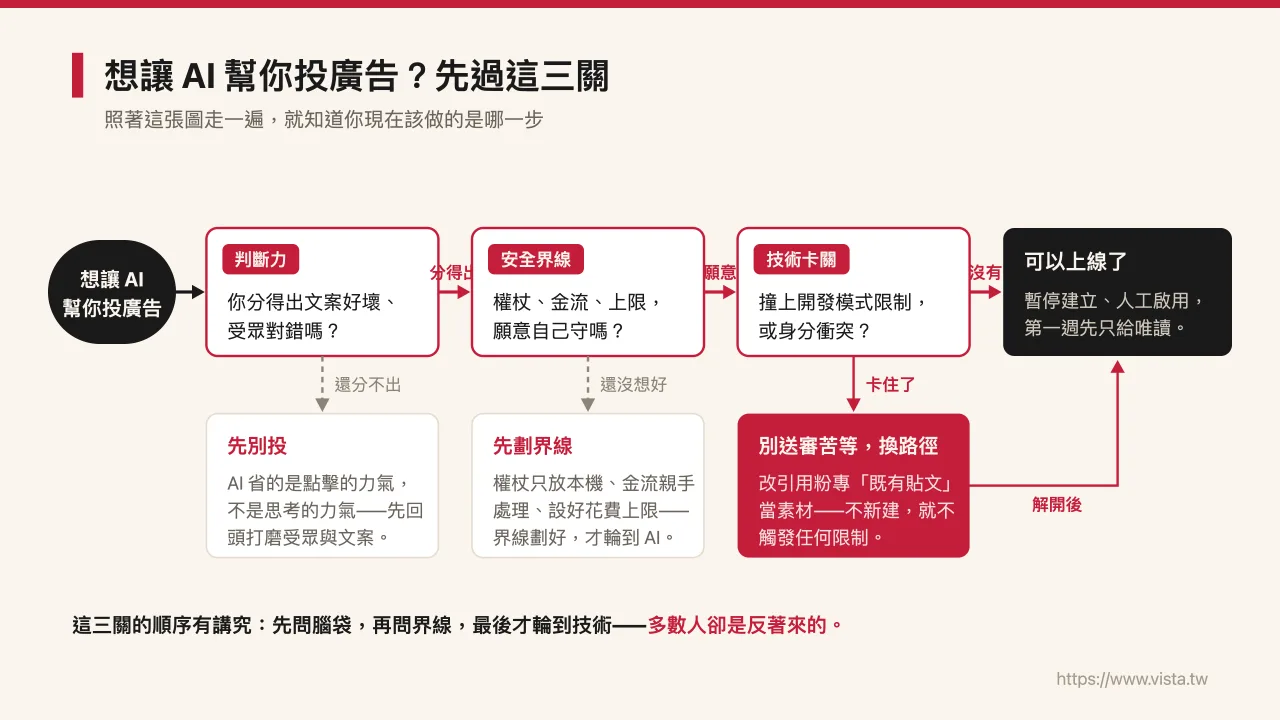
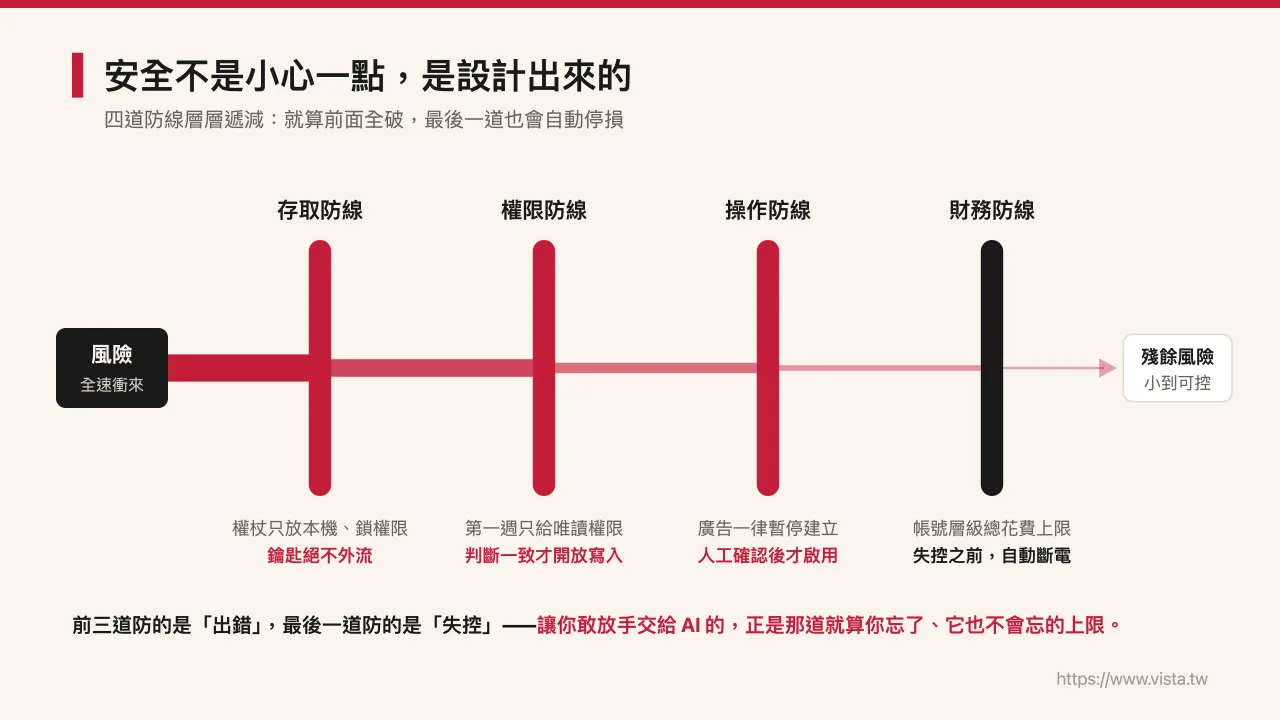
I handed Claude Code my token and the identification code of my advertising account, and asked it to be stored in a hidden file on my computer. The permissions were locked so that only I could read it, and I made clear requirements: no uploading to the cloud, no access to version control. I insist on this, because that set of scepters is the key to operating my advertising account and can only be stored on my own machine.
After the string was completed, Claude immediately used the API to read my advertising account and confirmed that the status was normal. The first step went surprisingly well. At that time, I naively thought that all that was left was to issue an order and the advertisement would be online.
Then, thunder came one after another
The real test begins with the second step. I told Claude the course I wanted to promote (a physical workshop on AI empowered academic writing (opens in a new tab)), the sales page and the budget, and asked him to start creating ads. As a result, I hit a wall all the way. Here are a few of the most representative ones to share with you.
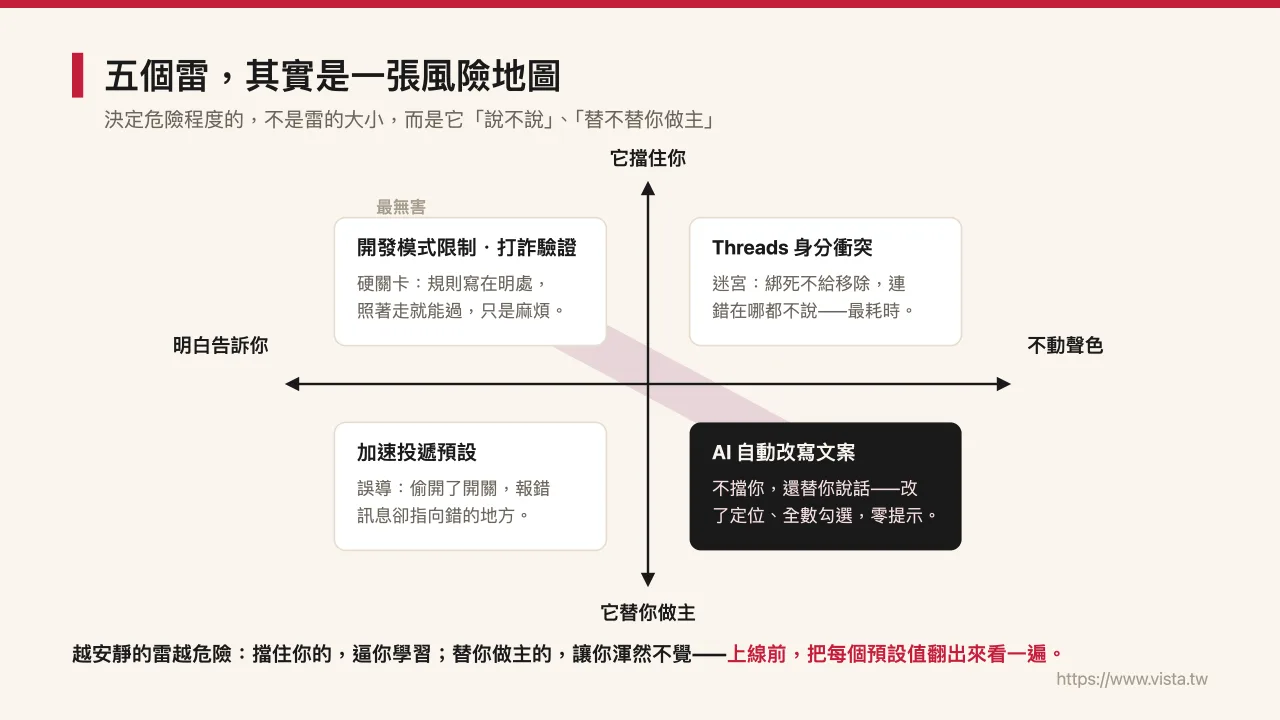
**First caveat: Development mode applications cannot create creatives. **Meta has a rule that applications in development mode cannot directly generate new fan posts as advertising materials through the API. If you want to lift this restriction, you must submit the application for online review, and the review will take one to two working days. I don’t want to wait right now.
**The second mine: Advertiser verification of Taiwan’s Anti-Fraud Regulations. **Now as long as the advertisement is placed in Taiwan, it is necessary to declare who the advertiser and funder are, and to use a verified identity. This level took me a while. I had to complete personal identity verification with a government ID, and then set myself as the default advertiser and funder in the ad settings. The good news is that individual households can pass with their own identity documents, not necessarily companies.
**The third mine: The interface made the settings for me. **I switched to the advertising manager’s interface to create it, but it turned on “expedited delivery” for me by default, which also made the budget check weird: no matter how much I filled in the daily budget, it said the amount was not enough. After struggling for a long time, I discovered that it was the “accelerated delivery” that I hadn’t noticed that was causing trouble. Just change it back to “standard” and it would be fine.
**The fourth mine: AI automatically rewrites my copywriting. **When creating an ad, the interface’s “Smart Copy Optimization” automatically rewrote the copy I wrote into several versions, and checked all of them for rotation. The problem is that the wording it changed is wrong and completely contrary to the spirit of the course. I had to uncheck the AI versions one by one, leaving only the original text I wrote. This incident left a deep impression on me: the default value given by AI is not necessarily what you want, and you must check it when you need to.
**The fifth mine is also the most difficult: Threads identity conflict. **This question is quite technical, but worth writing down. Because my fan page is connected to an Instagram account, and that Instagram is connected to a separate Threads profile, Meta determined that this Instagram account cannot be used as a Threads advertising identity. Unfortunately, when I use the interface to create ads, it automatically binds my Instagram identity and won’t allow me to remove it. No matter how I change the layout, reload or change the settings, I have tried everything, but I can’t get around it. I was stuck at this level for the longest time. I thought I could only submit it for review and wait for a day or two.
Breakthrough: Change the angle and it will work
When I was stuck on the Threads level, Claude and I changed our minds.
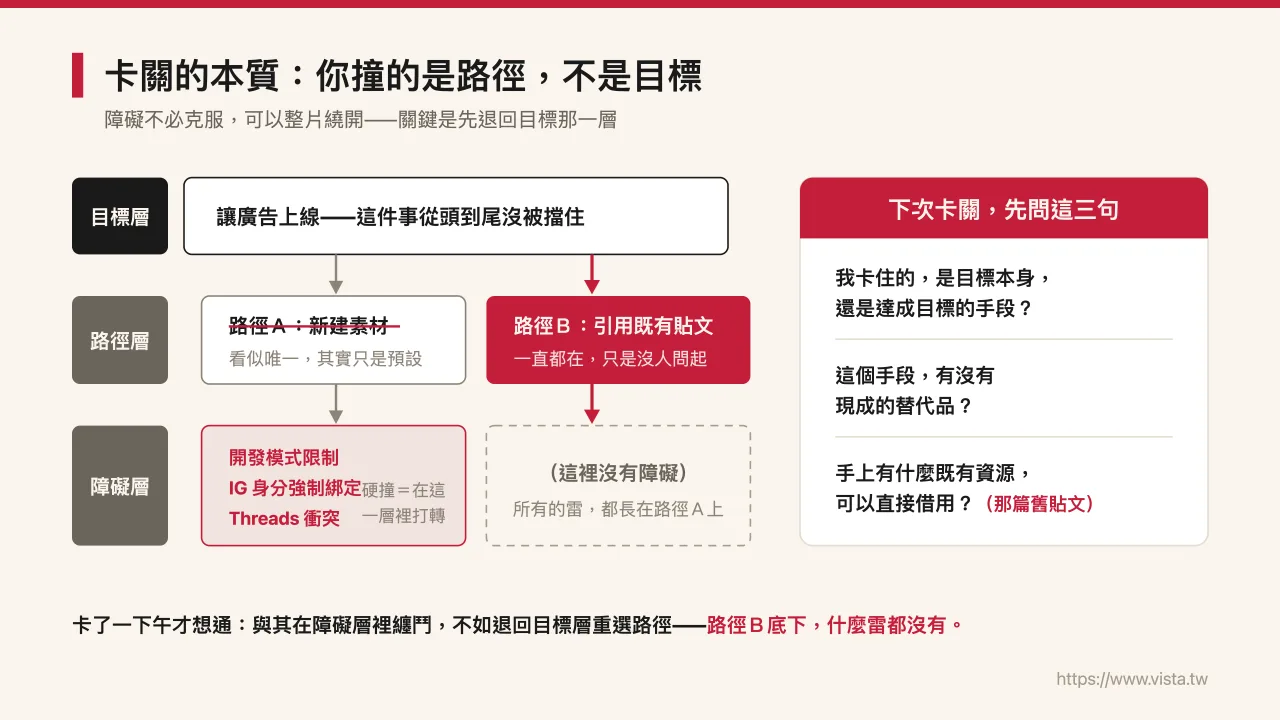
The root cause of all the previous deadlocks is “using API or interface to create new creatives”: either encountering development mode restrictions or getting stuck in the Threads identity. I had a sudden thought… What if instead of creating a new creative material, I could use the first existing post on the fan page as the advertising material?
We first did a small test: take an old post from my fan page and try to use it to create an ad. It worked, no errors at all. This confirms one thing: creating an ad by referencing an existing post does not trigger development mode restrictions (because there is no new post), and because it is a pure fan page and not tied to Instagram, even the Threads conflict disappears.
So, the final process became like this: I posted a normal course promotion post on the fan page (with the main image and copy written by Claude, and attached a registration link), and then Claude read out the post and used it to create two sets of ads: one targeted the research institute and academic-related interest audiences, and the other used a wider automatic audience to let the data compare. All of them were put into a paused state first, and they were not activated until I confirmed the materials, copywriting, audience, and budget one by one.
The only thing I needed to do was send out the post. Because Meta will not give AI the authority to post on your behalf, you must do this step yourself. Claude takes care of the rest of creating campaigns, setting up audiences, and tracking campaigns.
 (opens in a new tab)
📮 Want to see more such first-hand AI combat records? Welcome subscribe to "Vista AI Inspiration Supply Station" (opens in a new tab). I will regularly share my experience in AI applications, content creation and one-man company management, and help you turn your expertise into a cumulative asset.
Three things I learned
**First, “If you throw it to AI, you will make money” is an illusion. Human-machine collaboration is real. **What Xiaoguan said is right. Throughout the afternoon, AI was responsible for the hands and feet: it remembered all the fields, would not slip, and could set the background in one go. However, the judgment of “whether this copy deviates from the spirit of the course”, “is this audience the right one” and “should I accept this default value” still comes from my choice. AI saves me from having to deal with interfaces that tell people off, but it doesn’t do the thinking for me. This also echoes the point I talked about before in <The starting point for making full use of AI is not to pick tools, but to dismantle the work process>: first think clearly about which links should be handed over to AI and which ones must be kept in your own hands, so that the tools can really be used by you.
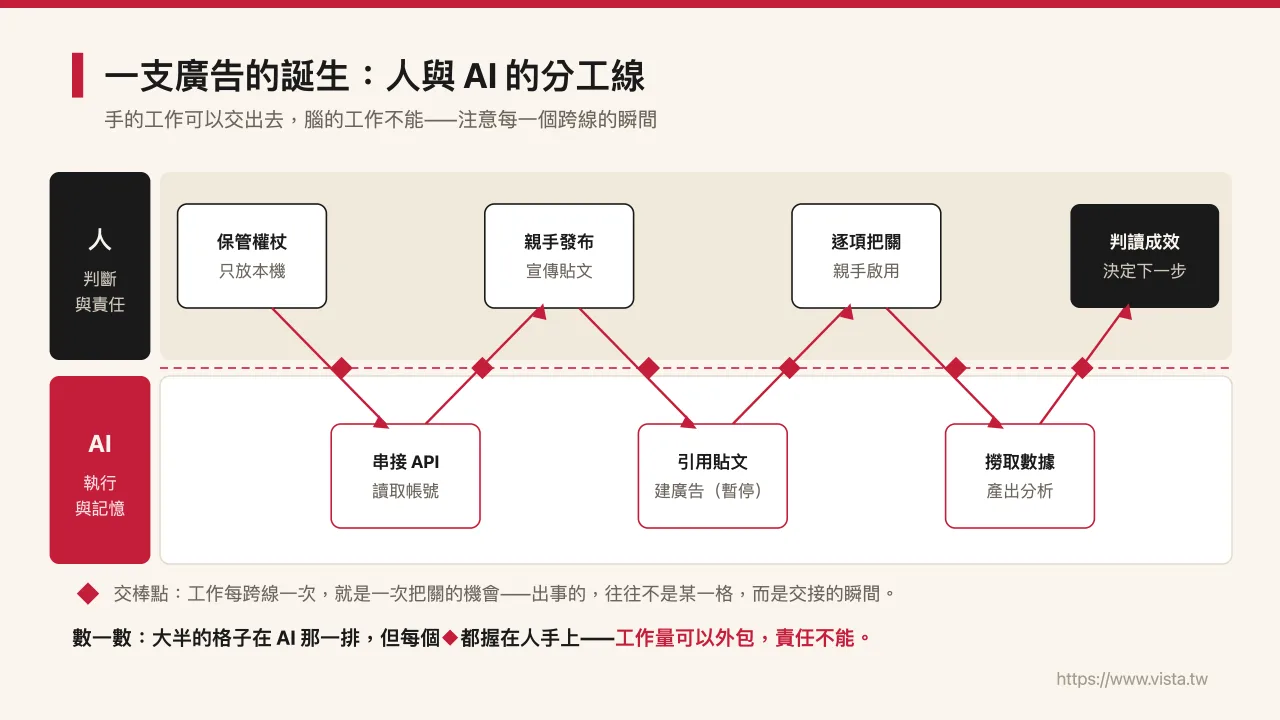
**Second, you must keep your own safety boundaries. **I insist on keeping the set of wands for operating advertising accounts only on my own computer from beginning to end, locking the permissions, and not going to the cloud. I did all the card binding involving cash flows myself and did not let AI handle it. I also left an account-level total spending cap as a safety net: if I forget to turn off an ad, the entire account will be automatically deactivated if it reaches the cap, preventing it from getting out of control. AI will not draw these boundaries for you, you have to figure them out yourself.
**Third, the value of a checkpoint is to force you to understand the system. **In this afternoon, I have a deeper understanding of the operation of Facebook ads, Taiwan’s advertising regulations, and the account relationship between Fanzhuan and Threads than before. If the first step were to go all the way, I would have learned nothing. Every thunder I step on makes me understand better why this system is designed the way it is. This mentality of “upgrading yourself to an AI commander, rather than being led by tools”, I have a more complete discussion in “Make good use of AI Agent digital clones to upgrade from mid-to-high-level supervisors to Agent Commander-in-Chief”, welcome to further reading.
For those who want to try it too
If you read my article and are interested in using this method to place and manage your own Facebook ads, my suggestions are:
- Just connect one platform first, don’t try to connect all the platforms at once. Even as an individual, you can apply for the API.
- The scepter is the key, only put it on the local machine, lock the permissions, and never go to the cloud. For any procedures involving personal information and cash flow such as binding credit cards and verifying, please set it yourself.
- Consider only making AI read-only in the first week: Get reports and do analysis, but don’t rush to make it real. Wait until you confirm that its judgment is consistent with yours, then open it to create ads and adjust the budget.
- Set a spending cap as a safety net. Yes, that’s more important than anything else.
- Know what you know: It saves you the effort of clicking, not the effort of thinking. Whether the results are good or not depends on your understanding of the audience, the copywriting, and the product. If you want to build a complete set of AI workflow thinking first, you can refer to 〈Workplace Self-Help Guide: AI will not replace you, but people with AI workflows will〉.
Seeing the ad running gave me mixed feelings. Through Claude, I did not become an advertising pitcher, but because now I am only one sentence away from looking at advertising data.
💡 **By the way, the course I promoted through advertising this time is the “AI Empowering Academic Writing” physical workshop. **If you are a graduate student, university teacher, or researcher who needs to write a lot of papers, and want to know how to make AI your academic co-pilot (rather than a ghostwriter for you), please refer to Course Introduction Page (opens in a new tab). If you want to know my complete thoughts on AI-assisted research first, you can also read <Don’t just learn AI tools: How researchers can create a reproducible academic co-pilot> this article.
Next step
Bring this topic to your team
Vista Cheng speaks and runs workshops on AI workflows, writing and content systems for companies, schools and public agencies.