The next step for Second Brain: MCP for Obsidian and Anytype
In the past few years, when we talked about the second brain, the most talked about thing was probably “how to store data well.”
So, we were busy learning Notion, Obsidian, and Anytype, building databases, designing labels, organizing folders, and writing two-way links. Of course these things are important, but the problem is also obvious: there is more and more information, and when you really want to use it, you still have to go through it yourself.
Until the emergence of AI, knowledge management began to enter the second stage.
If the first stage is to make the information accessible, then the second stage is to make the information accessible. For example, you can ask: “Why did that customer lose last year?” AI can help you sort out the answer from meeting minutes, interview notes, and proposal documents. Yes, this has been useful.
But then, the really critical third stage comes: allowing data not only to be queried, but to be scheduled, rewritten, connected, and even participate in the work process.
This is why note-taking software such as Obsidian and Anytype are worth installing MCP on them next.
What is MCP? Why it’s a turning point for knowledge work
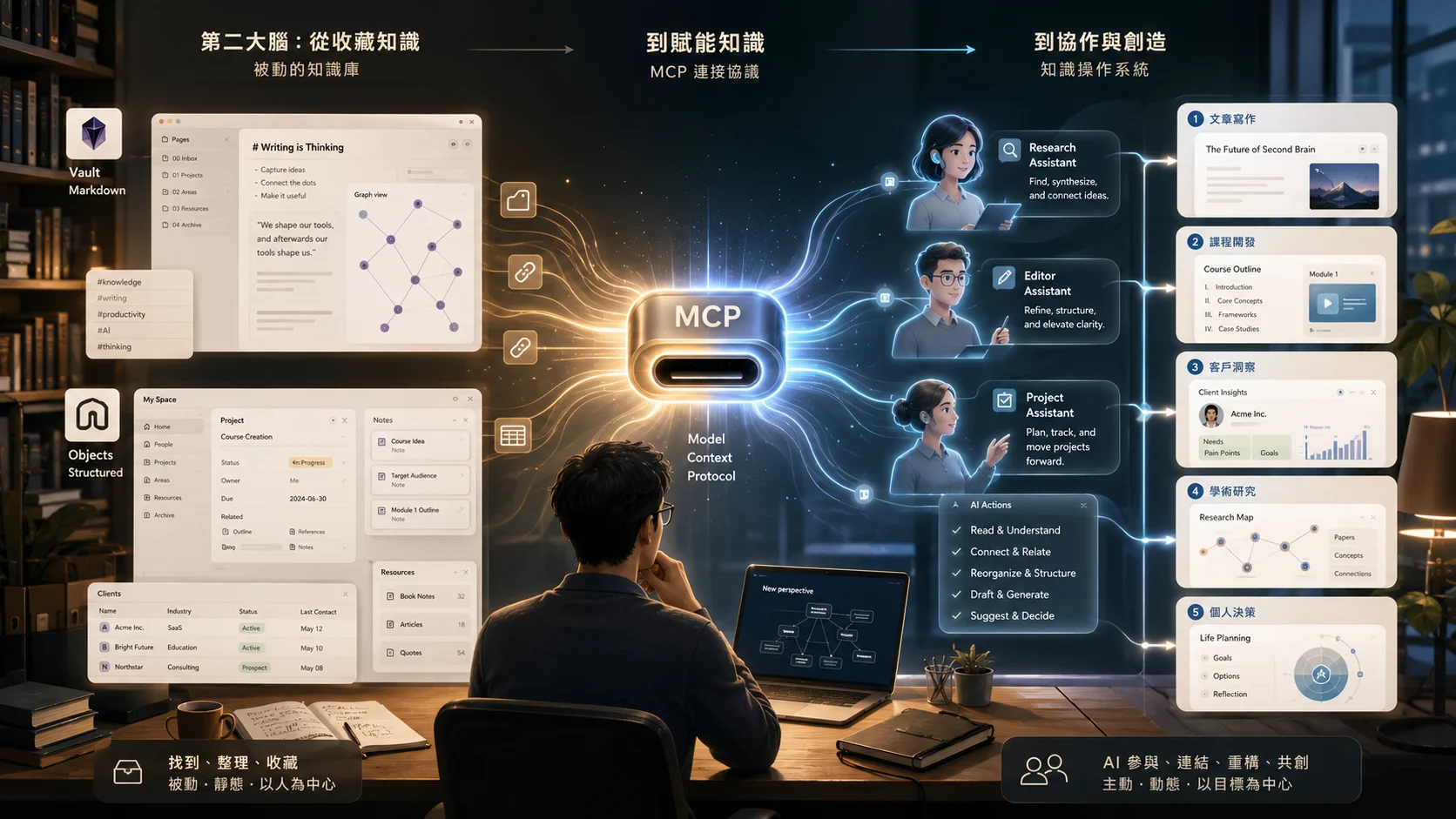
MCP, the full name is Model Context Protocol. When launched in late 2024, Anthropic defines it as an open standard that allows AI tools to establish secure two-way connections to external data sources, tools and workflows. Official documents also liken MCP to a USB-C port for AI applications: different tools do not have to rewrite an integration method, but use a common agreement to allow AI to access data, call tools, and complete tasks.
Before the emergence of MCP, although large-scale language models were powerful, they were usually closed and unable to actively access users’ local data (such as files, databases) or interact with external software tools (such as Slack, GitHub, Google Calendar) in real time.
To put it in a more vernacular way, MCP is not an ordinary plug-in, but an interface that allows AI to enter your work site.
For example, in the past, you put data in Obsidian or Notion, and AI could only wait for you to copy and paste it. If you ask it a question, no matter how well it answers, it will just stand outside the door and help you with ideas. After installing MCP, AI can read your notes, search your folders, organize a batch of files, and even assist in creating, updating or rewriting notes within the scope of authorization.
The difference is huge.
A note-taking system without MCP is like a beautifully organized library; with MCP installed, it is more like a knowledge office with research assistants, editorial assistants, and project assistants working together.
Obsidian connects to MCP: turning long-term notes into a second brain
Take Obsidian as an example, it is originally very suitable for in-depth knowledge workers. Because it uses Markdown and is native-first, you take your notes into your own hands. There are already many Obsidian MCP servers developed by the community, which can allow Claude, Cursor or other MCP-supported AI tools to read, search and manage Obsidian vaults. Some can even read and write notes, manage folders and frontmatter through the Local REST API.
This has great implications for researchers, writers, consultants or lecturers.
You can use Obsidian as your long-term knowledge base, putting all your reading notes, course syllabus, interview transcripts, research documents, and column drafts in it. In the past, you had to rely on searches, tags, and links to slowly find information; now you can directly say to AI: “Please help me find all my notes on AI workflow in the past six months and sort out three topics that are most suitable for corporate internal training.”
Or, you can say: “Please help me organize a 40-minute speech outline based on my notes about Vibe Coding in Obsidian, and mark the cases that can be cited.”
At this time, AI is no longer just a general talk. It does not randomly generate a seemingly correct article from the Internet, but goes back to your notes, your corpus, your experience and your opinions to reassemble the knowledge for you.
This is also what I think is the greatest value of note-taking software like Obsidian, connected to MCP: it will transform your personal knowledge base from passive storage to active collaboration.
Anytype connects to MCP: let structured data make decisions for you
As for Anytype, the value is slightly different.
The characteristic of Anytype is that it combines structured data, object association, local priority and privacy protection. It is not Markdown-centric like Obsidian, but closer to a local-first object-based database. Anytype’s official GitHub currently lists the anytype-mcp project, which explains that it allows AI assistants to interact with Anytype in natural language through the Anytype API; the related MCP server has also been sorted out by the community to allow AI clients to access Anytype data.
What does this mean?
It means you can turn Anytype into a more sensitive and structured personal information center. For example: customer information, cooperation records, project milestones, contract summaries, course student feedback, health records, and financial tracking can all be managed using objects. When MCP is connected, you can let AI assist you in analysis within certain permissions.
For example, you can ask: “Based on my customer records in Anytype, please find the three most common needs and suggest which course I should develop next season?”
Or ask: “Please sort out the common issues of the past ten corporate internal training projects and help me design a new pre-course requirements interview form.”
This kind of task can easily turn into empty suggestions if you rely only on general chat AI. But if AI can read your real data, it can generate answers from the context of your work.
This is the key to MCP: it takes AI from chatbots to working agents with access to knowledge systems.
Risk reminder: The more connections there are, the greater the attack surface.
However, I would also like to caution that using MCP is not without risks.
Because once AI can read and write your data, permission management becomes very important. The spirit of MCP is connections, but the more connections there are, the greater the attack surface may be. In early 2026, information security reports pointed out that some MCP servers had experienced risks such as path verification and command injection. They reminded everyone that when multiple tools are strung together in an agentic AI system, security issues should not just look at a single component, but at the overall combination.
Therefore, I do not recommend giving all notes and all materials to AI from the beginning. A more prudent approach is to start with low-risk, high-frequency scenarios.
Five scenarios suitable for trial first
The first scene: article writing
You can install MCP on Obsidian and let AI read your past columns, reading notes, and course materials. When you want to write a new article, instead of asking AI from scratch: “Please help me write an AI workflow article,” ask it: “Please compile an outline of a column based on my notes about AI workflow, corporate training, and content production in the past three months.”
This writing mode is exactly what I have actually been using in the past few years. If you want to systematically apply this approach to your own community management and directly convert the knowledge assets of the second brain into posts, short videos and e-newsletter materials, I have broken down the entire process into a course and put it below.
The second scenario: curriculum development
The most painful thing for lecturers is not that there is no material, but that the material is scattered in briefings, notes, student questions and after-class feedback. MCP can allow AI to enter your knowledge base and help you sort out a new course structure from old syllabuses, case notes, and frequently asked questions from students. It can even help you mark: “Which content has been talked about too many times? Which cases can be updated? Which paragraphs are suitable to be turned into practice questions?”
The third scenario: Customer Insights
If you put customer interviews, proposal records, and meeting summaries in a structured note-taking system such as Anytype, MCP can help AI read these data and sort out the real recurring needs of customers. This is extremely valuable to a consultant, coach, or business developer because you no longer just judge the market based on impressions, but let your own database tell you what people are really asking.
Fourth Scenario: Research and Paper Writing
For researchers, Obsidian is inherently suitable for managing literature notes and concept cards. After connecting to MCP, you can let AI help compare theoretical differences in different documents, sort out research gaps, and find out how a certain concept is used in different notes. This does not mean that AI will do research for you, but that it will help you rearrange scattered knowledge fragments so that you can see problem awareness faster. If you are interested in how to use AI tools in academic research, you can read more about my previous article “[Researcher’s Academic Co-pilot System] (/blog/ai-academic-research-copilot-system)”.
Fifth Scenario: Personal Decision-making
This is what matters most to me. Many people’s notes actually contain a lot of clues to their life decisions: past career choices, cooperation experiences, failure records, annual goals, health tracking and financial planning. When MCP allows AI to read this long-term data, it has the opportunity to help you answer deeper questions:
- Where have I most often overestimated myself in the past three years?
- Which types of collaboration cost me the most?
- What is my most productive work rhythm?
These questions are the questions that the second brain should really answer.
Upgrade from data storage tool to AI operable knowledge operation system
Therefore, installing MCP on note-taking software such as Obsidian and Anytype is not to follow the trend, nor is it to install another technical toy. The real meaning behind it is to upgrade note-taking software from a data storage tool to an AI-operable knowledge operating system.
In the past, we spent a lot of time organizing notes so that we can find them in the future.
Now, we should redesign notes so that AI can understand, use, and adapt to your workflow.
This is also a new capability that future knowledge workers must learn: not to throw everything to AI, but to establish a personal knowledge environment that AI can safely enter, clearly understand, and effectively schedule.
Simply put, after adding MCP to note-taking software, what really changes is not the software, but our relationship with knowledge.
In the past you were the steward of knowledge, responsible for classifying, archiving, and finding.
In the future you will be more like an editor-in-chief, a research moderator, or a systems designer. You have to decide which data can be used by AI, which processes can be taken over by AI, and which judgments must still be left to you.
When your Obsidian or Anytype is connected to MCP, your second brain no longer just sits quietly on the hard drive.
It starts to understand you, respond to you, and even help you complete the next step.
And this is the truly fascinating part of knowledge management in the AI era.
If you find this article helpful, you are welcome to visit my personal website or follow my business card page for more information. My own long-term content platform content.tw mainly accumulates writing and content creation methods, while one-person company solo.tw provides various online classes and workshops for creators and independent workers. I will continue to update topics such as MCP, second brain, and AI workflow on vista.tw. The next article will directly demonstrate the actual screen of my own Obsidian + Anytype dual-brain collaboration.