Say goodbye to tool anxiety: why a writer chooses Ulysses to return to simple writing
Written in front: A story about choice
Hello friends, my name is Vista.
Before I start sharing my migration history of writing tools, I would like to ask you a question: How many note-taking or writing-related apps do you have on your mobile phone or laptop?
If you are a word worker like me, or like to write something on the Internet, this number may shock you.
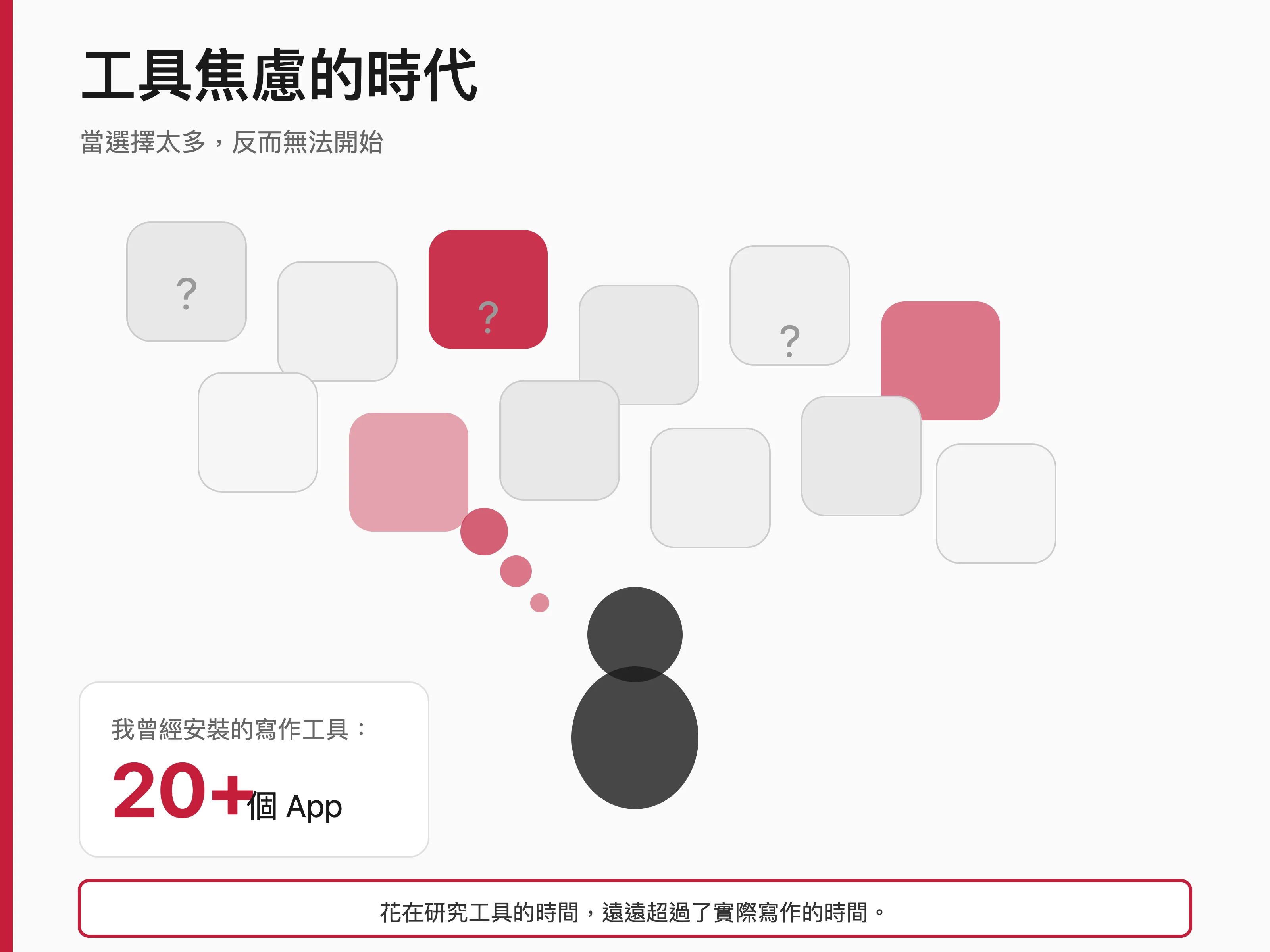
I once counted that during the period when I was most tool-anxious, I had installed more than twenty apps related to note-taking and writing alone. Notion, Obsidian, Bear, iA Writer, Craft, Logseq, Roam Research, Drafts, Day One, Apple Notes, Google Docs, Evernote⋯⋯ are too many to be included.
I have carefully studied every tool. I have written my experience using each tool. Every tool, I thought it was the one I was looking for, like the love of my life.
Then what?
Then I found myself spending far more time researching tools than actually writing. This is obviously a ridiculous phenomenon, but I’m sure I’m not the only one experiencing this.
Tool anxiety - a collective symptom of this era
How did we get here?
Let me rewind the time twenty years ago.
Back then, if you wanted to write, your choices were simple: a pen, a notebook, or a PC plus Microsoft Word. Well, that’s it.
No one will spend time comparing which ball pen has the best writing experience, and no one will debate whether Word or WordPerfect is more suitable for creative writing? A tool is a tool, and it exists to serve your creation, not to become the creation itself.
But it’s different now.
Open the App Store and search for “writing” or “note” and you’ll get thousands of results. Each claims to have unique features, a better experience, or greater organizational capabilities. Each has a passionate community of users sharing how they’ve used the tool to transform their workflows.
Thus, a new kind of anxiety was born - tool anxiety.
We started to worry: Is there a better tool that I haven’t discovered yet? Will switching to another app help me write better, faster, and more organized? Is it that everyone else is using some magical software and I’m the only one using something outdated?
This anxiety keeps us trying new tools, learning new systems, and migrating old materials. As a result, we spend a lot of time preparing to write, but rarely actually sit down and start writing.
Traps of feature stacking
The competition among modern writing tools has largely become a competition over feature stacking.
Does this tool have a two-way link? You need that tool too. Which tool supports Mermaid charts? This tool must also be supported. So, every time a competitor launches a new feature? The tools we use will also be revised soon.
The result is that each tool becomes increasingly complex, with interfaces filled with buttons, menus, and sidebars. Open any note-taking software at will, and you may need to spend half an hour studying its various functions before you can start writing the first word.
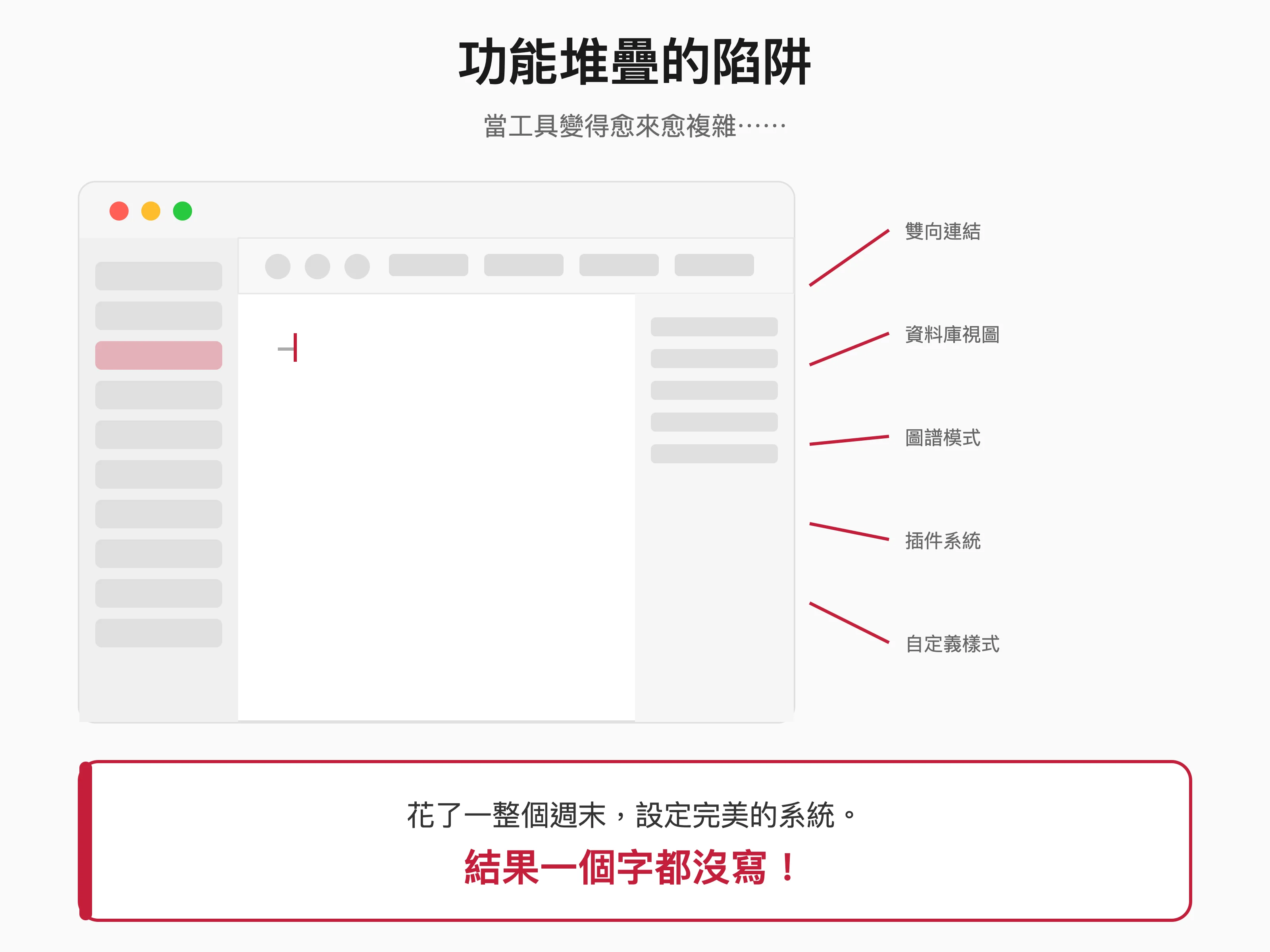
I remember one time I spent an entire weekend studying Notion’s database functionality. I built beautiful templates, designed complex relationships, and configured various views. When I finally set it up and looked at this perfect writing system with satisfaction, I suddenly realized that I barely wrote a word that weekend.
At that moment, I started to wonder: is this really what I need?
Productivity Porn: Our Obsession with Tools
There is a term called “Productivity Porn” (Productivity Porn), which refers to people’s excessive obsession with productivity tools, methodologies or systems.
When we see others sharing their Notion templates, we think “Wow, that’s awesome.” When we see a knowledge-based influencer displaying their Obsidian knowledge base, we immediately think that I want to build such a system. When we read about a writer sharing his writing tools, it’s natural to think that it’s no wonder he writes so well.
But here’s the hard truth: No one tool will make you a better writer.
Hemingway wrote “The Snows of Kilimanjaro” on a typewriter, J.K. Rowling conceived “Harry Potter” on a napkin in a coffee shop, and Haruki Murakami still insists on writing the first draft with pen and paper.
None of these great works were born out of choosing the right tools.
They were born because the writer was willing to sit down, face the blank page and the loneliness in his heart, and write out what he wanted to say word by word.
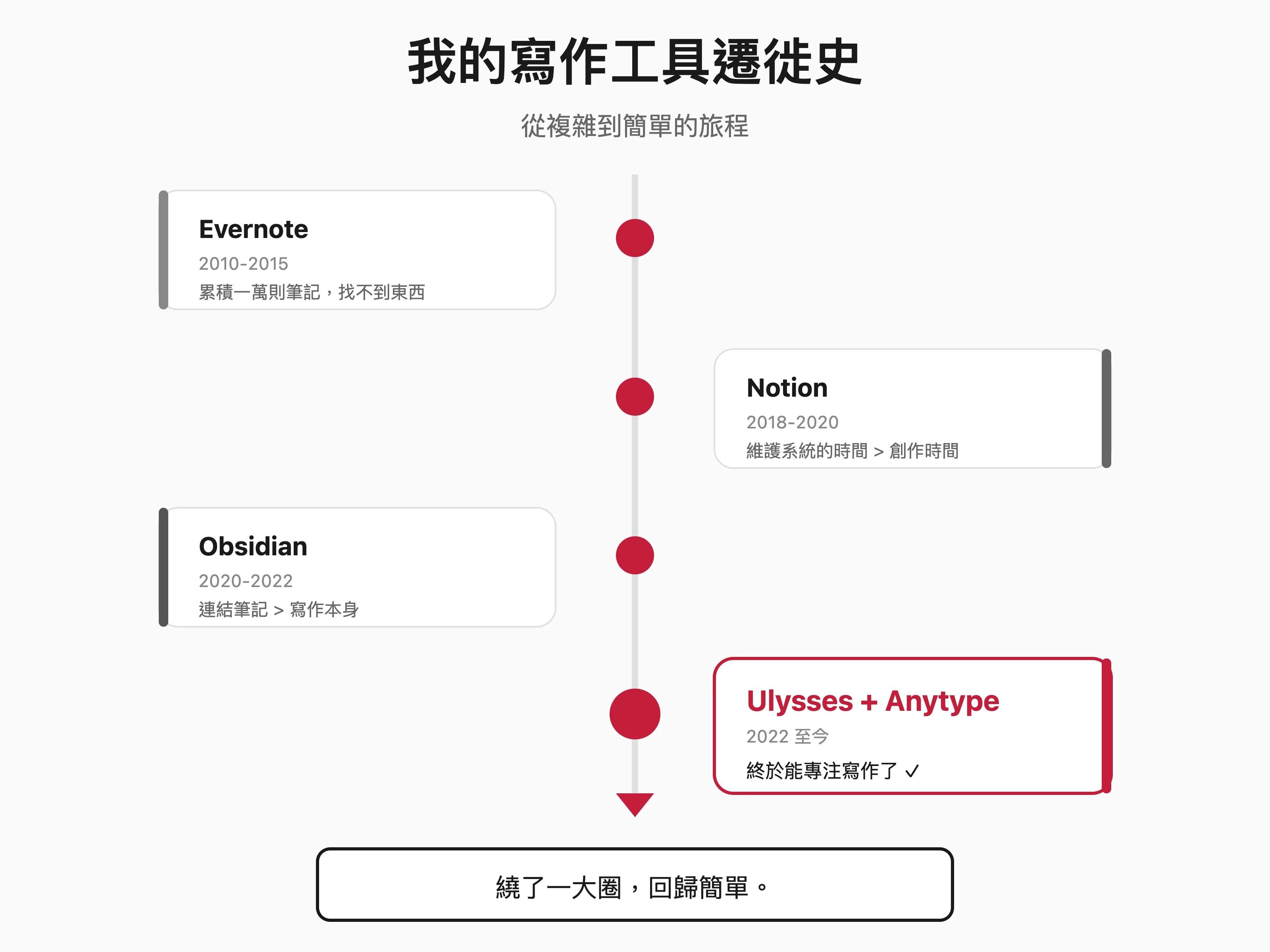
My Tool Trek - A Journey from Complexity to Simplicity
Once upon a time, I was also a tool collector.
By saying this, I am not criticizing powerful tools, nor am I trying to deny the value of tools. Because I myself was once the most avid collector of tools.
As a former media reporter and technology enthusiast, and my job requires me to frequently review various software, I have tried almost all the mainstream writing and note-taking tools on the market. Not only did I try them, I used them religiously - some for months, some even for a year or two.
If you don’t mind, please let me share my writing tool migration history:
Evernote period (2010-2015)
Evernote was the first digital note-taking tool I used seriously. This is an online note-taking product with a cloud concept that you can use on different devices such as PC, Mac, iPhone, Android and iPad.
At that time, its slogan was “Remember Everything”, and this concept deeply attracted me. I throw everything into Evernote: article ideas, reading notes, meeting minutes, web clippings, and even use it to scan and store business cards…
I love Evernote so much that I participated in their fun party in 2011 and communicated with Evernote’s VP of International Operations, Dmitry Stavisky. The following year, I had the opportunity to host the activities of the Evernote Taiwan community. At that time, I also had close communication with the webmaster of “Computer Playthings” Esor.
Over the past few years, I have accumulated more than 10,000 notes in Evernote.
The problem is, when the number of notes reaches this size, finding things becomes a nightmare. What’s worse is that Evernote’s editor, Sunchun, is really not good enough for me who am serious about writing. In other words, it is suitable for collecting information, but may not be suitable for creating.
Notion period (2018-2020)
When Notion came out, I, like many others, was blown away by its flexibility. You can use it for anything: writing notes, building a database, project management, organizing a wiki or setting up a website… In my opinion, it is like the Lego bricks of the digital world.
So, I spent a lot of time building my “second brain.” I designed beautiful homepages, complex database connections, and automated templates. My Notion workspace looks so professional and makes me feel satisfied every time I open it.
But one day I suddenly discovered that I spent more and more time maintaining the system, but less and less time using the system to create. Notion’s flexibility is its biggest advantage, but for someone like me who is full of curiosity about everything in the world, it is also its biggest disadvantage - I can’t help but want to optimize it.
Roam Research and Obsidian period (2020-2022)
The concept of a two-way connection fascinates me. “Your notes should be connected like your brain.” This idea sounds so wonderful!
I remember clearly that I joined its ranks on July 25, 2020, and spent $500 to become a believer. Initially, I jumped into the arms of Roam Research. Later, I tried Logseq. Next, I started working on my Obsidian knowledge base in earnest. I installed dozens of plug-ins, learned various Markdown syntaxes, and even studied Zettelkasten’s methodology. My graph view looks like a beautiful galaxy, densely packed with nodes and links.
But when I actually need to write an article, I find that I spend too much time linking notes instead of writing. I keep thinking: Where should this concept connect? Should this paragraph be broken down into atomic notes? Should this labeling system be redesigned?
Therefore, writing became a burden.
The turning point: When I started asking “What do I really need?”
The change will happen one day in 2022.
I had to write a column that day, and the deadline was the next day. I open Obsidian and get ready to start writing.
I then spent twenty minutes adjusting the layout of my workspace. I spent another ten minutes thinking about which folder this article should be placed in? Next, spend another fifteen minutes thinking about what tags to use.
When I was finally ready to write, an hour had passed and there was only one title in my file. At that moment, I suddenly felt very tired.
It’s not physical fatigue, it’s psychological fatigue. What I’m tired of is the ritual of preparing to write, and what I’m tired of is that this tool puts the cart before the horse before the content.
I closed Obsidian and opened an app I hadn’t used for a long time - Ulysses.
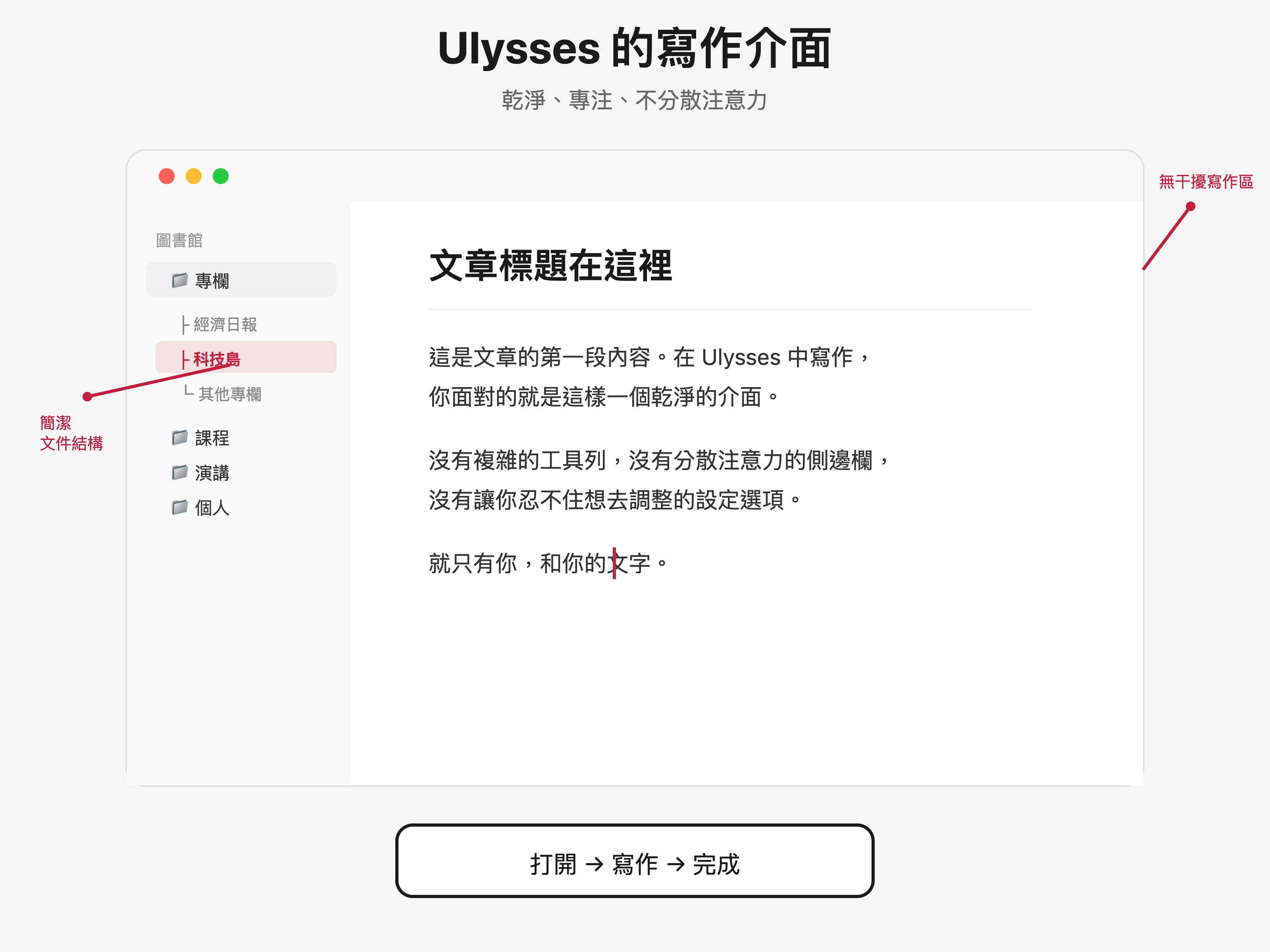
No complicated settings, no fancy features. It is a clean writing interface, with the file structure on the left and the writing area on the right. Then, I started writing.
An hour later, I finished the 3,000-word column. Writing is as natural to me as eating and drinking, but it was the smoothest I have written in a long time.
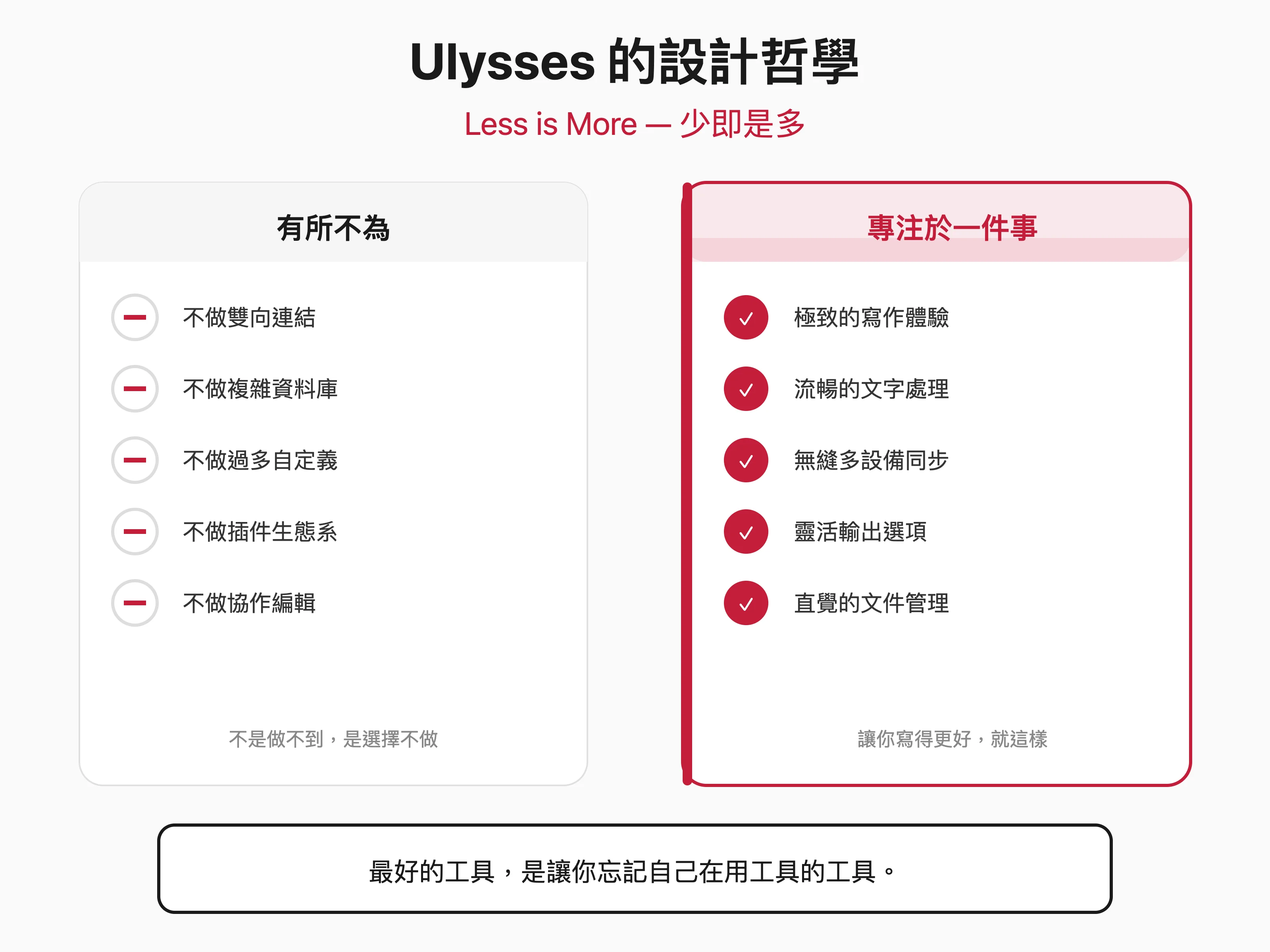
Ulysses’ design philosophy – less is more
Meeting Ulysses for the first time
In fact, I have known about the software Ulysses for a long time.
I tried Ulysses back in 2013 when it was just a niche writing software on Mac. At that time, I couldn’t understand its value. “That’s it?” I remember thinking. “Isn’t this just a Markdown editor? What’s so special about it?”
Then I continued to pursue tools with richer functions and fancier interfaces.
Ten years later, after a long journey, I finally understand - Ulysses is simple not because it can’t do more, but because it chooses not to do more.
This is the embodiment of a design philosophy.
Something to do and something not to do
The development team of Ulysses comes from Germany, and their design philosophy is deeply influenced by the Bauhaus tradition: form follows function, and less is more.
Let’s see what Ulysses doesn’t do:
**Do not make two-way links. **
In the era when Roam Research and Obsidian started the trend of two-way connections, Ulysses has never included this feature. This is not because they technically can’t do it, but because they believe that a two-way connection is not necessary for writing.
What a writer needs is to concentrate on completing an article, rather than being constantly interrupted by the thought of “here can be connected to that” while writing.
Two-way links make sense, but I’d make them on Anytype.
**Do not create complex databases. **
Notion’s library is impressively powerful, but Ulysses offers only the most basic folder and group structure. Because they believe that writers need simple, intuitive ways of organizing rather than complex systems that need to be learned.
**Don’t do too much customization. **
Many tools market themselves as highly customizable, but Ulysses’ customization options are quite limited. You can choose from a few themes, adjust the font size, but that’s about it.
This is not a limitation, but a liberation. When you don’t have many options, you don’t spend time choosing.
Focus on one thing: making you write better
So, what does Ulysses focus on?
**The ultimate writing experience. **
When you write in Ulysses, distractions are minimized. No toolbars, no sidebars (unless you need them), no distracting elements whatsoever. In front of me, there is only you and your words.
This immersive writing experience can be said to be the greatest value of Ulysses.
**Smooth word processing. **
Ulysses uses a glorified Markdown syntax. You can format text using standard Markdown syntax, but Ulysses will render it into a readable style on the fly.
This means that you can enjoy the simplicity of Markdown (without having to take your hands off the keyboard to click the format button), while still seeing a layout effect that is close to the final product.
**Seamless multi-device sync. **
Your writing progress is automatically synced between Mac, iPad, and iPhone via iCloud. This synchronization is truly seamless—you can be halfway through writing on your Mac, pick up your iPhone, and continue without any additional action.
**Flexible output options. **
After writing, you can output the article to almost any format: Markdown, HTML, PDF, Word or ePub…with one click. This is a very useful feature for writers who need to publish content on different platforms.
Why is simplicity more powerful?
The Science of Cognitive Load
Let me explain from a cognitive science perspective why simple tools often help us create better than complex tools.
The human brain has a system called “Working Memory”, which is responsible for processing the tasks we are currently doing. But the capacity of working memory is limited—according to research by psychologist George Armitage Miller, we can only process approximately 7±2 units of information at a time.
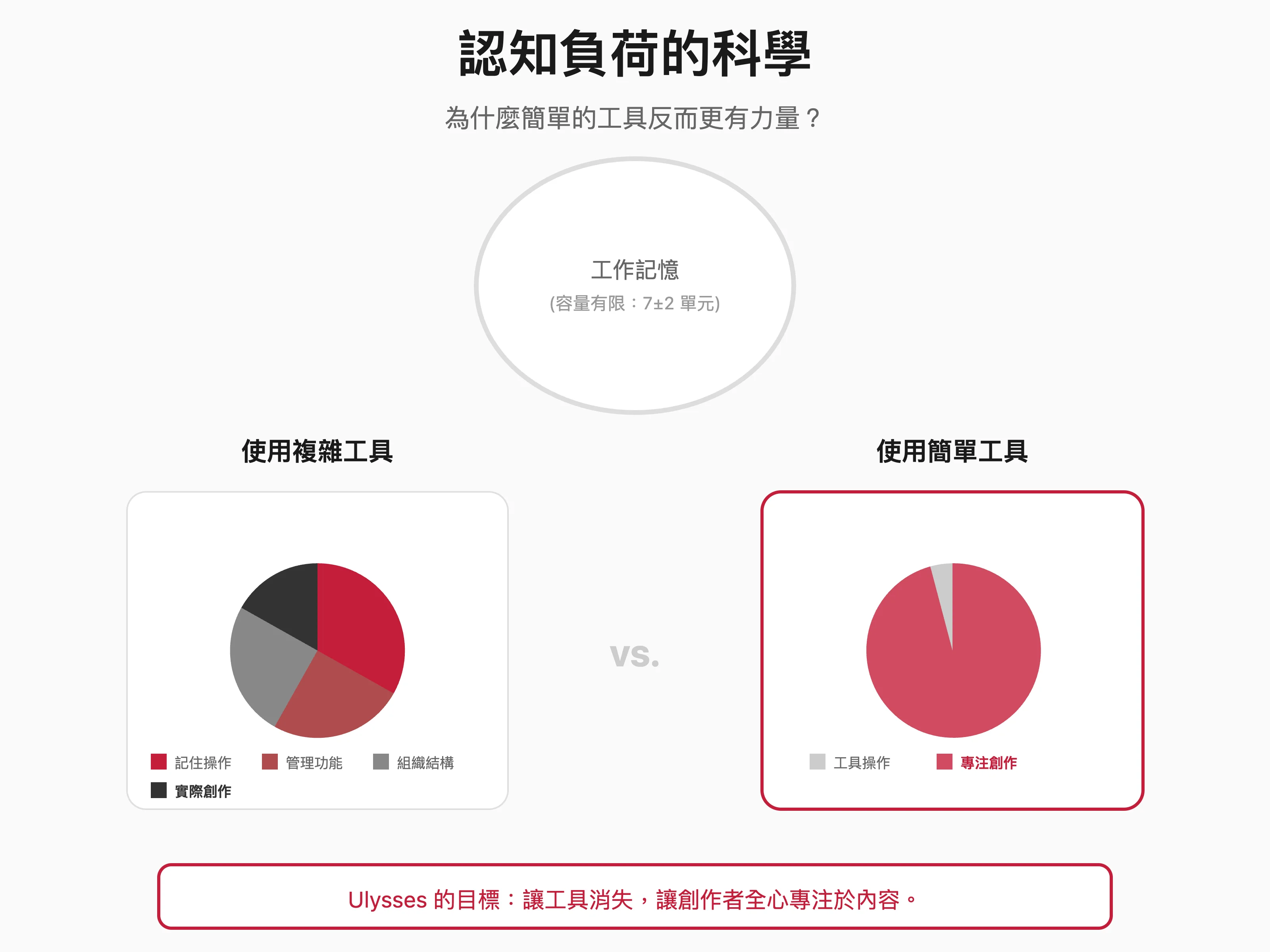
When you use a complex tool, your working memory is divided into several parts:
One part is used to remember how the tool operates, another part is used to manage the various functions of the tool, and another part is used to think about the organizational structure of the content, and the rest is used for actual creation.
This is why when using complex tools, we often feel that our brains are not enough – because there really is not enough. Too many cognitive resources are taken up by the tool itself.
In contrast, when you use a simple tool, your working memory can be used almost entirely to think about what you want to write. The tool recedes into the background, becoming a presence that you barely need to be aware of.
Well, that’s what Ulysses is after: making tools disappear.
The paradox of choice
In his book “The Paradox of Choice,” psychologist Barry Schwartz proposed a counter-intuitive idea: More choices will not make us happier, but will make us more anxious.
When we are faced with too many choices, we will: spend more time comparing and making decisions, be less satisfied with the final choice (because we are always thinking “Would the other option be better”), and feel more stress and fatigue.
In my opinion, this principle applies completely to the choice of writing tools.
When you use Notion, you’re faced with endless possibilities: What template to use? Do you want to build a database? How to design the page structure? These choices drain your decision-making energy. I still like Notion very much, but the purpose and usage scenarios are different.
When you use Ulysses, your options are drastically reduced: if you want to write something, just create a new file, if you want to organize, create a group, it’s that simple. Your decision-making energy can be reserved for what really matters - deciding what to write and how to write it.
The importance of friction
Having said that, I would like to make a possibly controversial point: moderate friction is beneficial to creation.
The design philosophy of modern tools is often to eliminate all friction—allowing you to capture any idea, anywhere, any way. This sounds wonderful, but it also brings about a problem: when recording becomes too easy, we record too much and rarely go back to organize and digest it.
The result is what we mentioned earlier: tens of thousands of notes lying there, never being converted into any meaningful output.
The friction of Ulysses is just right. It’s simple enough that it won’t hinder your creative flow, but formal enough that you won’t treat it like a trash can for random things.
When you open Ulysses, you know you are here to write, not just jot down random notes. This setting of psychological expectations is itself a beneficial friction.
How I use Ulysses – a writer’s daily life
My writing workflow
So much theory, let me share how I actually use Ulysses.
As a person who produces words every day, my writing types are diverse: columns, course notes, speech briefs, consultant reports, reading notes and personal diaries…the nature of these contents is different, but I almost complete them all in Ulysses.
My folder structure is very simple:
The top level is classified according to “project type”: columns, courses, speeches, consultants, and individuals. Each type is grouped according to specific projects or time. For example, under “Column” there will be subgroups such as “Economic Daily” and “Technology Island”; under “Course” there will be subgroups such as “A certain university’s autumn 2025” and “Internal training of the company”.
Well, that’s it. No complicated tagging systems, no web of cross-referenced links.
You may ask: wouldn’t it be difficult to find something?
The answer is: no.
Ulysses’ search functionality is very powerful. As long as I remember the general keywords, I can quickly find the file I want. And because the structure is simple, I usually intuitively know where things are. What’s more, now with the help of AI, it is easy for me to do some information query and task processing through the functions of MCP.
My typical writing process
Step 1: Quick Capture
When I have an idea for writing, I create a new document in Ulysses and write down a title and outline first. This action can be done in seconds on an iPhone.
I don’t particularly spend time thinking, where should this idea go? Or, what template should I use? I just add a new document, type a few words, and it’s done. I don’t even have to save the action of archiving, since iCloud will back it up for me anyway.
Step 2: Brewing and Expansion
This initial idea will sit in my Ulysses for a while. Sometimes it’s days, sometimes it’s weeks. During this period, if I have new ideas or see relevant information, I will add it to this document.
This is not a systematic process, it just adds whatever comes to mind very casually.
Step Three: Focus on Writing
When I decide that I want to turn this idea into a complete article, I will find some uninterrupted time, turn on Ulysses’ typewriter mode, and start writing focused.
Ulysses’ typewriter mode keeps the line currently being edited in the center of the screen, so your eyes don’t have to move up and down constantly. It’s a small detail, but it really reduces fatigue a lot when writing for long periods of time.
Step 4: Output and Publish
After writing, I will output the article into different formats according to different publishing needs.
Want to publish to a website? Output to HTML or Markdown. Submit it to an editor? Export to Word. Want to save it yourself? Export to PDF.
This output process only takes a few seconds, and the output quality of Ulysses is very good and the format is very clean.
Some practical functions you may not know
Although Ulysses is known for its simplicity, it actually has many thoughtful little features, but they are not placed in conspicuous places to distract you. Let me share a few that I find particularly useful:
Writing Goals
You can set a word count goal for each file, and Ulysses will display a small circle next to the file to let you know your progress. When you reach your goal, the circle will turn green.
This function is very practical for writers who need to produce regularly. For example, I will set a goal of 1,200 words for my Economic Daily column, so I can tell at a glance whether I have completed my task for the day?
Keyword Tag
Even though I said Ulysses is simple to organize, it does have the ability to provide keyword tags. It’s just that it makes this function very low-key and won’t make you feel like you have to tag each file.
I will use keywords to mark the status of the article, such as: draft (draft), review (pending review), published (published). This way I can quickly filter out unfinished articles.
External folder
Ulysses can connect to folders outside of iCloud, allowing you to directly edit the Markdown files in them. This is convenient for people who need to collaborate with other tools.
For example, if some of my articles will eventually be published on my blog, I will directly link the content folder to Ulysses, so that I can write in Ulysses and the files will be saved directly to the website project.
Quick preview and output style
Ulysses can define different output styles. You can design your own PDF templates or use styles shared by others. This allows you to output the same document with different appearances to suit different occasions.
I have a PDF style specifically for client proposals, with fonts, spacing, and headers all set. Every time you want to output a proposal, you can get professional layout effects with just one click.
Ulysses compared to other tools – my personal experience
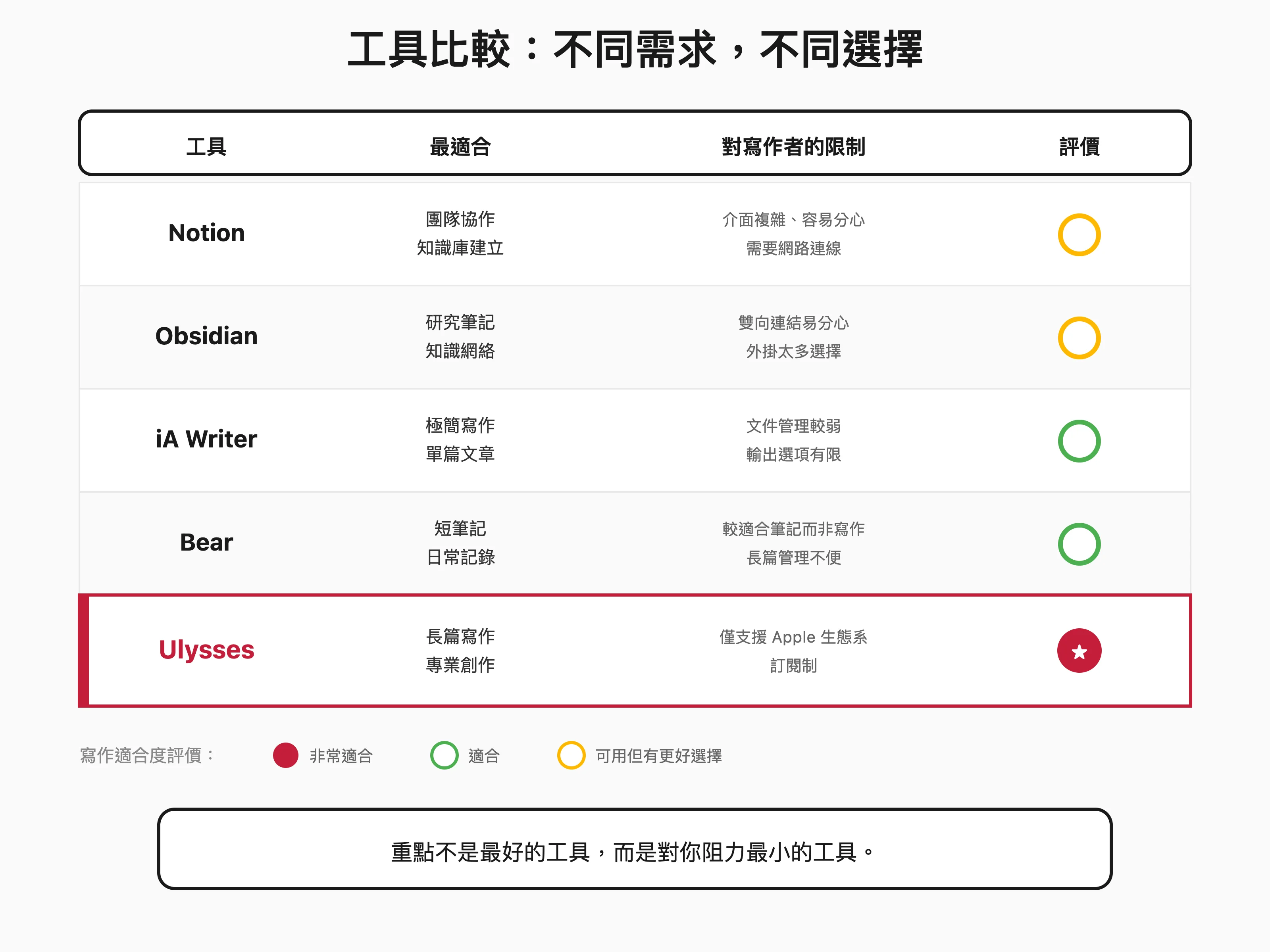
It’s not about who is good or who is bad, but whether they are suitable or not
Before I continue, I want to make one thing clear: I have no intention of criticizing any other tool.
Notion, Obsidian, Bear, iA Writer… these are all excellent software, each with its own advantages and applicable scenarios. I still use some of them myself – just for different purposes.
What I want to share is: why I ended up choosing Ulysses for writing.
Comparison with Notion
Notion Advantages:
Notion’s flexibility is unparalleled. It can be a note-taking software, a project management tool, a database, or a Wiki… If you need a tool that can do everything, Notion may be the best choice.
Its collaboration features are also powerful and suitable for team use.
But for personal writing:
Notion is too bulky.
Open Notion, and you will see various library, board, or calendar views… These things are all distractions for people who want to concentrate on writing an article.
Notion’s editor is block-based, which is convenient when taking notes and organizing information, but it feels less smooth when writing long-form articles. You will automatically start formatting instead of writing.
In addition, Notion requires an Internet connection to use smoothly, which is a problem for me who often writes in coffee shops, buses, or airplanes.
How I use it now:
I use Notion as a project management and knowledge base tool, but I don’t write in it. What I need to write, I will do it in Ulysses or Anytype, and then copy it to Notion.
Comparison with Obsidian
Obsidian Advantages:
Two-way links and graph views are the biggest features of Obsidian. This is a very powerful feature for anyone who needs to build a knowledge network.
Obsidian uses pure Markdown files and is not tied to any proprietary formats, which gives many people peace of mind. Its plug-in ecosystem is also very rich. Almost any function you want can be achieved with plug-ins.
But for focused writing:
Obsidian’s two-way link function is a distraction to me.
When I’m writing an article, I don’t have to keep thinking about where does this link go? All I need is to focus on the logic and expression of the current article.
In my opinion, Obsidian’s plug-in ecosystem is a double-edged sword - you can constantly install new plug-ins to optimize your workflow, but it also means you can constantly spend time on it instead of writing.
In addition, Obsidian’s mobile experience is not as good as the desktop version, which may also be a potential disadvantage for people who need to write in mobile settings.
How I use it now:
I use Obsidian as a repository for study notes and research materials. I will put content that needs to be connected to each other to form a knowledge network in Obsidian. But when I want to write an article, I will sort out the relevant information and complete the writing in Ulysses.
Comparison with iA Writer
iA Writer Advantages:
The design philosophies of iA Writer and Ulysses are very similar, both pursuing simplicity and focus.
The interface of iA Writer may be simpler than Ulysses. Its famous focus mode will fade all text except the current sentence to help you focus on the sentence you are writing.
It is a one-time purchase of software with no subscription fees, which is a plus for some.
In comparison, the advantages of Ulysses are:
Ulysses’ file management capabilities are even more powerful. In iA Writer, you are managing files; in Ulysses, you are managing a library. Ulysses is a better experience when you have a lot of writing content to organize.
Ulysses’ output options are even richer. You can output to various formats and customize the output style. iA Writer is relatively basic in this regard.
In addition, the integration of Ulysses and MCP allows it to work seamlessly with Claude, which may not be possible with iA Writer currently.
My choice:
If you just need a pure writing environment, iA Writer is a good choice. But if you’re like me and need to manage a lot of writing content and need flexible output options, Ulysses may be a better fit.
Comparison with Bear
Bear Advantages:
Bear has a very beautiful design and is one of the most beautiful note-taking software I have ever used. Its tag system is flexible, and the way you organize your notes using nested tags is intuitive.
Also, the price seems to be cheaper than Ulysses.
In comparison:
Bear is more like a diary or note-taking software, while Ulysses is more like a writing software.
This distinction is subtle, but important to anyone who writes seriously. Bear is suitable for writing short notes, inspiration records or daily miscellaneous notes; on the other hand, Ulysses feels more suitable for writing long articles, book manuscripts and series of columns.
In addition, Ulysses’ file management functions (groups, subgroups, filters) are more suitable for managing large writing projects than Bear’s tag system.
我的建议:
If your writing is mostly journaling, note-taking, or daily journaling, Bear is a great choice. If you need to write long-form or manage multiple writing projects, Ulysses may be a better fit.
Advice for different types of writers
Is Ulysses suitable for you?
After the previous analysis, I think you should have a clearer understanding of Ulysses. But everyone’s needs are different, and Ulysses may not be suitable for everyone.
Let me give you some advice based on different types of writers:
If you are a blogger or columnist:
Ulysses is perfect for you.
You need to regularly produce articles, manage a large number of drafts, and output them into different formats… These are the strengths of Ulysses.
Recommended workflow: Establish a group for each column or blog, mark the article status (draft, published) with keywords, and make good use of the output function to directly generate a format suitable for publication.
If you are an academic researcher:
Ulysses can be part of your toolbox, but it may not be the only tool.
For the paper writing itself, Ulysses’ dedicated environment was helpful. But for reference management and citations, you may also want to go with a tool like Zotero or EndNote.
Suggested workflow: Complete the draft of the paper in Ulysses, switch to a reference management tool when you need to insert a citation, and finally move the manuscript to Word or LaTeX to complete the final formatting adjustment.
If you are a fiction writer:
Ulysses is a favorite tool for many fiction writers.
Its group and subgroup structure is great for organizing chapters and scenes. You can create a file for each chapter and then use groups to organize their order.
Ulysses also has a merge output function that can merge multiple files into one output, which is very convenient when exporting the entire book to ePub or PDF.
Recommended workflow: Use groups to manage chapters, use subgroups to manage scenes, and make good use of the note function to record character settings and plot outlines.
If you are a team player:
Ulysses is primarily a personal tool, and collaboration features are not its strong suit.
If you need to edit the same document with a team of people, Notion or Google Docs may be better suited.
But if you’re the person responsible for writing on a team, you can use Ulysses to complete the writing and then share the finished product with your team members.
If you primarily use Windows or Android:
Unfortunately, Ulysses only supports the Apple ecosystem (Mac, iPad, iPhone). If you’re not in this ecosystem, you may want to consider other options like iA Writer (cross-platform) or Obsidian (cross-platform).
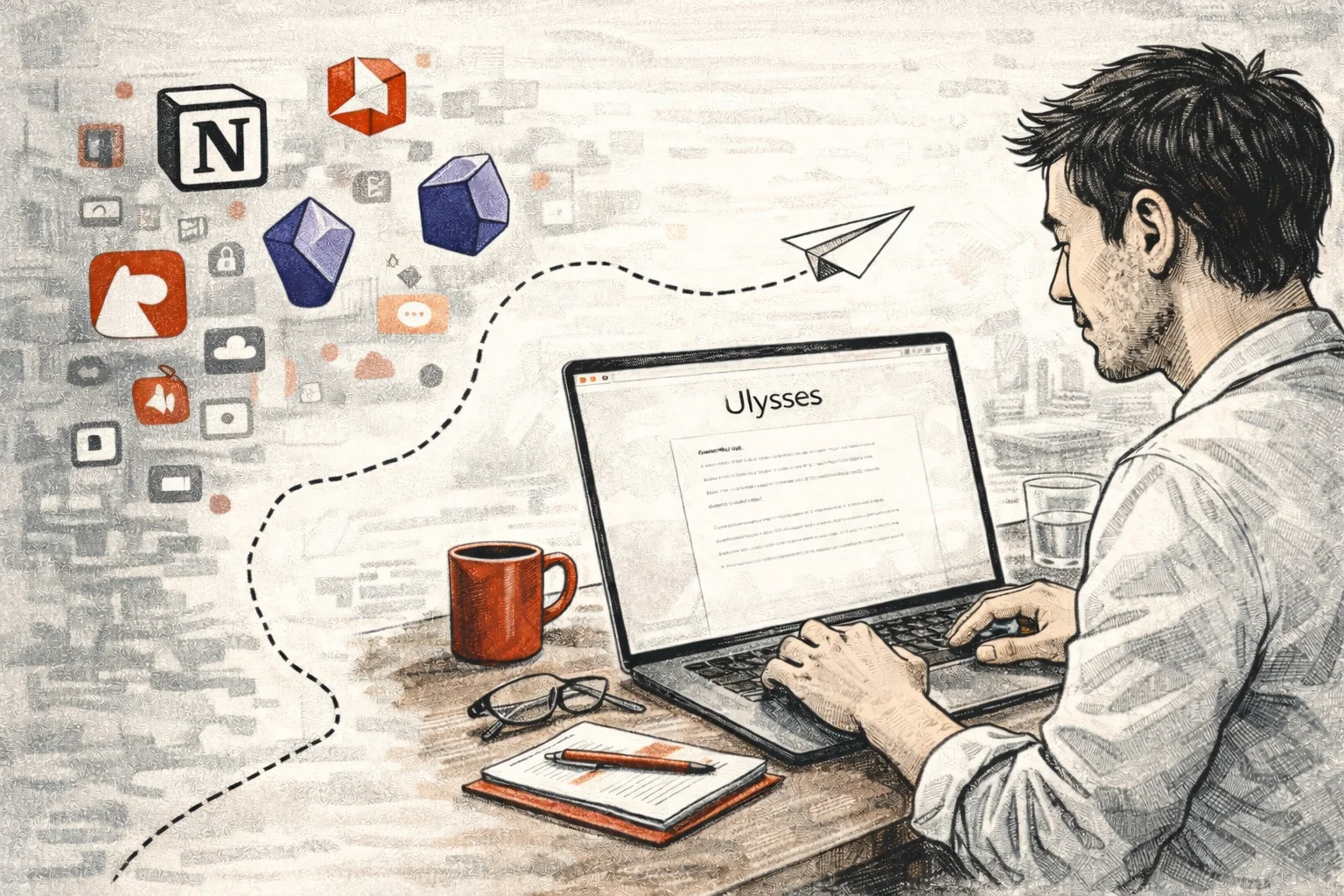
Migrate to Ulysses from other tools
If you decide to try Ulysses but have accumulated a lot of content in other tools, you may be worried about migration.
The good news is that Ulysses supports importing files in a variety of formats, including Markdown, text files, and even Word files. You can export content from other tools to these formats and then import it into Ulysses.
Some specific suggestions:
Migrate from Evernote: Use Evernote’s export feature to export your notes to HTML or plain text, then import them into Ulysses. Note that Evernote’s formatting may need some cleaning up.
Migrate from Notion: Notion can export pages to Markdown. However, Notion’s database structure will become very messy in Markdown. It is recommended to migrate only pages with pure text content.
Migrating from Obsidian: Since Obsidian itself uses pure Markdown archives, this is the easiest migration. You can directly add Obsidian’s folder to Ulysses’ external folder, or copy the files to Ulysses’ library.
Migrate from Bear: Bear can be exported to Markdown format and imported directly into Ulysses.
However, I would like to give a suggestion: it is not necessary to migrate everything.
This might be a good opportunity to refresh. You can take this opportunity to review which content you really need and which content you can let go.
Many of the things we collect in note-taking software have never been reviewed and will not be reviewed in the future. Rather than moving all this digital clutter to a new home, it’s better to leave it where it is and start from scratch.
Return to the essence of writing - thinking beyond tools
Tools are just vehicles
As I write this, I want to temporarily break out of the tool comparison framework and talk about something more essential.
In the past few years, I have realized one thing more and more deeply: tools are just vehicles, and content is the destination.
It’s like saying that a taxi driver wouldn’t spend all day researching which car has the most comfortable seats and which car has the best speakers? However, he will choose a car that is safe, reliable and affordable, and then focus on getting his passengers to their destination.
Likewise, a writer doesn’t need to spend too much energy on tools. Choose a tool that works well enough and focus on writing.
That’s not to say tools aren’t important – good tools do make work go more smoothly. But the importance of tools is often overestimated.
I’ve seen too many people spend a lot of time building the perfect writing system, only to end up not writing a single article. Of course, I have also seen many people who can steadily produce high-quality content using the simplest tools (even just Apple Notes).
What’s the difference?
The difference is whether they actually sat down and wrote it.
Path of least resistance
Why did I end up choosing Ulysses?
Because it’s the path of least resistance I’ve found so far.
When I open Ulysses, there is minimal friction between having an idea and starting to write. I don’t need to think too much, I don’t need to make too many settings, I don’t need to make too many decisions. I just open the app, find the file I want to write to (or create a new one), and start typing.
This feeling of least resistance is, honestly, very personal. The path of least resistance for you might be Notion, it might be Obsidian, it might be more likely a pen and a notebook.
The point is not to find the best tool, but to find the tool that gives you the least resistance.
Once you find it, don’t change it.
The real challenge of writing
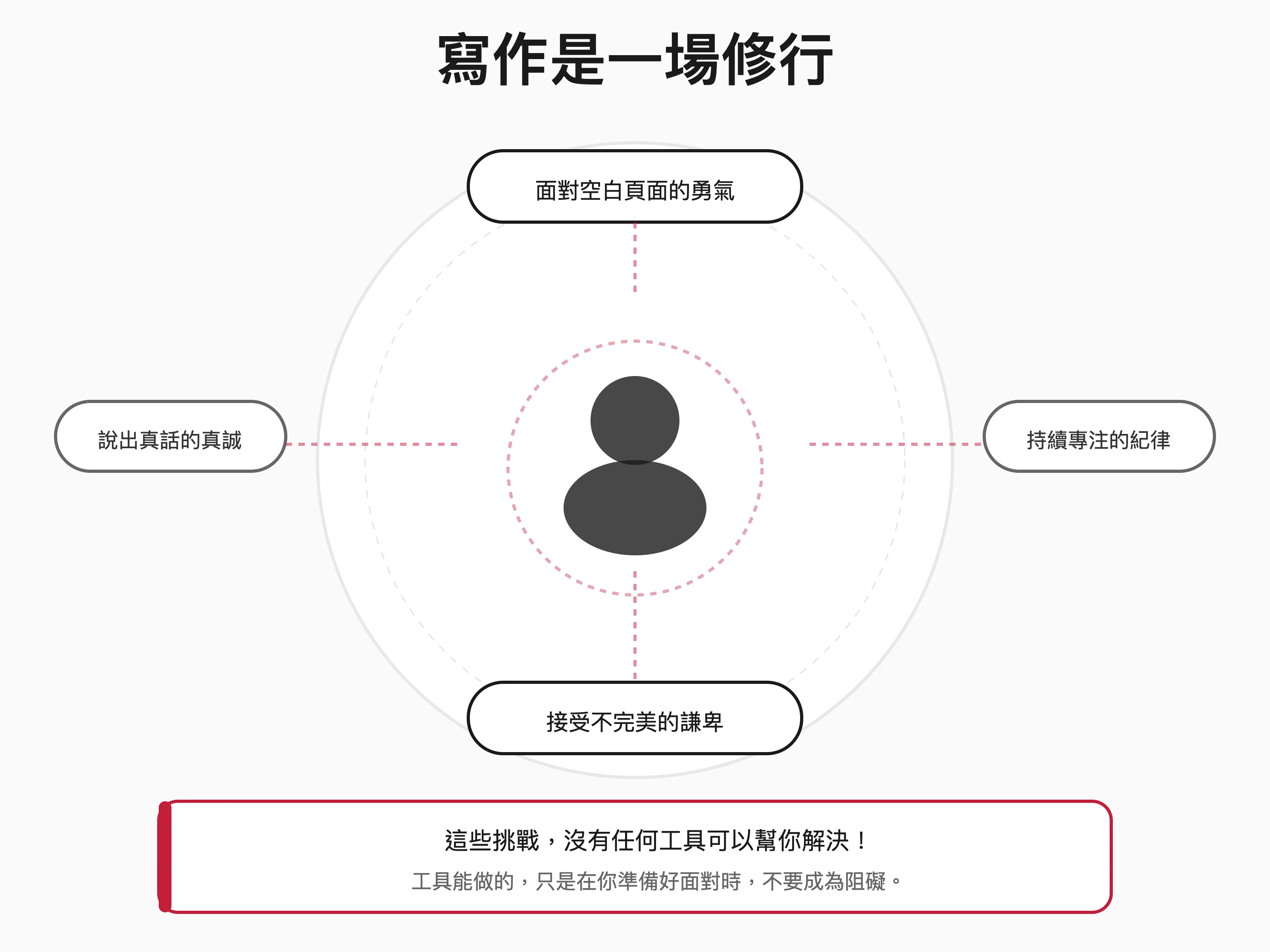
Next, let me tell you something that may make some people uncomfortable: the real challenge of writing has never been the tools.
The real challenge of writing is: **The courage to face the blank page. ** When you open a blank file and the cursor flashes there, you know that the next hundreds, thousands, or even tens of thousands of words will be squeezed out of your head. This takes courage.
**Constant discipline of sitting in a chair. **Writing is an activity that requires long periods of concentration. In this age of distractions, it takes discipline to be able to sit still in your chair without looking at your phone, checking social media, or doing other more interesting things.
**Have the humility to accept that you don’t write well. ** First drafts are usually terrible. Being able to accept this fact and not give up because the writing is not good, but continue to revise and improve, requires humility.
**Be sincere in saying what you want to say. ** In this era of information explosion, sincerity is required to say something truly valuable and to say what you really want to say, rather than catering to readers or chasing traffic.
No tool can help you solve these challenges.
All tools can do is not hinder you when you are ready to face these challenges.
And this is what Ulysses does best.
Establish a writing ritual
Since tools are not the most important, what is important?
I think establishing a stable writing ritual is more important than choosing a tool.
The so-called writing ritual refers to a set of fixed processes to help you get into a writing state.
My writing ritual is this:
**Fixed time. ** I try to write between 6 and 10 am every morning. This is when I feel at my best and have the least distractions.
**Fixed location. ** I have a desk just for writing, with just my MacBook and a cup of coffee. No phones, no other screens, nothing to distract you.
**Fixed process. ** Every morning, I buy a cup of coffee, sit down at my desk, open Ulysses, and start writing. Not checking email, not reading the news, not doing anything else.
**Fixed target. ** I set a small goal for each writing session, usually 2,500 to 10,000 words. This goal doesn’t stress me out but keeps me motivated.
I have been performing this ritual for several years. Now, when I sit down at my desk and open Ulysses, my brain automatically goes into writing mode.
This kind of conditioned reflex takes time to develop. And once cultivated, it will become a powerful creative power.
What role do tools play in this ritual? It’s part of the ritual—when I open Ulysses, my brain knows “it’s writing time.”
But the tools themselves are not the point. The emphasis is on the existence of this ritual, and on performing it day after day.

Ulysses and AI—writing partners in the new era
When tradition meets technology
Speaking of this, some readers may ask: Didn’t you talk about the integration of Ulysses with Claude and MCP in your previous article? Doesn’t that contradict the return to simplicity emphasized in this article?
Well, that’s a great question, let me explain what I think.
The simplicity I emphasize refers to the simplicity of the writing interface and workflow. When you are writing, you should be working in a clean, non-distracting environment.
But that doesn’t mean you can’t make good use of technology to assist other aspects of writing. Just like a carpenter would use hand tools for fine carving, but would also use power tools for rough machining. Different jobs require different tools.
I divide the writing process into several stages:
- Collection stage: Collect materials, research materials, and organize references
- Incubation stage: Thinking structure, developing arguments, organizing content
- Writing Stage: Actual sitting down and writing the words out
- Revision Stage: Proofreading, editing, polishing
- Publishing stage: Output, typesetting, publishing
For me, the writing stage requires the purest, simplest environment. This is the value that Ulysses itself provides.
But at other stages, making good use of AI tools can greatly improve efficiency:
- Claude can help me do research, organize information, and analyze different viewpoints
- Claude can help me check the logic and find loopholes in the discussion
- Claude can help me with preliminary proofreading and editing suggestions
- Claude can help me adjust the content according to the needs of different platforms
The point is: AI is an aid, not a replacement.
The core part—deciding what to write and how to express my thoughts—is still my own. AI only handles relatively mechanical tasks.
By the way, let me advertise, if you are interested in cooperating with AI to develop web programs, you are welcome to sign up for my Vibe Coding practical workshop!
The value of MCP integration
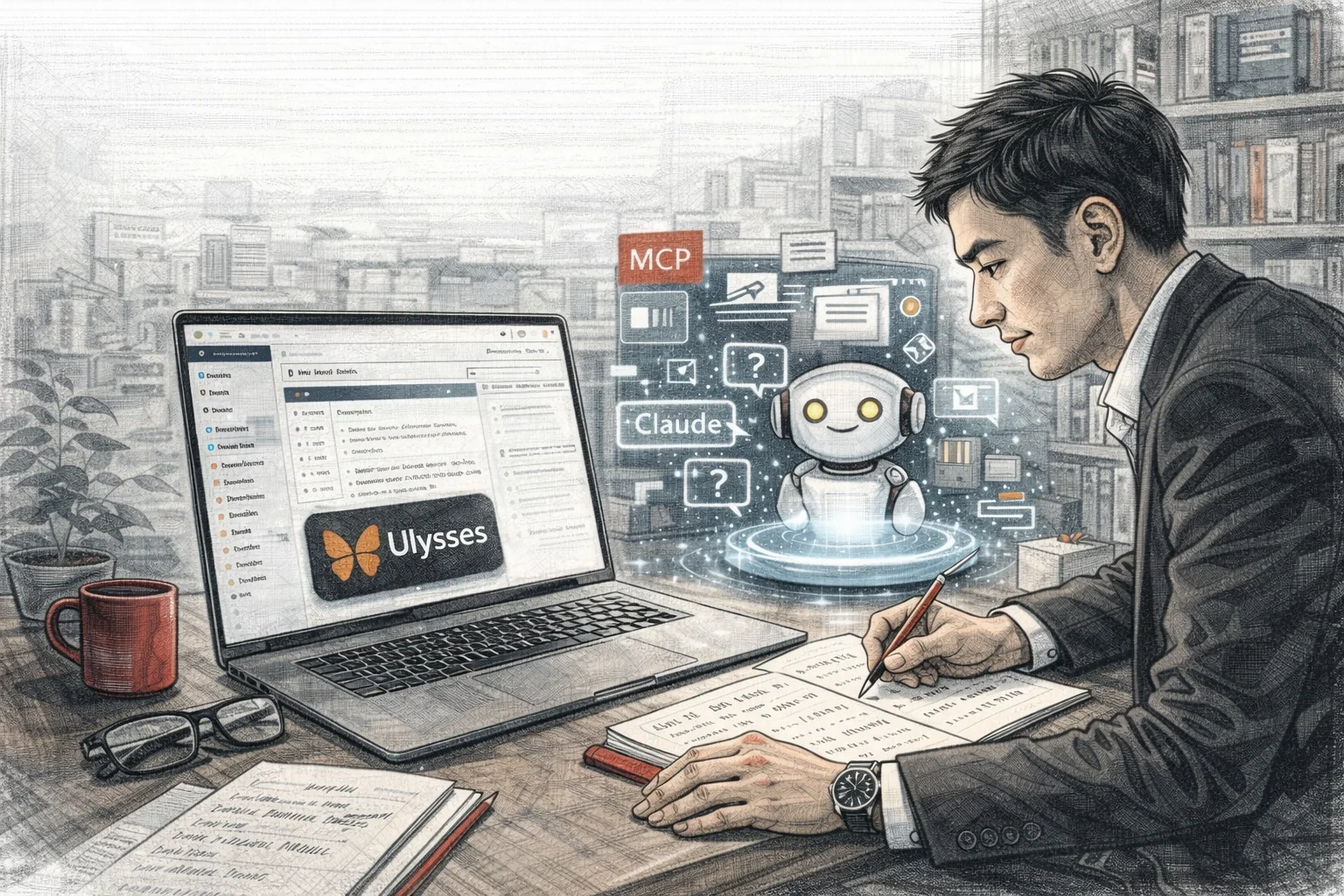
Through MCP (Model Context Protocol), Claude can directly read and operate my content in Ulysses. This brings some very useful features:
Smart Search: I can ask Claude “What articles have I written about personal branding before?” and it will search the entire Ulysses library for me to find relevant content.
Content Analysis: I can ask Claude to analyze the distribution of my writing topics in recent months to help me understand my creative trajectory.
Automated Notes: I can ask Claude to help me create notes in a specific format in Ulysses, such as a daily journal template.
Draft Assistance: When I have an idea but haven’t had time to develop it yet, I can tell Claude the keywords and let him help me create a preliminary outline and save it in Ulysses for my subsequent processing.
These features don’t change the simplicity of Ulysses itself. When I open Ulysses to write, I see the same clean interface.
The AI intervenes in the background, appearing when I need it.
This is what I call “tradition meets technology” - retaining the advantages of traditional tools (simplicity, focus), while making good use of technology to enhance efficiency.
The correct mentality for human-machine collaboration
Finally, I want to talk about the mindset of using AI-assisted writing.
I see that many people have two extreme attitudes towards AI writing tools: one is complete rejection and believes that using AI is cheating and dishonest. The other is complete dependence, leaving everything to AI and only doing the final copy and paste.
I don’t think either attitude is right.
AI is a tool, just like a computer, a search engine, or a spell checker. Using these tools doesn’t mean you can’t count, research, or spell.
Similarly, using AI to assist writing does not mean that you cannot write. The key is what do you do with AI?
If you use AI to completely replace your thinking and expression, there is a real problem. What you produce is not your work, but the work of AI.
But if you use AI to assist with research, organize information, and provide preliminary suggestions, but the final judgment and expression are still yours, then this is a legitimate and valuable use of the tool.
Just like how I use Ulysses and Claude: Claude helps me find information, organize outlines, and check logic. But every word, every sentence, every argument is written by me. The final product is my voice, my style and my thinking. This is what I consider to be a healthy human-machine collaboration, do you agree?
Writing is a practice
Return to the starting point
At this point in this article, I have talked about a lot: tool anxiety, Ulysses’ design philosophy, comparison with other tools, and AI-assisted writing⋯⋯
But in the end, I want to bring the focus back to the most fundamental question: Why do we write?
For me, writing is not just a job, not just a skill, but also a kind of practice.
Every time you sit down to write, it’s an opportunity to face yourself.
Face your own thoughts – what do I really believe? What do I want to express?
Face your own abilities – can I make this complex concept clear?
Face your own discipline – can I stay focused without interruption?
Face my fears – dare I write about this potentially controversial idea?
This kind of confrontation is uncomfortable.
This kind of facing requires courage.
This kind of facing also makes people grow.
I believe that everyone who writes seriously will become more understanding of themselves, better able to express themselves, and have greater depth of thinking in the process.
What role do tools play in this practice?
It should be a quiet companion.
Help when you need it and be there quietly when you don’t. Don’t overwhelm it, don’t distract you, don’t make you spend energy on it instead of the writing itself.
That’s why I chose Ulysses.
Not because it’s the most powerful.
Not because it has the prettiest interface.
Not because it is used by the most people.
It’s because it allows me to focus on writing the most.
A message to fellow travelers
If you are also a writer, no matter what tool you use, I want to say a few words to you:
**Stop spending time researching tools. **
Pick one that feels comfortable to you and use it. Spend the time you spend researching tools on researching the topic you want to write about.
**Don’t pursue a perfect system. **
A perfect system does not exist. Even if it exists, it won’t help you write better articles. The only way to write better articles is to write more articles.
**Don’t be afraid of writing poorly. **
All good articles start with a bad first draft. What matters is that you are willing to start, willing to revise, and willing to try again and again.
**Don’t forget why you started writing. **
Is it because you have something to say? Is it because you want to help others? Is it because you want to record your life? Whatever the reason, remember it. That reason will keep you going when you feel tired or lost.

The last and the last
Back to the topic of this article, I want to discuss with you: In an era of tool explosion, why do I choose to return to simplicity?
My answer is: because writing itself is something that requires extreme concentration. In a world full of distractions, the things that allow us to focus are the most valuable things.
What Ulysses gave me was this focused environment.
It’s not fancy, it’s not showy, it’s not trendy. It just sits there quietly, providing a comfortable place for you to sit and write when you need to write.
After trying dozens of tools, I finally figured out:
The best writing tool is one that makes you forget you are using a tool.
Ulysses is such a being.
Conclusion: Write it down together
If you’ve read this far, I want to thank you for taking the time to read this long article.
Writing is a lonely road, but knowing there are people walking the same road as you makes it less lonely. No matter what tool you end up choosing, I hope you keep writing.
Because the world needs more people who are willing to think seriously and express seriously. Our tools will continue to evolve, but the essence of writing will never change - it is one person’s attempt to use words to connect with another person’s soul.
This is something worth practicing throughout our lives.
If you want to learn more about how to use Ulysses to build a smart writing system, please sign up for the online live broadcast between me and teacher Zhang Yongxi:
📅 Date: January 30, 2026 (Friday)
⏰ Time: 20:00 - 22:00
📍 Format: Zoom online live broadcast
💰 Cost: Free for early birds 👉 Registration link: https://www.accupass.com/event/2601130157011656231442
I look forward to exploring new writing possibilities with you.