Claude Code is not just a tool for engineers: five practical uses that amaze knowledge workers
A few days ago, a friend who works as an education and training director in a company came to chat with me.他说最近公司在评估各种 AI 工具,他自己也用了半年多的 ChatGPT,写信、做摘要、翻译文件,确实省了不少时间。
But he then asked me a question: “I heard you mentioned Claude Code, but I checked it out and it seems that it is for people who write programs? I am not an engineer, what does this have to do with me?”
I smiled and told him, “This is probably the biggest misunderstanding you’ll hear this year.”
Then I spent twenty minutes demonstrating several usages on the spot. After he read it, he was silent for about five seconds, and then said something that impressed me deeply: “This is not an AI tool, this is basically a full-time assistant.”
Your imagination of AI may still be limited to dialog boxes
Let me start with an observation.
In the past two years, most people have used AI in this way: open ChatGPT or Claude’s web page, type a command in the dialog box, wait for it to reply with a text, copy it, and paste it where you want to use it. If necessary, revise it back and forth a few more times.
There’s nothing wrong with the process itself, it’s certainly a lot faster than starting from scratch. But if you think about it carefully, you’ll find a limitation: for each conversation, the AI can only process the small piece of information you “feed” it. It can’t see the files in your computer, can’t connect to your note-taking software, can’t help you check the latest information online, and can’t help you write the output directly into your system.
In other words, the traditional AI dialog box is like a very smart assistant who is locked in a room - you have to move the data in and show it to him, and then you move the results out after he is done. The time spent moving back and forth in the middle is actually the culprit that eats away at your efficiency.
Claude Code breaks down this wall. It’s not a dialog box, but an AI agent that can directly operate various tools on your computer. It can read your files, search the Internet, execute commands, and connect your note-taking software and various applications. And all you have to do is tell it what you want in natural language.
A traditional AI dialog box is like a smart assistant locked in a room. Claude Code is a full-time assistant who sits next to you and can directly operate your computer.
Five practical uses for knowledge workers
Next, I want to share five cases that I or my friends are actually using. These usages do not require programming at all, you just need to be able to type.
Usage 1: Produce a market research report in 30 minutes
If you are a consultant, marketing executive, or entrepreneur, you must have done market research. What is the traditional approach? Open a bunch of browser tabs, switch back and forth between various reports, news and databases, take notes as you read, and finally spend hours putting together a briefing or document.
Now, I just have to say one thing to Claude Code:
“Help me research the current situation of Taiwan’s small and medium-sized enterprises introducing AI, including market size, main challenges, success cases and future trends. Organize it into a structured report.”
It automatically searches the Internet for the latest information, cross-references multiple sources, filters out unreliable information, and then compiles it into a complete report with titles, data, and source citations. In about thirty minutes, a first draft of a survey that might have taken you a whole day to complete in the past is in front of you.
Of course, this is just a first draft. You still need to use your professional judgment to test it, supplement it, and add your own insights. But the most time-consuming data collection and preliminary sorting has been saved for you. This logic is the same as what I mentioned in my previous article Adopting AI for Small and Medium Enterprises: make good use of ready-made tools to quickly see results, don’t start from scratch yourself.
Usage 2: One theme produces files in three formats at the same time
This is one of my most used functions myself.
As a lecturer who often needs to give lectures in companies, I often face a situation: on the same topic, I need to prepare a blog article, a teaching briefing, and a PDF of handouts for students. The core content of these three formats is the same, but the structure and expression are completely different.
Previously, I had to create three separate documents, each of which had to be retyped. Now, I just need to write the core content first, and then ask Claude Code to help me convert the format. It can directly produce Word files, PowerPoint presentations and PDFs with neat formats and clean layout.
One content, three outputs, done in fifteen minutes.
The principle behind this is Claude Code’s Skills system – you can think of it as a plug-in for AI. Each Skill allows AI to have a specific ability, such as making presentations, producing PDFs, and writing Word files. These Skills can be used in combination, just like stacking different building blocks together, to create the workflow you need.
Usage 3: Turn your note-taking software into a thinking second brain
This usage may be the one that I think has the most long-term value.
I wrote in detail in the article Anytype + Claude: Through the MCP (Model Context Protocol) technology, Claude Code can directly connect to your note-taking software - whether it is Anytype, Notion, Heptabase or Ulysses.
What happens after concatenation? Your note-taking software is no longer just a static data warehouse. You can directly ask AI: “What notes have I written related to my personal brand in the past three months? Help me sort out the common thread and core ideas.” It will scan all your notes, find relevant content, and then give you a comprehensive analysis.
More advanced usage: You can ask it to automatically generate an outline for a new article based on your past notes. Because it already knows what you have written in the past, what your views are, and what issues you are concerned about, the outline it produces will be very close to your thoughts, rather than the general AI-standard output.
This is why I say it is the second brain - not the kind of warehouse where you put things in and never look at them again, but an intelligent system that will help you think, connect, and produce for you.
Note-taking software plus AI is no longer just a warehouse of information, but a partner who can help you think.
Usage 4: Competitive product analysis and industry tracking
If your job requires you to constantly monitor industry trends or what your competitors are doing, you know how time-consuming this can be.
I know a friend who works as a brand consultant. She helps her clients track the latest developments of five to six competing products every week: what press releases they have issued, what new content they have posted on social media, what product updates they have, and whether there are any changes in pricing. She used to have an intern spend a full day a week sorting out the information.
Now, she uses Claude Code paired with the Deep Research feature to accomplish the same task in half an hour. She only needs to give the list of competing products to AI and tell it which aspects to track, and it will automatically collect the latest information from various channels and compile it into a comparative analysis report.
The time saved is used by her to do things that really require human judgment: developing differentiated strategies for customers based on this information. This is the core value of a consultant.
This is completely consistent with the point of view I mentioned in Freelance Survival Guide in the AI Era: AI will not replace consultants, but it will replace consultants who only do data collection and do not do strategic thinking.
Usage 5: Automation of meeting records to action plans
The last usage is something I just started trying recently.
What do you usually do after a meeting? Organize meeting minutes, list action items, assign owners, set deadlines, and write them into a project management tool. It takes another half an hour to an hour to complete this set of procedures.
Now, as long as you have a verbatim transcript of the meeting (many online meeting tools can automatically generate it), you can directly throw it to Claude Code and ask it to help you:
- Organize structured meeting summaries
- Refine key decisions and to-do items
- Classify topics and mark priorities
- Write directly into your note-taking system or project management tool
From a verbatim draft to an executable action plan, it takes five minutes. And because AI is organized based on complete verbatim transcripts, it will not miss any details - something that human handwritten meeting minutes often cannot do.
The most critical question: What should I do if I can’t write programs?
I know what you are thinking.
There is a code in the name Claude Code, which sounds like it is for people who write programs. And you may have seen some tutorials on the Internet, all of which talk about how to use it to write software, debug, and deploy. These contents will make you feel: This thing has nothing to do with me.
But in fact, the way Claude Code operates is by typing. You tell it what you want to do in Chinese, English, or any language you are accustomed to, and it does it. It’s called Claude Code because it executes code to accomplish a task—but that’s what it does behind the scenes, and you don’t need to see or understand that code at all.
For example: you use a smartphone every day, but you never need to understand how the chip inside the phone works. Same goes for Claude Code. Its “Code” is what’s under the hood. You just need to sit in the driver’s seat and tell it your destination.
My friend who is the education and training director cannot program at all. But now he uses Claude Code every day to organize training materials, analyze student feedback questionnaires, and produce monthly reports. He told me that it only took about an afternoon to learn the basic operations.
The “Code” in Claude Code is what’s under the hood. All you have to do is sit in the driver’s seat and tell it your destination.
A deeper thought: The nature of knowledge work is changing
After talking about the specific usage, I want to talk about it at a higher level.
In the past decade, the core skills of knowledge workers have been considered to be: collecting information, analyzing information, organizing information, and presenting information. But if you look carefully at the first five uses, you will find that the first three of these four things—collection, analysis, and organization—can already be done by AI, and it can do it quickly and stably.
what does that mean?
This means that the value of knowledge workers is rapidly moving upstream. What is truly valuable in the future is not how much data you can collect or how many reports you compile, but whether you can make correct judgments, come up with unique insights, and design effective strategies based on this data.
In other words, AI is not replacing knowledge workers, but forcing us to return to the essence of knowledge work: thinking.
If you are still relying on “I can organize information” or “I can make beautiful presentations” to stay competitive, then you should really be anxious. But if you can hand over those mechanical tasks to AI and use the time saved to do deeper thinking and warmer communication, you will become more valuable because of AI.
This is also the core argument in my article in The Big Word Coining Era: What truly makes knowledge valuable is never the noun that packages it or the format in which it is presented, but the person behind it who has experienced, thought, and judged.
AI is not replacing knowledge workers, but forcing us to return to the essence of knowledge work: thinking.
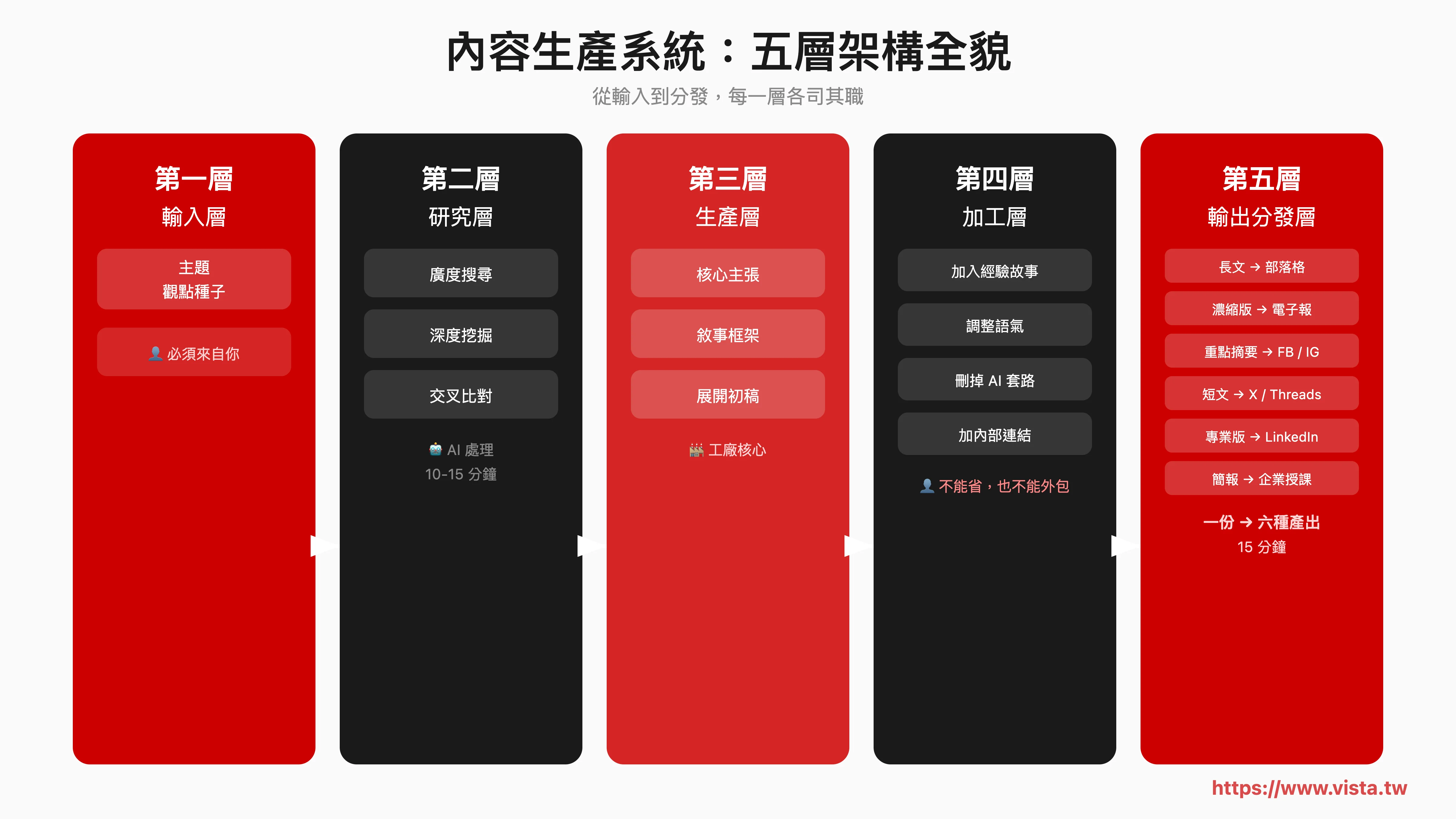
💡 **Are you ready to upgrade from “chatting with AI” to “managing content with AI system”? **
I have opened an AI content production system workshop to take you step by step to build a five-layer architecture from research to release. Whether you are a lecturer, consultant or self-media operator, you can create your own AI content production line in the workshop, and one person can have the production capacity of an entire content team.
👉 Learn about the AI content production system workshop now →
Your next step
If you read this and feel that these usages may be helpful to your work, my advice is: don’t think too much, try it first.
You don’t need to learn all the features at once. Pick the most painful point in your current work - maybe it’s that market research takes too much time, maybe it’s that meeting minutes are always delayed, maybe it’s getting more and more notes but it’s getting harder and harder to find what you need - and then focus on this point and try to see if Claude Code can help you solve it.
Once you experience the feeling of “it can be like this” in a certain link, you will naturally start to wonder: Can other links be optimized in this way?
Tools are always just tools, but people who choose the right tools can often achieve several times more results in the same amount of time.
Don’t wait for the perfect time to start. Pick the spot that hurts the most and try it today.
Extended reading:
- When AI not only helps you write, but also helps you research, format and publish: the content production line I created with Claude Code
- Anytype + Claude: Create an AI-driven second brain to make your notes come alive
- Ulysses + Claude + MCP: Create an AI-driven smart writing system to double productivity
- Five key points for small and medium-sized enterprises to introduce AI: Don’t use AI for the sake of AI, pragmatic application is the way to go
- Profit Awakening of Knowledge Workers: From Cash Flow Thinking to Survival Rules in the Micro-Organization Era