Anytype + Claude: Create an AI-powered second brain to make your notes come alive
I am a writer, lecturer and consultant, and have published twenty books. I likes to write notes. It can be said that I am a professional who is passionate about digital tools and knowledge management.
In recent years, whether in work or life, there is always a pursuit of more efficient and safer productivity systems. Recently, I have become obsessed with a tool called Anytype. It is not only my daily note-taking tool, but also integrates database management and team collaboration functions to make my workflow smoother. What’s even better is that I connected it with AI through MCP Server!
Today, I want to use this article to share how Anytype can become a secret weapon for professionals? If you are troubled by scattered notes, privacy leaks, or team communication, this tool is definitely worth a try.
What is Anytype? Why is it worthy of attention?
Simply put, Anytype is an open source, local-first productivity application, similar to an advanced version of Notion or Evernote, but with more emphasis on data privacy and user sovereignty.
Anytype adopts an object-based design. Each piece of data—whether it is notes, tasks, contacts, or files—is treated as an independent object and can be easily connected and visualized into a graphical network. This means that you no longer need to switch between multiple apps to build a complete knowledge graph.
Data is stored entirely on your device, encrypted end-to-end, and only you hold the key, no central server or third party can snoop. This is especially important in the digital age of 2026, as workplace data often involves confidential information.
Anytype’s core strengths: privacy and offline capabilities
The core advantage of Anytype lies in its powerful privacy and offline capabilities.
Imagine being on a plane or in a remote meeting room, editing notes, updating your database, and even initiating one-on-one chats without an Internet connection. The app supports cross-platform synchronization (iOS, Android or PC App), and uses peer-to-peer technology to quickly share on the local network without delay.
最新版本还加入了直接聊天功能,让你能与同事私讯讨论专案、分享档案或任务清单,而不必担心资料外泄。 This is a game-changer for professionals—especially now that remote work is prevalent.
I really like Notion, Heptabase or Obsidian, but I now prefer the lightness and speed of Anytype.
Feature Highlights: Multifunctional design like a Swiss Army Knife
Anytype is like a Swiss Army Knife when it comes to functionality. Its block-based editor lets you easily combine text, lists, images, videos, tables, and nested pages to create customized dashboards.
The database section is more powerful: you can create tables, Kanban or gallery views to track customer relationships, project progress or resource allocation.举例来说,我用它管理我的内容创作流程——从搜集点子、激荡想法到追踪 deadline,全都一目了然。
In workplace applications, Anytype is particularly suitable for knowledge workers, project managers or creative teams. For example, if you are like me and often deal with cross-department collaboration, its multi-spaces feature allows you to separate personal notes and team workspaces, invite colleagues to join shared spaces, and edit files or chat discussions on the fly.
There is no subscription threshold (free to start), and the open protocol allows you to customize and expand. This is more flexible than traditional tools and avoids the risk of data being hijacked by cloud services. I recently used it to organize a client database, linking meeting notes, tasks and attachments, and the efficiency increased by at least 30%. If you are a freelance worker or a startup team, this app can help you save subscription fees while ensuring data security.
Of course, Anytype is not perfect - the learning curve can be steep, especially when it comes to connecting objects. But once you get started, you’ll fall in love with its elegant interface and sense of autonomy. Compared with other apps, it is more like a private haven, allowing you to focus on creation rather than worrying about privacy.
In conclusion, if you are tired of the limitations of traditional note-taking tools, give Anytype a try. It is not only a digital note-taking software, but also an upgrade solution for workplace productivity.
When Anytype meets Claude: Your knowledge base starts to “come alive”
Next, I want to talk about its connection with AI.
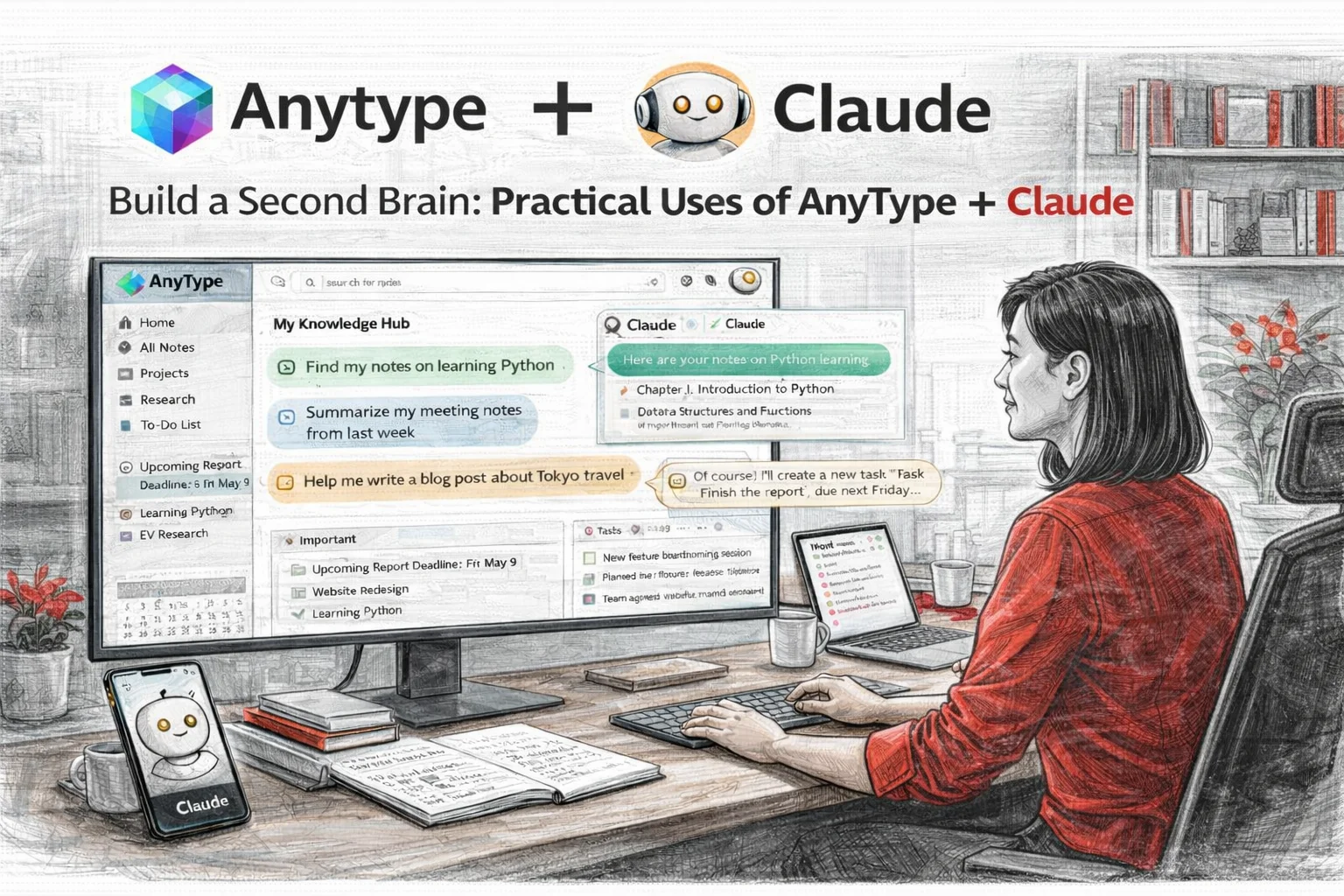
For example, if you pair Anytype with Claude, you can have many interesting applications. Through MCP (Model Context Protocol), you can let Claude directly access your Anytype knowledge base to achieve a true AI-driven personal assistant.
The following are ten practical application scenarios I compiled:
1. Personal knowledge base Q&A
You can think of Anytype as your second brain and let Claude help you query:
- Find the notes I wrote before about Python learning
- What reading experiences did I record last month?
- Search for all items marked “Important”
2. Project Management Assistant
If you manage tasks and projects in Anytype:
- List my current ongoing projects
- Help me create a new task: complete the report, due next Friday
- Update the status of the “Website Design” project to “Completed”
3. Writing and content creation
Combining Claude’s writing skills with his own notes is particularly helpful for content creators:
- Help me write a blog post based on my travel notes in Anytype
- Organize my meeting minutes and produce a summary
- Refer to my research notes to help me develop an outline for my paper
4. Study and review
Use your accumulated learning materials to make AI become your reading partner:
- Help me create a 10-question test based on my English study notes
- Organize the programming skills I collected and make a cheat sheet
- Find everything I marked “To be reviewed”
5. Diary and reflection
If you have the habit of keeping a diary:
- Analyzing my diary for this month, are there any emotional or thematic trends?
- Find all my journal entries where I mention “gratitude”
For example, Claude can analyze the closing sentences in your diary to discover your self-talk style and growth mindset:
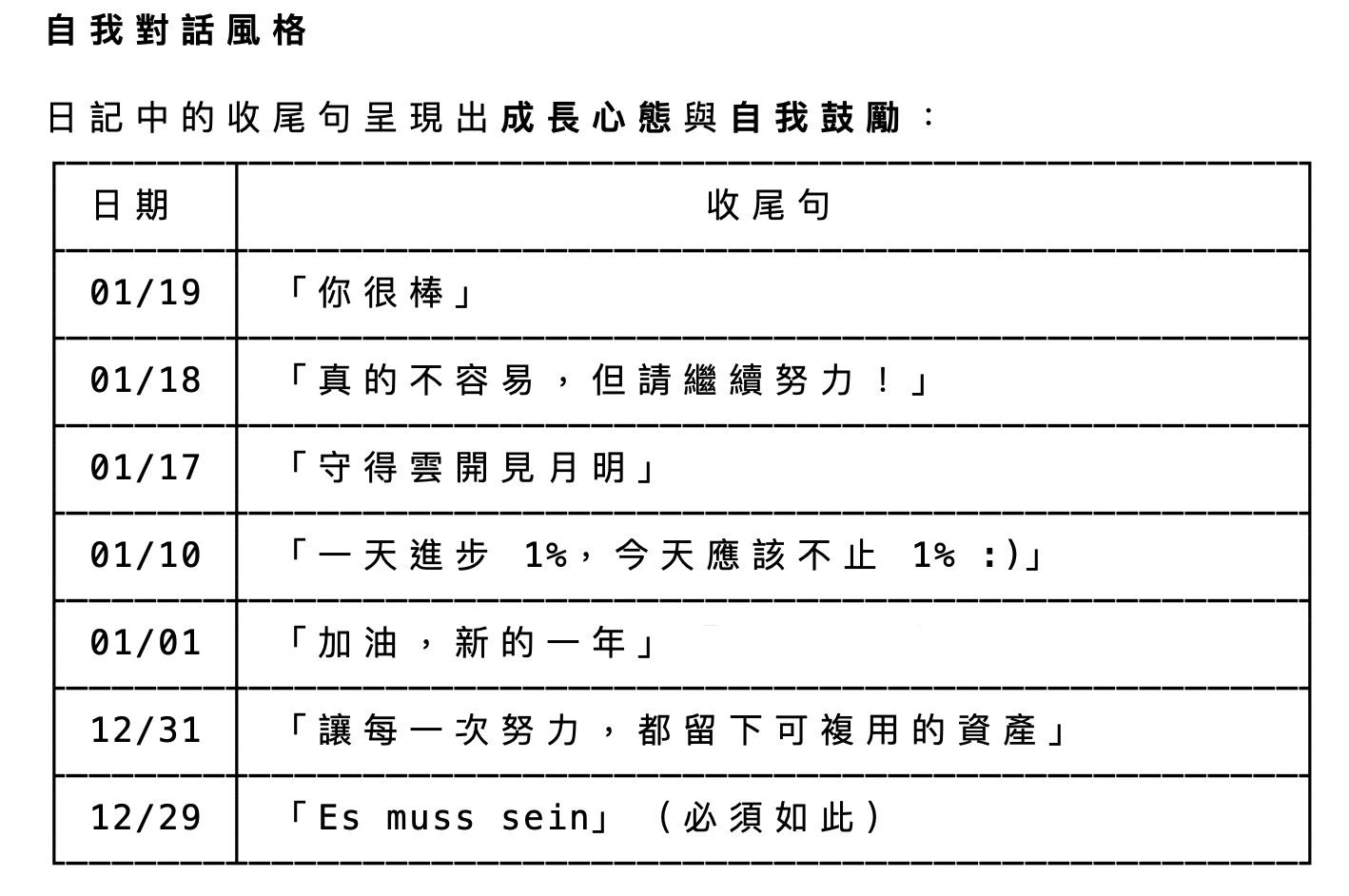 *▲ Claude analyzes the closing sentence of the diary, showing the model of growth mindset and self-encouragement. *
6. Cross-note link analysis
Leverage the power of knowledge graphs:
- Which notes mention both AI and productivity?
- List everything related to your startup idea
7. Meeting preparation and follow-up
Let AI be your right-hand man before and after important meetings:
- Organize the minutes of the past three meetings between me and client A and list the items to be processed
- Help me prepare the key points of tomorrow’s briefing based on my project notes
- Convert today’s meeting discussion into an action list and save it to my task library
8. Inspiration capture and content creation
When you run out of ideas, let AI look through your knowledge base to spark new ideas:
- Find topics that can be written into articles from my reading notes in the past six months
- Among the famous quotes I have collected, which ones are suitable to be used to open a speech?
- Combined with my industry observation notes, help me come up with three podcast topics
In actual operation, Claude can analyze your notes and sort out topics that can be written into articles:
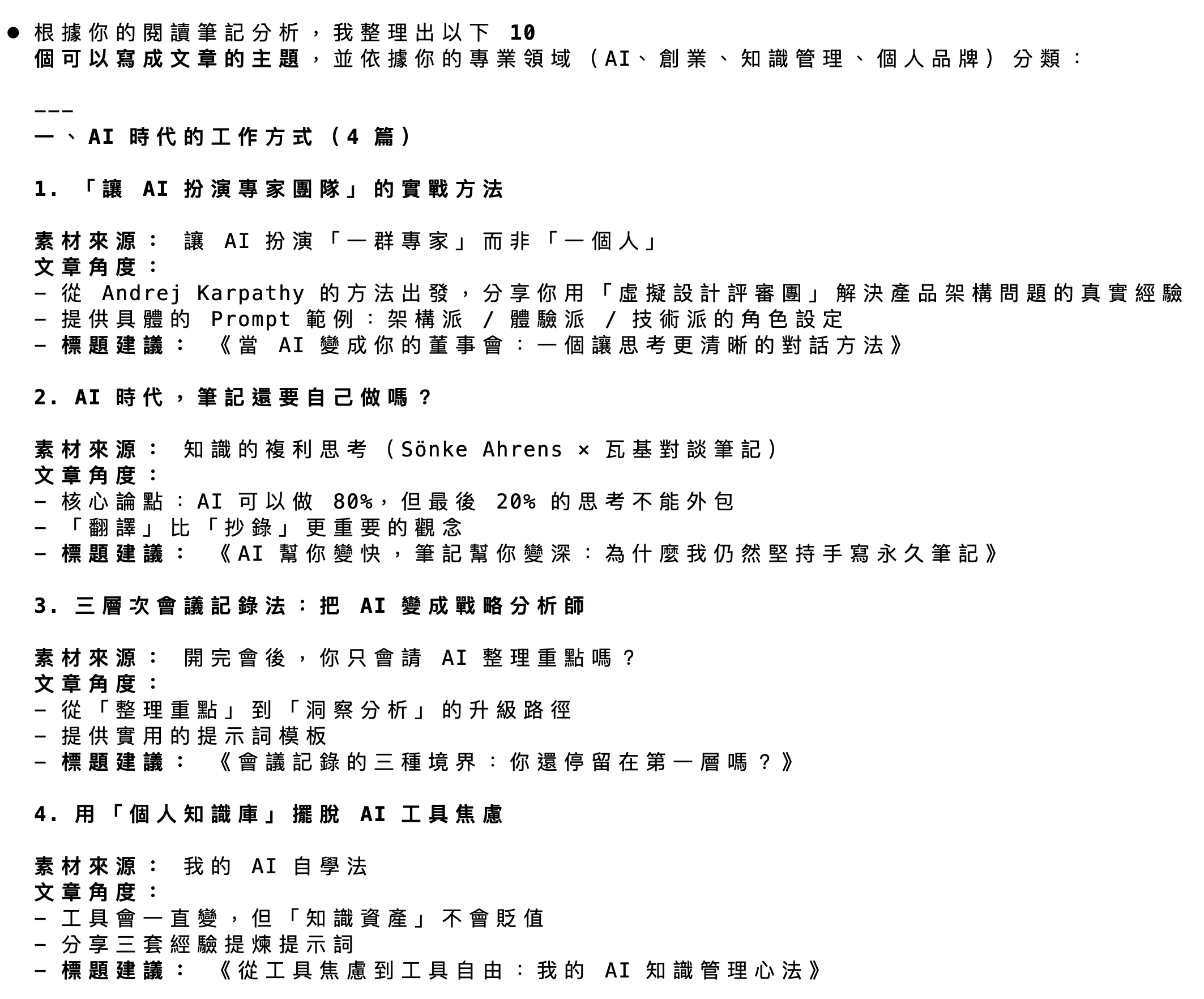 *▲ Claude compiled 10 topics that can be written into articles based on analysis of reading notes. *
Even better, it can help you prioritize your writing:
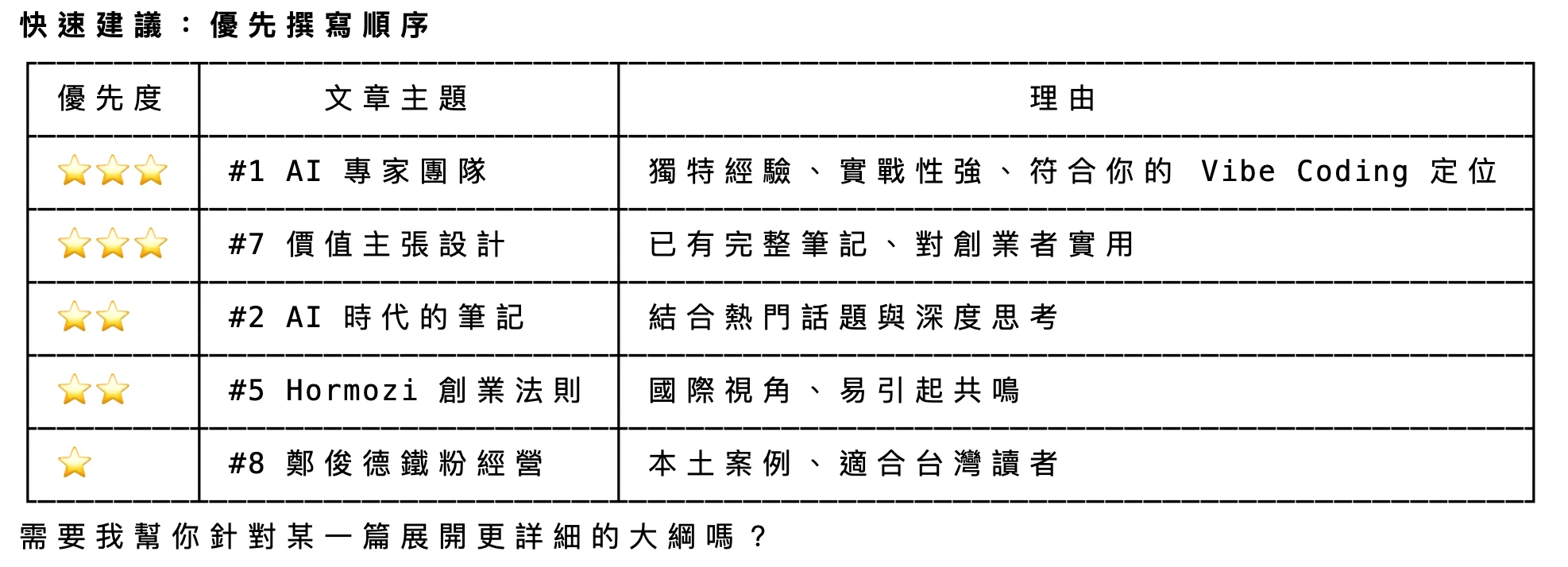 *▲ Claude recommends the writing priority of articles based on uniqueness, practicality and positioning. *
9. Customer and network management
If you use Anytype to manage contact and customer data:
- List important customers who have not been contacted for more than three months
- Organize all interaction records between me and Manager Zhang
- Which customers have expressed interest in AI training courses?
10. Annual review and goal planning
Let AI help you extract insights from massive notes:
- Analyze all the projects I completed this year, which type has the most?
- Based on my goal tracking, which habits are maintaining best?
- From my reflection notes, ten important lessons learned this year
Why is this combination so powerful?
Traditionally, our notes are just static text files that need to be searched, organized and linked by ourselves. But when Anytype meets Claude, everything changes - from now on, your knowledge base begins to “live”.
AI becomes the navigator of your knowledge base. You no longer need to remember where that note exists, just describe it in natural language and Claude will find it for you. This is a lifesaver for people like me who have accumulated thousands of notes.
From passive storage to active application. In the past, notes were often shelved after they were written. Now, you can ask Claude to help you recombine, analyze, and transform these materials at any time. Those sleeping notes can finally show their true value.
Privacy and intelligence at the same time. Most importantly, Anytype’s local-first architecture ensures that your data will not be uploaded to the cloud for training or leakage. You enjoy the convenience of AI while retaining complete data sovereignty. This is particularly important when corporate applications or handling sensitive information.
If you are interested in making good use of AI to improve work efficiency, this combination is definitely worth trying.
Build your own AI-driven knowledge system
Looking back on my journey of exploring digital tools over the past few years, I deeply understand:
The best productivity system is not the one with the most features, but the one that best integrates seamlessly with your workflow.
Anytype gives me a safe, flexible, and truly my own knowledge base. Through the connection between MCP Server and Claude, this base has evolved into a smart partner that can think and respond. This is not just an upgrade of tools, but a fundamental shift in the way we work.
Imagine: when all your notes, projects, and inspirations can be understood and used by AI, how will your productivity be improved? How will your career be different when you no longer spend time searching for information, but focus on thinking and creating that really matters?
Now is the best time to start.
Act Now: Four Steps to Start Your Journey
-
Download Anytype: Go to anytype.io for free download, supports Windows, Mac, Linux, iOS and Android.
-
Create your first space: Spend 15 minutes to import the notes currently scattered everywhere and experience the magic of object connection.
-
Connect Claude: Refer to GitHub files to give your knowledge base AI superpowers.
-
Join the community: Exchange skills with global users in Anytype’s official forum and continue to improve your system.
Your notes shouldn’t just be a graveyard of words, but a launching pad for creativity and productivity.
Act now and let Anytype and AI become your secret weapon for career advancement!
Further reading
- Stop “reading hard”, AI is rewriting your reading efficiency and knowledge absorption method
- Lecturer’s Digital Asset Management Technique: Use AI to turn teaching experience into a compounding system
- When AI makes answers cheap, what’s really valuable is whether your questions are accurate enough
- With multiple interests, how can you turn “wanting to learn everything” into a unique advantage?
- A cruel watershed in the AI era: Why has the income of 95% of freelance workers been cut in half, while the income of 5% has doubled?