Can you use Claude Code even if you don’t know how to program? A complete self-study guide for writers
You don’t need to be able to write programs, you just need to be able to express what you want clearly
A few days ago, I gave a Vibe Coding practical class in the Chinese Department of National Sun Yat-sen University. The group of students who usually read poetry, music, and poetry, and wrote literary reviews, each created their own web page work in just three hours. No one in the class wrote a line of code, but each piece was conceived, described, and iterated on by themselves.
This teaching experience once again confirmed my belief: in the AI era, liberal arts students will not be eliminated, but will have unique advantages. Claude Code is the key tool to transform this advantage from potential into works.
In the AI era, liberal arts students will not be eliminated, but will have unique advantages.
This article is written for friends with all literary backgrounds - whether you studied Chinese, Foreign Languages, Mass Communication, History, or Sociology in college, or you are now a marketer, teacher, freelance worker, entrepreneur. As long as you can express your ideas in Chinese, you have the ability to use Claude Code. Below, I will take you through the complete path from choosing a plan, installing and setting up to starting self-study, and sort out the most valuable free learning resources currently.
Why Claude Code? The first AI development tool that everyone in Wen Group should know
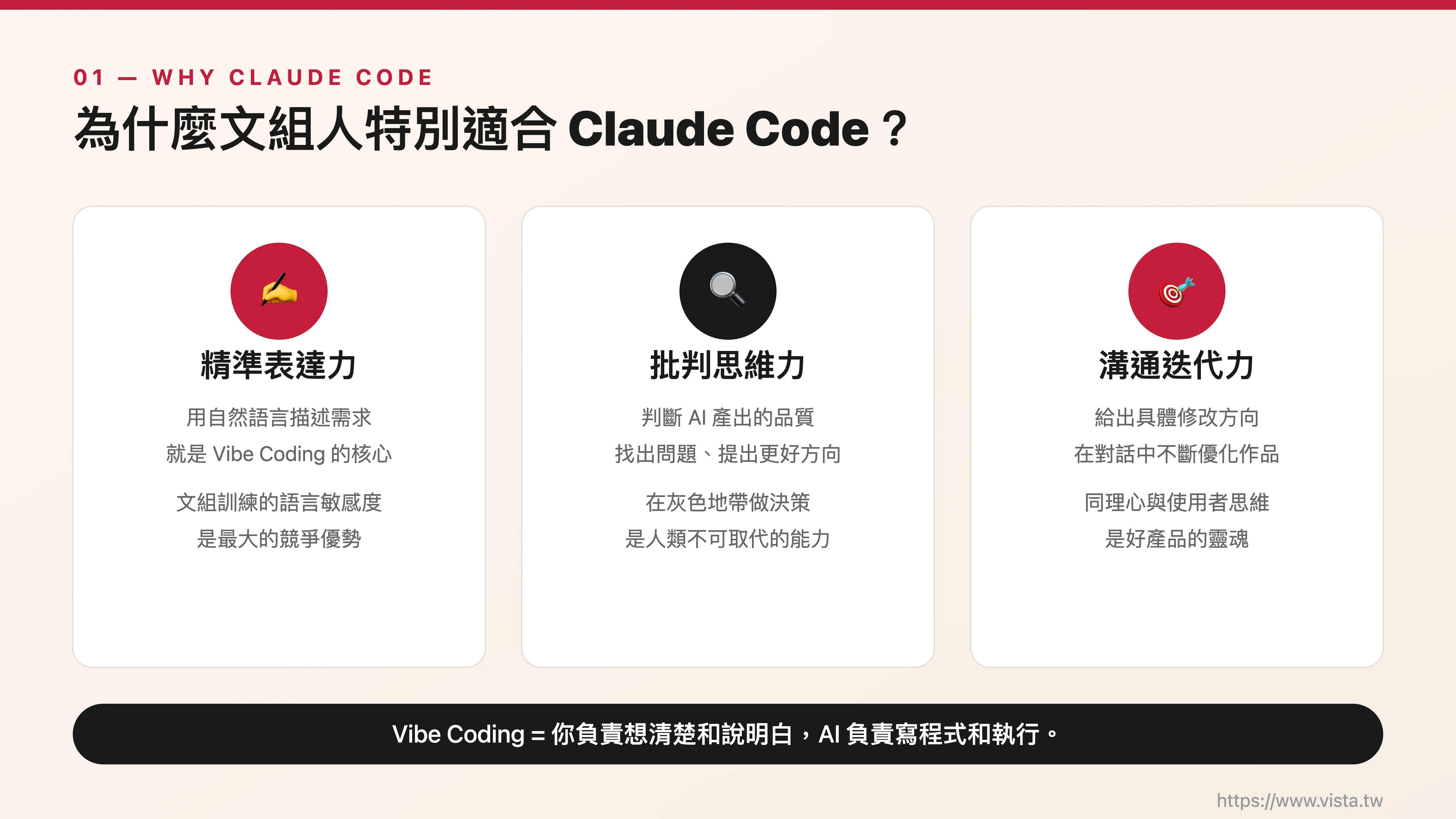 ▲ The language skills and critical thinking of Wenzu people are the core qualities that Vibe Coding needs most.
Among the many AI tools, why do I particularly recommend friends with a writing background to start with Claude Code? This starts with its design concept.
Claude Code is a terminal AI programming assistant launched by Anthropic. Sound technical? Not really. Its core operation method is that you tell it what you want to do in natural language, and it will write the code for you. What you are responsible for is thinking clearly and explaining it clearly, and what it is responsible for is translating it into program code and executing it.
This is exactly what Andrej Karpathy proposed in 2025 The spirit of Vibe Coding - you don’t need to understand programming syntax, you only need to master three things: clearly describing requirements, judging the quality of the output, and giving specific modification directions. These three things happen to be the core qualities of writing group training: accurate expression, critical thinking and communication iteration.
Compared with other AI programming tools, Claude Code has several features that make it particularly suitable for users with non-technical backgrounds. First of all, its ability to understand Chinese is very good, and you can directly give instructions in Chinese. Second, it understands the structure of an entire project, not just a single file, which means you can ask it to do more complex things. Third, its “Plan Mode” function allows you to see its planning and reasoning process before implementing any changes, giving you sufficient review time.
Claude Code is not just a tool to help you write programs, it is more like a technical partner who is always on call - you suggest an idea and it will be implemented; you suggest modifications and it will adjust immediately.
The most important thing is that Claude Code is not just a tool to help you write programs. It is more like a technical partner who is always on call - you suggest an idea and it will be implemented; you suggest modifications and it will adjust immediately. This collaboration model is a tailor-made solution for Wen Group people who are good at expression but not good at technical implementation.
Step one: Choose the plan that suits you
 ▲ Comparison of Claude subscription plans as of March 2026
Before you start using Claude Code, you need to understand the subscription plans offered by Anthropic and choose the option that best suits your needs and budget. The following is the latest plan as of March 2026:
Free plan (Free): This plan allows you to use Claude chat on the web version and mobile app, but does not include the use of Claude Code. If you just want to get a taste of Claude’s conversational abilities, you can start here. But if you want to officially use Claude Code, you need to upgrade to a paid plan.
Pro Plan ($20 per month, $17 per month with annual subscription): This is my most recommended plan to get started. It includes full access to Claude Code, and you can perform various development tasks in the terminal. The usage of the Pro plan is about five times that of the free version, which is more than enough for the learning phase and daily light use. The usage limit is reset every five hours, so as long as you don’t use it continuously and intensively, you’re unlikely to hit the upper limit. After conversion, it costs less than NT$20 per day, which is cheaper than a cup of supermarket coffee.
Max plan ($100 or $200 per month): If you already rely heavily on Claude Code for your daily work and need higher usage and faster response times, consider upgrading to Max. The $100 plan provides five times the usage of Pro, and the $200 plan provides twenty times. The Max plan also includes full access to Opus models, making it suitable for advanced users who need to handle large projects or complex tasks.
My Advice: If you are a complete newbie and want to test the water temperature first, start with the Pro plan. An investment of US$20 per month is exchanged for a technical assistant who is on call around the clock. This return on investment is very cost-effective in the AI era. After you have used Claude Code for a month or two and confirmed that it has become an indispensable part of your workflow, then consider whether you need to upgrade to Max?
Step 2: Install Claude Code - easier than you think
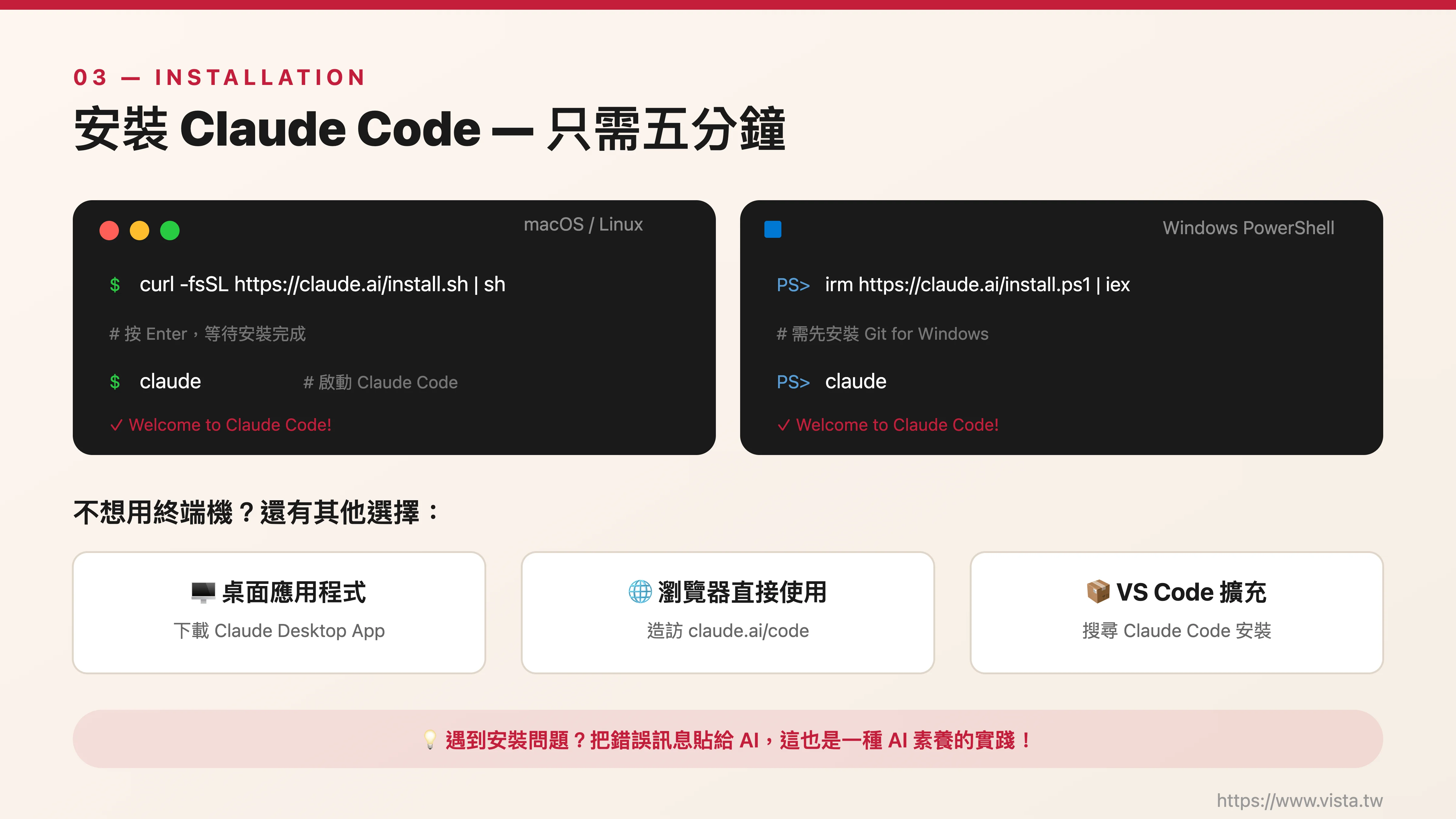 ▲ The installation process is simpler than you think, it only takes about five to ten minutes
I know that the word “installation” is like a high wall to many people in the literary group. Don’t worry, the 2026 Claude Code installation process is already user-friendly and the entire process only takes about five to ten minutes.
Installation on Mac: Open your “Terminal” application (in “Applications” → “Tools”, or directly search Terminal with Spotlight), then enter the following command:
curl -fsSL https://claude.ai/install.sh | shPress Enter and wait for it to finish.
Installation on Windows: Open PowerShell (search for PowerShell from the Start menu, it is recommended to run as an administrator) and enter:
irm https://claude.ai/install.ps1 | iexPlease note that Windows users will need to install Git for Windows first. If you haven’t installed it yet, you can go to git-scm.com to download the installation file. During the installation process, just press “Next” to use the default settings.
First startup after installation: Type claude in the terminal and press Enter. It will automatically open the browser and guide you to log in to your Claude account. After successful login, your authentication information will be stored on this machine, and you will not need to log in again.
**What if you don’t want to use the terminal? ** Good news! Claude Code now also has a VS Code extension and desktop application. If you are more accustomed to graphical interfaces, you can download the Claude desktop application, log in to your account after installation, and click the “Code” tab to start using it. Plus, you can even use claude.ai/code directly in your browser, no native installation required at all.
**What should I do if I encounter a problem? ** The most common problem during the installation process is “command not found”, which can usually be solved by closing the terminal and reopening it. If that still doesn’t work, you can post the error message directly to ChatGPT or Claude’s web version and ask it to help you troubleshoot the problem. Well, this is also a practice of AI literacy, which is using AI to solve problems using AI.
Step Three: Your First Claude Code Experience
 ▲ Use natural language to describe what you want, and Claude Code will help you achieve it.
After installing it, let’s do it in practice. Suppose you want to create a simple personal self-introduction page.
In the terminal, first create a working folder and then start Claude Code:
mkdir my-first-page
cd my-first-page
claude
You are now in Claude Code’s conversational interface. Try entering the following command:
“Please help me create a personal self-introduction webpage. I am a content creator who graduated from the Chinese Department of a university and am currently engaged in self-media management. The style of the webpage should be simple and elegant, with a light beige background, black and dark gray fonts, my name and a personal slogan at the top, self-introduction and three main service projects in the middle, and contact information at the bottom.”
You will see Claude Code begin to analyze your needs, and then help you create HTML files, write CSS styles and content step by step.它可能会先展示计画,征求你的同意后才开始动手。 You can see what it is doing at every step. If you are not satisfied with anything, just tell it in Chinese.
For example: “The font of the title is too small, please enlarge it to twice the original size.” Or: “I want to change the color scheme to dark blue and white.” Or: “Please add a small icon to the service items.”
This process of back-and-forth communication and constant modification is the essence of Vibe Coding. You don’t need to know the syntax of HTML or the attribute names of CSS. You only need to “see what’s wrong” and “tell what you want” - these are the abilities that writing group training is best at cultivating.
Step 4: Create your CLAUDE.md - let AI remember your preferences
 ▲ CLAUDE.md is like a memorandum of cooperation for AI
When you use Claude Code for a while, you will find a very useful feature: the CLAUDE.md file. This is a configuration file placed in the root directory of your project. It tells Claude Code important information about you and your project.
▲ CLAUDE.md is like a memorandum of cooperation for AI
When you use Claude Code for a while, you will find a very useful feature: the CLAUDE.md file. This is a configuration file placed in the root directory of your project. It tells Claude Code important information about you and your project.
Enter /init in Claude Code and it will automatically generate a CLAUDE.md for you. You can include information about what your project is about, your preferred design style, the language you want Claude to use when responding (e.g. Traditional Chinese), and any special specifications or preferences.
For example, as a user with a writing background, your CLAUDE.md might read like this:
# Project Description
This is my personal brand website to showcase my writing work and course information.

# Preferences
- Please always respond in Traditional Chinese
- Design style preference: simple, literary and green, with lots of white space
-Color preference: dark blue + white + light gray
- Font preference: Sans serif fonts are the main choice
- Please explain what you want to do before each modification, and wait until I agree before executing it.
With this profile in place, Claude Code will automatically read these settings every time you launch it, like a long-term partner that remembers all your preferences.
With CLAUDE.md, Claude Code automatically reads these settings every time you launch it, like a long-term partner that remembers all your preferences.
Step 5: Self-study road map – five stages from imitation to creation
 ▲ Five progressive stages, taking you from zero foundation to independent creation
Based on my teaching experience in universities and workshops, I have designed a step-by-step self-study route for learners with literary backgrounds:
Phase One: Observation and Imitation (Weeks 1-2). First find a few websites or apps you like and try to replicate similar effects using Claude Code. It doesn’t have to be 100% the same, the point is to practice your ability to translate what you see into written descriptions. The goal of this stage is to familiarize you with the rhythm and method of communicating with Claude Code.
Phase 2: Minor revisions (Weeks 3-4). Based on the imitation, start adding your own ideas. Change colors, change styles, add new features, and adjust interaction methods. Every time you revise, you are exercising your prompt word muscles. You will gradually develop an intuition, that is, knowing how to describe it so that Claude Code can accurately understand what you mean.
Phase Three: Independent Creation (Weeks 5-8). Start building your own project from scratch. It could be a personal brand website, portfolio, blog, course registration page, or a simple interactive tool. The key to this stage is to start from real needs. In other words, make something that you really need and will continue to use.
Phase Four: Advanced Exploration (Weeks 9-12). Start trying more complex features: database connections, user login systems, API connections, and automated processes. Don’t be afraid to come across concepts you don’t understand, Claude Code will explain everything. Your job is to understand the general direction and make decisions, leaving the technical details to the AI.
Phase 5: Teaching and learning (from week 13 onwards). Share what you learn bravely and generously. For example, you can write articles, make instructional videos, or conduct workshops. Teaching others is the best way to learn and a great way to build your personal brand.
Selected free learning resources
 ▲ From official documents to community courses, these free resources are worth collecting
The following are free learning resources that I have carefully compiled, covering official documents, community courses and Chinese resources:
Official resources
Anthropic’s official documentation site is the most authoritative reference, with content that is continuously updated and includes quick start guides, complete feature descriptions, and best practices. In addition, Anthropic has also launched a free official course “Claude Code in Action” on the Skilljar platform, which takes you from basic operations to advanced workflows through interactive learning modules.
Free community courses
Claude Code for Everyone is a free course designed for people from non-technical backgrounds. The most special thing about it is that you learn Claude Code in Claude Code. No need to watch videos or read files, just do it directly. In the same series, there is also CC for PMs (ccforpms.com) specially designed for product managers, which teaches you how to use Claude Code to write PRD, analyze data, and formulate competitive product strategies.
GitHub Open Source Guide
FlorianBruniaux’s Claude Code Ultimate Guide is the most comprehensive community guide available, containing more than 22,000 lines of files, 41 architecture diagrams, 204 production-level templates, and 271 quiz questions. Although it is in English, you can directly ask Claude to translate key paragraphs for you. Another thing worth paying attention to is shareAI-lab’s learn-claude-code project, which provides multi-language teaching files in English, Chinese (simplified) and Japanese.
Online community resources
ClaudeCode101.com and ClaudeCN.com provide Chinese Claude Code teaching guide and technical community respectively.虽然主要以简体中文为主,但内容对繁体中文使用者同样有参考价值。 In addition, ClaudeLog.com is operated by Claude Developer Ambassadors and provides a large number of practical tips and best practice sharing. Additionally, I also enjoy reading the r/ClaudeAI discussion board on Reddit.
YouTube instructional video resources
Search Claude Code tutorial for beginners 2026 on YouTube to find a large number of introductory tutorial videos. I especially recommend watching the demonstration video on Anthropic official channel to understand the basic operations, and then go to the social channel to watch various practical application cases.
🎯 **Want to get started faster? ** If you want to cross the threshold from zero to one in a shorter time under the guidance of professional instructors, welcome to join my [Vibe Coding Practical Workshop] (https://www.vista.tw/workshop/vibe-coding). In this class, you will complete a web page work of your own - just like the students in the Chinese Department of Sun Yat-sen University, you will experience the wonderful transition from “I can’t do this” to “Oh my God, I really did this”.
 ▲ Vibe Coding practical workshop will help you complete your first web page work
The three key mindsets of Wenzuren’s study of Claude Code
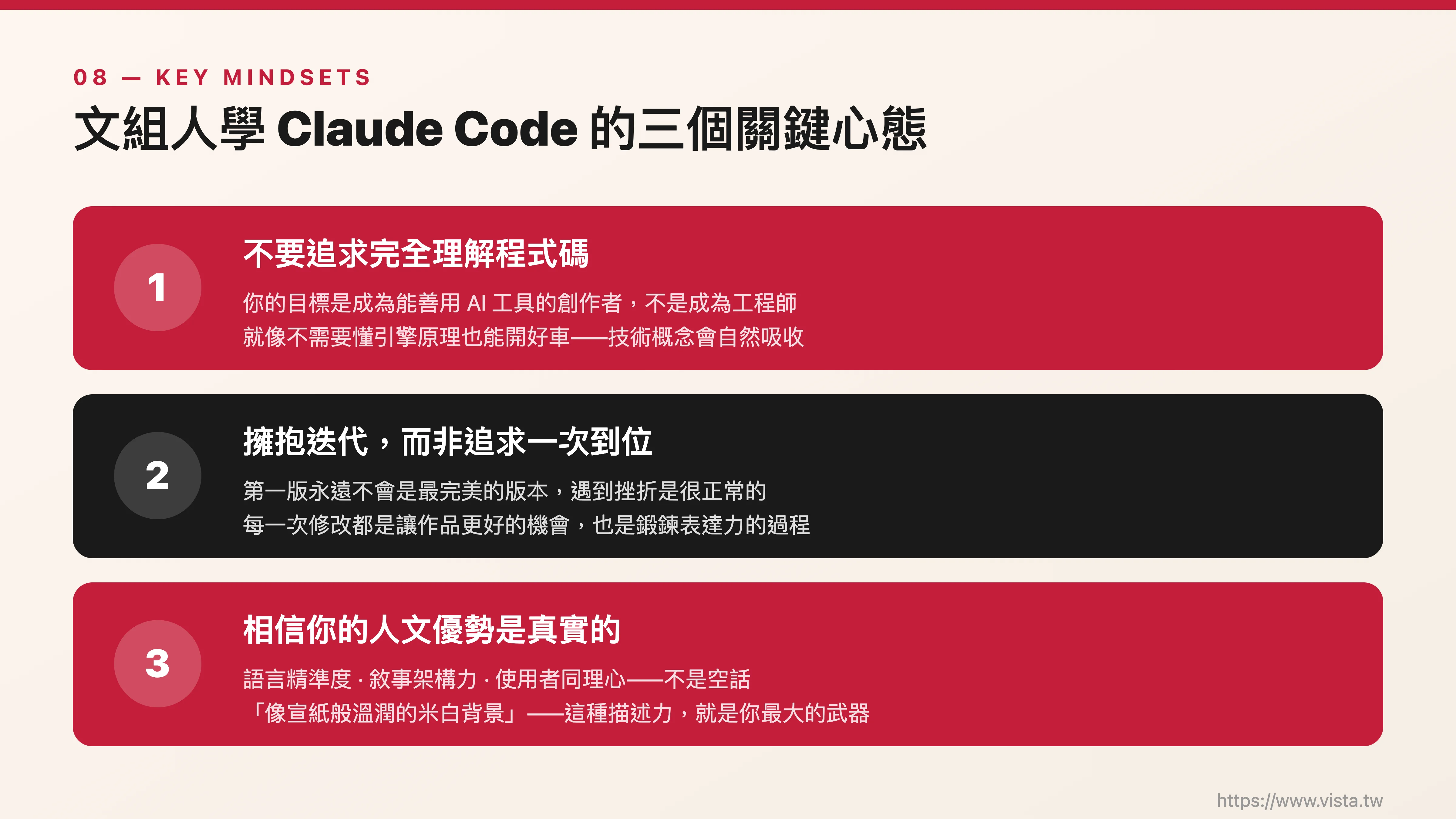 ▲ If you have the right mentality, you can learn anything quickly
In the process of learning, I would like to remind you of three mental adjustments:
**First, there is no need to pursue a complete understanding of the program code. ** Your goal is not to become an engineer, but to become a creator who can make good use of AI tools. Just like you don’t need to understand engine principles to drive a good car, you don’t need to fully understand the programming code to create excellent works with Claude Code. Of course, you will naturally absorb some technical concepts over time, but this should be a by-product, not the main goal.
**Second, embrace the spirit of iteration rather than pursuing one-stop success. ** Liberal arts training makes us accustomed to the creative process of writing and then revising, and the essence of Vibe Coding is also the same. Your first version will never be your final version, and it’s normal to experience setbacks. Every revision is an opportunity to make the work better, and it is also a process to practice expression skills.
Your first version will never be the final version, every revision is an opportunity to make the work better.
**Third, believe that your humanistic strengths are real. ** Precision in language, ability to structure narrative, and empathy for the user’s feelings – these are not empty words, but core capabilities used every day in the practice of Vibe Coding. When you can write a picture-rich description such as “I want an off-white background as warm as rice paper, with a title in cursive font”, you are already in a better position to communicate with AI than most engineers.
Want to get started faster? Welcome to Vibe Coding Practical Workshop
 ▲ Whether you study on your own or attend a workshop, the most important thing is to start now
If you want to cross the threshold from zero to one in a shorter time under the guidance of professional instructors, I sincerely invite you to participate in my Vibe Coding practical workshop. In this class, you will complete a web page work of your own, just like the students in the Chinese Department of Sun Yat-sen University, and experience the wonderful transition from “I can’t do this” to “Oh my God, I really did this”.
Whether you ultimately choose to teach yourself or attend a workshop, the bottom line is: Start Now. The development of AI tools is astonishing. Every day, there is a gap of one more day. And you already have the best weapon in your hands - the expression, judgment and creativity you cultivated from your liberal arts training.
Claude Code is just a key, opening up your own infinite possibilities.
Further reading
- Vibe Coding Practical Workshop
- When AI meets communicators: An AI practical class I gave at National Chengchi University EMA
External resources
- Claude Code official documentation (Traditional Chinese)
- Claude Code for Everyone Free Course
- Claude Code Ultimate Guide (GitHub)
📖 深入探索相關主題