How much time does a one-person company spend every morning putting together numbers? Free tool helps you figure out the answer
At 7:30 in the morning, you first open a backend to see how many transactions were listed today, then switch to another backend to confirm how many transactions were completed this month, then open a spreadsheet, copy the numbers on both sides, and glance at the collection record to see how much cash is left. By the time you collect all these numbers, the morning has passed and you haven’t even started writing what you should really write today.
This is a common morning scene when running a one-person business. The problem is that the information is scattered in too many places, and you have become the one responsible for collecting it, and you may have never seriously calculated how much time this thing steals from you every day.
Dashboards are not just for big companies
When it comes to “dashboard”, most people will think of an enterprise-level BI system, with a whole wall of screens, full-time data analysts, and weekly meetings to review reports. This kind of imagination makes one-person company operators directly cross the dashboard from their tool list, thinking that it is someone else’s specification and not something they should have.
But what the dashboard solves is the decision-making method, which has nothing to do with the size of the company. The pilot’s cockpit is crowded with instruments. The pilot will not stare at each bar for the entire flight. The function of the instruments is to stay silent until a certain number exceeds the normal range, and then the pilot’s attention will be drawn back. This is exactly what a one-person company needs: you don’t have to keep an eye on it normally, and the moment something goes wrong, the instrument can immediately catch you back to the scene.
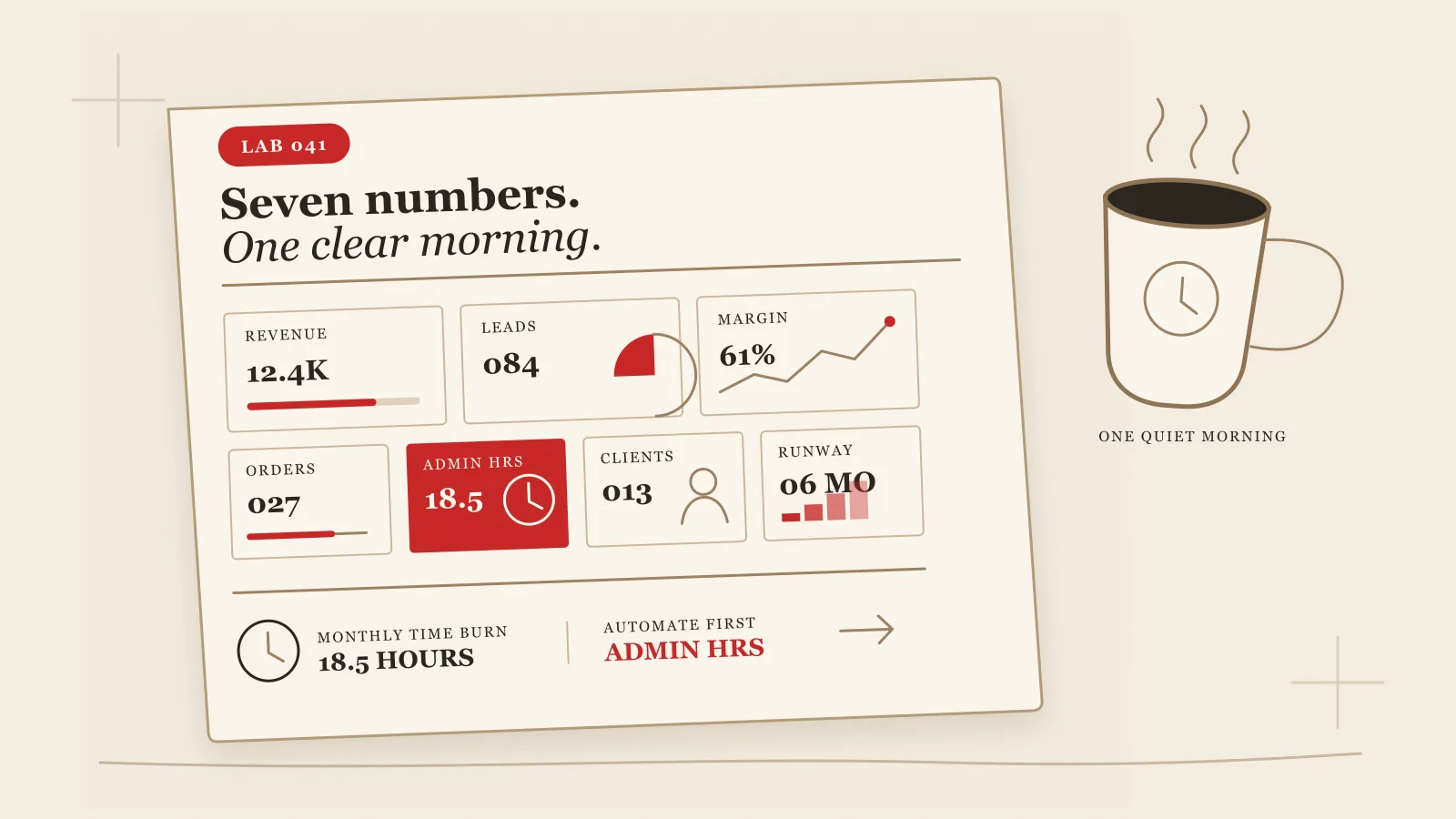
LAB 041 “Every Morning Page” is a free tool based on this logic. The core proposition is very straightforward:
In an unmanned company, it’s not that no one is watching. It’s that every morning, everything that needs to be read has been compiled into one page and is waiting for you.
How to use the tool: seven indicators, converted into time
Open lab.vista.tw/dashboard (opens in a new tab), the first step is to select the business type: content creator, case worker, course and knowledge products, e-commerce or merchandise, consultant or service industry, choose one from the five. This step determines that the wording of subsequent questions will be close to what you are actually doing, rather than a general questionnaire.
The second step is to take stock of seven indicators: new lists, transactions, frequently asked questions from customers, content response, stuck matters, hours saved by AI, and cash flow. These seven items are not listed casually. They come from Chapter 14 of “The Nobody Company” which breaks down the framework of what a one-person company should track.
You only need to mark one status for each indicator: automatically collected, manually gathered, or unavailable. If the indicator is automatically marked, it means that the system will handle the matter for you and you don’t need to worry about it; if the indicator cannot be obtained, it means that you have no way to know the number; if the indicator is marked manually, the tool will ask one more question about how much time it takes to collect the number every day. The options are within three minutes, about ten minutes, about twenty minutes, and more than half an hour.
After this round of questions, the tool will not give you an abstract score. What it does is more direct: add up all the minutes you spend manually making up the numbers every day, multiply it by twenty-two working days per month, and then divide it by sixty to convert it into how many hours you burn per month; then multiply this number of hours by twelve and divide it by eight, and convert it into how many working days you burn in a year. What you see are concrete numbers: the amount of time you spend making up the numbers in a year is equivalent to several full working days.
After calculating it, the tool will tell you which item to move first.
Among the seven indicators, the most time-consuming manual item will be named by the tool and listed as the first item to be handed over to AI, with a trial calculation of how many hours can be saved per year after automating it. If you don’t have any manual items, but an indicator is marked as unreachable, the tool will instead suggest that you fill in your field of view first, and don’t rush to automate something you can’t see at all. If all seven items have been automated, the tool will remind you that you should consider deleting redundant indicators.
Two metrics in particular are worth paying attention to: Frequently Asked Questions from Customers and Hours Saved by AI. If these two items are marked as unavailable, the tool will specifically mark a warning, because these two items are usually the first place where a one-person company loses its perception. You don’t know what customers are asking repeatedly, and you don’t know how much time AI has saved you. Over time, you will mistakenly think that you have to rely on yourself to support everything.
After filling it out, you get a specification that can be posted directly to ChatGPT or Claude. This prompt will ask AI to provide low-cost ways to obtain the indicators you have marked as unavailable; design specific automation steps for your most time-consuming manual items; at the same time, suggest a dashboard layout that suits you, and set the threshold for escalation when exceptions occur. The entire content is pure text and can be used by copying and pasting it. The data is only stored in the localStorage of your browser and will not be uploaded anywhere. There is no need to register the tool.
Five minutes, see where the time has gone
What this tool really cares about is vision, efficiency second. You won’t become more diligent just because you fill out a questionnaire, but you will see clearly for the first time how much time your seemingly trivial actions of adding numbers together every morning add up to. After seeing it clearly, it is your own judgment whether to take action or not.
If you want to know how much time you burn in the morning in your one-person company, take five minutes to fill out LAB 041 (opens in a new tab) and you will have the answer. It is free and no registration is required.
Want to learn hands-on AI with me? See upcoming courses →
Next step
Bring this topic to your team
Vista Cheng speaks and runs workshops on AI workflows, writing and content systems for companies, schools and public agencies.